

XSIME
海洋 崔 Productivity iPhoneiPadiPod touch
XSIME is a free Productivity app for iPhone and iPad by 海洋 崔. Rated 3.0/5 from 1 ratings. Requires iOS 17.0. Updated October 19, 2026.
- Rating
- 3.0
- 1 ratings
- Price
- Free
- on the App Store
- Size
- 39 MB
- Age 4+
- Updated
- Oct 19
- 2026 · v1.1.7
Screenshots



About XSIME
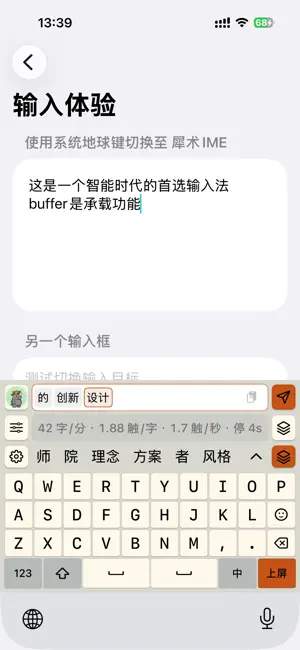
XSIME is a keyboard and text assistant for your iPhone, formerly RIMES / Lingxi IME. Type locally, organize your words in Buffer, and choose optional translation or AI assistance when you need it. TYPE YOUR WAY Use Pinyin, nine-key Pinyin, Ziranma double Pinyin, Wubi 86, XSIME Wubi, English or slide chords. Switch Simplified and Traditional Chinese, customize key layouts, and import compatible Rime scheme ZIPs or coded UTF-8 text dictionaries. XSIME Wubi combines Wubi and Pinyin; Wubi 86 offers z-prefixed Pinyin lookup. Both Wubi schemes can commit a unique four-key Wubi match automatically. A BUFFER FOR YOUR WORDS Compose and edit before inserting text into your app. Tap to insert one block, or hold for one second to insert all remaining blocks. Default Buffer also offers optional timed insertion, off by default; translation and AI results require explicit insertion. Inserting text never sends a message for you. Explicitly import readable text from the current input field, or collect clipboard text with the system Paste control. Saved clipboard entries stay in a separate local history that you can delete or clear; opening the list does not read the system clipboard. OPTIONAL APPLE TRANSLATION On iOS 26 or later, Apple translation uses downloaded on-device language models. Prepare the required languages in the XSIME app, then choose a language pair in Buffer. Availability depends on supported languages and downloaded models. No external AI fallback is used when local translation is unavailable. YOUR CHOICE OF EXTERNAL AI For optional AI polishing, rewriting and other writing tools, configure your own HTTPS AI service that supports a general-purpose interface format, along with your model and API key. The recipient is shown before you grant permission. Only Buffer text you explicitly submit is sent to the configured, consented service. Your provider's data policy applies and its service may require a separate account or payment. XSIME does not include an AI subscription, provider credentials or a hosted AI service. PERSONALIZE YOUR KEYBOARD Manage built-in Buffer tools, keyboard appearance, custom chord mappings and status-light pets. View local typing statistics and create a statistics card. Local learned associations suggest what you may want to type next. LOCAL EVERYDAY INPUT Ordinary typing and Buffer editing work offline without Full Access, an app account or a subscription. XSIME has no ads or keyboard-text telemetry. API keys use this device's Keychain. External AI, collecting clipboard text from the keyboard and keyboard image export require Full Access; saving an image to Photos requests add-only photo access. Buffer drafts are cleared when the keyboard session ends; separately saved clipboard history, learned words and settings remain on the device. Enable XSIME in Settings > General > Keyboard > Keyboards, then choose it with the globe key. Secure fields and apps that prohibit third-party keyboards use the system keyboard. Requires an iPhone running iOS 17 or later. Apple local translation requires iOS 26 or later and supported language models. Haptics depend on device and system settings.
What’s new
Version 1.1.7 · Updated October 19, 2026
Supports larger Rime scheme packages, including ZIP files up to 2 GiB. Imports now read large archives in chunks and check available storage before installation. Preserves your current input settings and learned words.
App privacy
The developer, 海洋 崔, reported these privacy practices to Apple.
Data Linked to You
The following data, which may be collected and linked to your identity, may be used for the following purposes:
- User Content: Other User Content
- Identifiers: User ID
Used for: App Functionality
Alternatives to XSIME
Looking for apps like XSIME? Here are 6 similar apps on the App Store. The highest rated is 超越输入法 (5.0/5), and all 6 are free to download.


| App | Rating | Price | Last updated | Compare |
|---|---|---|---|---|
| XSIME | 3.0 / 5 (1 rating) | Free | October 19, 2026 | |
| 超越输入法 | 5.0 / 5 (1) | Free | Oct 11, 2026 | Compare |
| Copy Vault | – | Free | Mar 27, 2026 | Compare |
| Feiyu Pinyin IME: Private | 5.0 / 5 (1) | Free | Oct 21, 2026 | Compare |
| SwissBoard | 5.0 / 5 (1) | Free | May 17, 2026 | Compare |
| DualKeyIM | – | Free | Oct 14, 2026 | Compare |
| SummarizeIt | 5.0 / 5 (1) | Free | Sep 29, 2026 | Compare |
Compare XSIME with the top alternatives: ratings, updates, ASO score and keyword gaps →