

Roomora: Room Planner
Tudlo Innovation Solutions Inc Lifestyle iPhoneiPadiPod touch
Roomora: Room Planner is a free Lifestyle app for iPhone and iPad by Tudlo Innovation Solutions Inc. Requires iOS 17.0. Updated October 27, 2026.
- Price
- Free
- on the App Store
- Size
- 7 MB
- Age 4+
- Updated
- Oct 27
- 2026 · v1.2
Screenshots

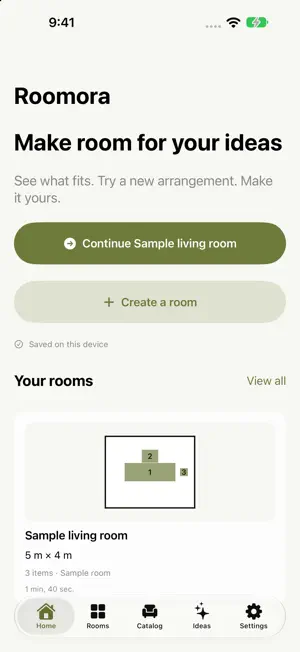


About Roomora: Room Planner
Plan a room before you rearrange it. Roomora helps you record room dimensions, explore furniture layouts, and keep practical design plans on your iPhone or iPad. Start with manual measurements, try a labeled sample room, or use guided RoomPlan capture on compatible LiDAR devices. PLAN YOUR SPACE • Enter room width, length, and optional ceiling height with clear measurement guides. • Review captured measurements before saving. • Arrange illustrative furniture concepts in a floor plan, with optional AR on supported hardware. • Move, rotate, resize, duplicate, and remove pieces with undo and redo. • Check spacing to walls and nearby pieces, with overlap feedback while arranging. • Find furniture through search, categories, favorites, and maximum width/depth filters. • Add your own furniture with dimensions and an optional reference photo. EXPLORE YOUR IDEAS • Get practical design suggestions and reference color palettes. • Use on-device AI on supported devices, or offline Quick ideas. • Find matching catalog items and preview suggested arrangements before applying them. • Save named layout alternatives, compare thumbnails, and restore a favorite. KEEP YOUR PLANS TOGETHER • Organize saved rooms with floor-plan thumbnails, search, and sorting. • Work in metres or feet. • Share floor-plan PNG images or PDFs with numbered furniture schedules. • Export and import editable room backups through Files. Furniture shapes are illustrative planning concepts, not product-accurate models or items for sale. Rooms use rectangular planning footprints. Measurements and layout suggestions are estimates; verify dimensions independently before purchasing, building, or renovating. RoomPlan capture requires compatible LiDAR hardware. Manual room entry is available without RoomPlan. On-device AI availability depends on your device and system settings; Quick ideas remains available without it. Roomora does not require an account. Room plans and furniture reference photos stay locally on your device and are not synced to a Roomora cloud service. Design Ideas does not send prompts, photos or scans to a remote AI service. Files are shared only when you choose a destination.
What’s new
Version 1.2 · Updated October 27, 2026
Make your room plans easier to create, compare and keep. • Add My furniture with your own dimensions and an optional reference photo. • Filter the catalog by maximum width and depth. • See wall spacing, nearby furniture distances and overlap feedback while arranging. • Save named layout alternatives, compare them and restore a favorite. • Export and import editable room backups through Files. • Turn Design Ideas into matching furniture choices, preview arrangements and Undo changes. • Get on-device AI ideas on supported devices, with offline Quick ideas available. • Use clearer measurement diagrams, unit labels, Share and room actions. Includes fixes and improvements to room saving, editing and exports.
App privacy
The developer, Tudlo Innovation Solutions Inc, reported these privacy practices to Apple.
Data Not Collected
The developer does not collect any data from this app.
Alternatives to Roomora: Room Planner
Looking for apps like Roomora: Room Planner? Here are 6 similar apps on the App Store. The highest rated is Thrift Me! (5.0/5), and all 6 are free to download.
-
 RoomFit: Room Layout Planner
-
 Dormroom DesignAR
-
 Smart Habit Tracker & Reminder
4.8
-
 Engen App
-
 Thrift Me!
5.0
-
 BabyPage: Baby Book & Journal
4.8
| App | Rating | Price | Last updated | Compare |
|---|---|---|---|---|
| Roomora: Room Planner | – | Free | October 27, 2026 | |
| RoomFit: Room Layout Planner | – | Free | Oct 20, 2026 | Compare |
| Dormroom DesignAR | – | Free | Aug 26, 2026 | Compare |
| Smart Habit Tracker & Reminder | 4.8 / 5 (61) | Free | Dec 17, 2025 | Compare |
| Engen App | – | Free | Sep 4, 2024 | Compare |
| Thrift Me! | 5.0 / 5 (1) | Free | Jan 7, 2024 | Compare |
| BabyPage: Baby Book & Journal | 4.8 / 5 (4,097) | Free | Sep 29, 2026 | Compare |