

Pingscape: Network & Ping
Niklas Temp Utilities iPhoneiPadiPod touch
Pingscape: Network & Ping is a free Utilities app for iPhone and iPad by Niklas Temp. Requires iOS 18.0. Updated November 24, 2026.
- Price
- Free
- on the App Store
- Size
- 12 MB
- Age 4+
- Updated
- Nov 24
- 2026 · v1.2.0
Screenshots
Save to Pinterest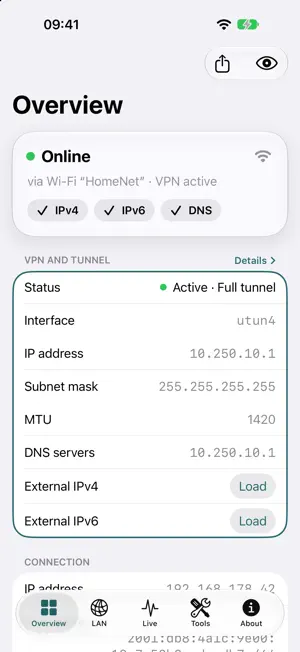


About Pingscape: Network & Ping
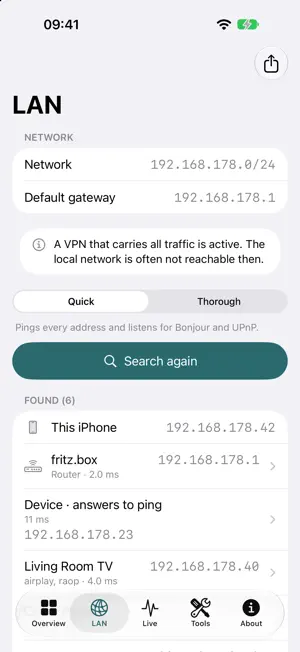
See your network clearly. Pingscape shows what iOS can tell you about your connection: Wi-Fi, cellular, VPN, DNS, proxy, routing and the devices on your local network. It only displays information. It changes nothing on your device or network. OVERVIEW Online status, IP address, subnet mask, default gateway, DNS servers and proxy at a glance. If you allow it, also your public IP address and provider. WI-FI Network name, BSSID, vendor and security type of the network you are connected to, the latency to your router and what the router says about itself. VPN AND TUNNELS See whether a VPN tunnel is active, and its address and MTU. CELLULAR The radio technology of each active SIM and the address of your mobile connection. INTERFACES AND ROUTING Every network interface with its addresses, MTU and traffic counters, plus the complete routing table. LAN Find the devices on your local network with a ping sweep, Bonjour and UPnP, with their names and services. LIVE Watch throughput, latency and jitter as they happen, and see when your connection changes. TOOLS Ping with packet size and path MTU search, traceroute with a continuous MTR mode, DNS lookup (also over TLS and HTTPS, with DNSSEC and a comparison of servers), whois and RDAP, port check, TLS certificate, HTTP timing with redirects and headers, NAT check via STUN, clock check via NTP, IPv4 against IPv6, subnet calculator and MAC vendor lookup. SIRI, SHORTCUTS AND WIDGETS Ask Siri or Shortcuts for any network value: IP address, gateway, DNS servers, Wi-Fi name, VPN and more. Shortcuts actions also run ping, DNS, port, certificate, traceroute and clock checks. Widgets show the values you choose or ping a host, and Control Center controls show your connection at a glance. PRIVATE BY DESIGN No account, no ads, no tracking, no analytics. Everything runs on your device, and requests to the internet start only when you allow or start them. Pingscape is free and open source: github.com/pilotofpackets/pingscape Notes: iOS only lets an app read the Wi-Fi name with location permission. Your location is never used or stored. Finding devices on your local network needs the Local Network permission.
What’s new
Version 1.2.0 · Updated November 24, 2026
Every test now shows the network interface it really used. • Ping, traceroute, DNS, ports, HTTP and TLS show the interface each run went over, for example Wi-Fi, cellular or VPN, read from the connection itself • If the interface changes during a run, for example when a VPN starts, you see from which attempt on • Start, Stop and Done react to a tap anywhere on the button • A quiet New Year greeting in Notification Center, by the calendar of your device
App privacy
The developer, Niklas Temp, reported these privacy practices to Apple.
Data Not Collected
The developer does not collect any data from this app.
Alternatives to Pingscape: Network & Ping
Looking for apps like Pingscape: Network & Ping? Here are 6 similar apps on the App Store. The highest rated is IP Tools: Ping & Traceroute (5.0/5), and all 6 are free to download.
-
 Aiden VPN: Network Check
-
 IP Tools: Ping & Traceroute
5.0
-
 NetToolbox Pro
-
 Echoes: Network Tools & Ping
5.0
-
 KlarVPN: Private VPN, No Logs
-
 Dataly: Data Usage Monitor
2.0
| App | Rating | Price | Last updated | Compare |
|---|---|---|---|---|
| Pingscape: Network & Ping | – | Free | November 24, 2026 | |
| Aiden VPN: Network Check | – | Free | Nov 19, 2026 | Compare |
| IP Tools: Ping & Traceroute | 5.0 / 5 (1) | Free | Nov 26, 2026 | Compare |
| NetToolbox Pro | – | Free | Oct 10, 2026 | Compare |
| Echoes: Network Tools & Ping | 5.0 / 5 (3) | Free | Nov 19, 2026 | Compare |
| KlarVPN: Private VPN, No Logs | – | Free | Sep 25, 2026 | Compare |
| Dataly: Data Usage Monitor | 2.0 / 5 (1) | Free | Nov 17, 2026 | Compare |