

Expense Tracker: BunnyBank
AUNG PHYO HLWAN Finance iPhoneiPadiPod touchApple Watch
Expense Tracker: BunnyBank is a free Finance app for iPhone and iPad by AUNG PHYO HLWAN. Requires iOS 26.2. Updated October 7, 2026.
- Price
- Free
- on the App Store
- Size
- 30 MB
- Age 12+
- Updated
- Oct 7
- 2026 · v1.1
Screenshots

About Expense Tracker: BunnyBank
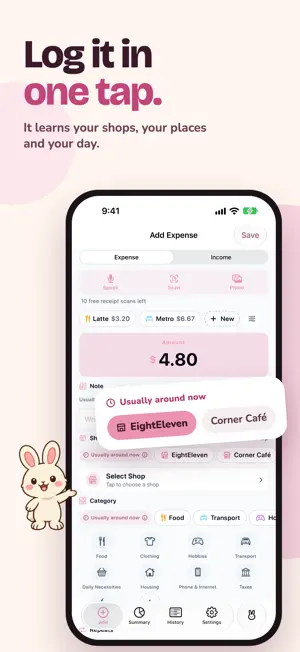
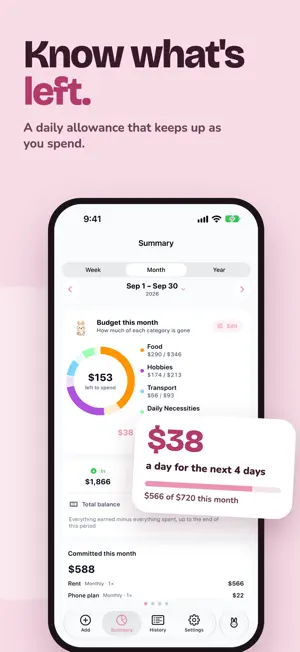
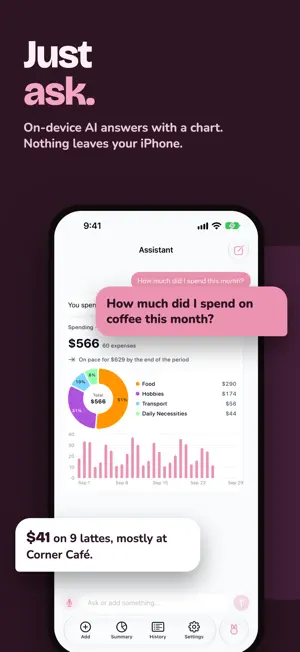
Keeping track of money should take seconds, not willpower. BunnyBank is a cute, private budget app that learns how you spend — and a little bunny buddy cheers you on. LOG IT IN SECONDS • Smart suggestions fill in the shop, category and note you usually pick — right when and where you usually pick them • Nearby shops appear as you log, even ones you haven't saved yet • Scan a paper receipt, or share a screenshot of an online order, and the form fills itself in • Speak an expense the way you'd tell a friend: “Lunch at the café, 12 dollars” • Templates add your daily coffee or commute in one tap KNOW WHAT'S LEFT • Set a budget for each category and see a daily allowance: how much you can spend today and stay on track • A clear monthly summary of income, spending and what you're saving • Charts of spending by category, by shop and by day • Gentle weekly and monthly recaps, and reminders for bills and subscriptions that repeat JUST ASK • Ask the Assistant “Where do I spend the most?” and get the answer with a chart • Runs with Apple Intelligence on your iPhone — your data isn't sent anywhere ALWAYS AT HAND • Home Screen and Lock Screen widgets for this month's spending and your budget pace • Siri and Shortcuts: “Add an expense in BunnyBank,” “How much have I spent this week?” • Control Center controls and the Action button (Lock Screen upgrade) MANY CURRENCIES, ONE DIARY • Record cash, card and digital wallet spending in your home currency, and log travel expenses in the local one • Moving country? Change your home currency and choose how past records come along PRIVATE BY DESIGN • No account, no ads, no tracking • Your personal finance diary stays on your iPhone and syncs only through your own iCloud BunnyBank is free to download, with no subscription. Optional one-time upgrades add more: • Receipt Scanning — 10 free scans included, unlimited with the upgrade • Automation — unlimited budgets and repeating expenses (2 of each free), CSV export • Lock Screen — the Lock Screen widget, Control Center controls and the Action button • Multiple Currencies — the Summary in each currency, and logging in a travel currency • Personalization — color themes and alternate app icons • Unlock Everything — all five at once Receipt reading, speaking an expense and the Assistant need an iPhone with Apple Intelligence. Download BunnyBank and log your first expense in seconds.
What’s new
Version 1.1 · Updated October 7, 2026
• Suggestions you can steer: see where BunnyBank learned each shop, move a pin, and choose when a shop or category is suggested • Apple watch support • Tap a suggestion heading to see why it was suggested • Amounts with cents for currencies that have them • Faster, friendlier History search • Many fixes and better translations
App privacy
The developer, AUNG PHYO HLWAN, reported these privacy practices to Apple.
Data Not Collected
The developer does not collect any data from this app.
Alternatives to Expense Tracker: BunnyBank
Looking for apps like Expense Tracker: BunnyBank? Here are 6 similar apps on the App Store. The highest rated is Couples Budget Tracker: Untoo (5.0/5), and all 6 are free to download.
-
 ExpenseFlow: Budget Planner
-
 ExpenseFlow Tracker
-
 みんなのAI家計簿
-
 Couples Budget Tracker: Untoo
5.0
Couples Budget Tracker: Untoo
5.0
-
 Monoline: AI Expense Tracker
-
 シンプルすぎる家計簿
| App | Rating | Price | Last updated | Compare |
|---|---|---|---|---|
| Expense Tracker: BunnyBank | – | Free | October 7, 2026 | |
| ExpenseFlow: Budget Planner | – | Free | May 21, 2026 | Compare |
| ExpenseFlow Tracker | – | Free | Mar 5, 2026 | Compare |
| みんなのAI家計簿 | – | Free | Sep 9, 2026 | Compare |
| Couples Budget Tracker: Untoo | 5.0 / 5 (3) | Free | Oct 13, 2026 | Compare |
| Monoline: AI Expense Tracker | – | Free | Oct 18, 2026 | Compare |
| シンプルすぎる家計簿 | – | Free | Aug 7, 2026 | Compare |