

Keyring – Passwords & 2FA
Aumatex srls Utilities iPhoneiPadiPod touchMacApple Watch
Keyring – Passwords & 2FA is a free Utilities app for iPhone and iPad by Aumatex srls. Requires iOS 26.0. Updated October 29, 2026.
- Price
- Free
- on the App Store
- Size
- 58 MB
- Age 4+
- Updated
- Oct 29
- 2026 · v1.4.0
Screenshots


About Keyring – Passwords & 2FA
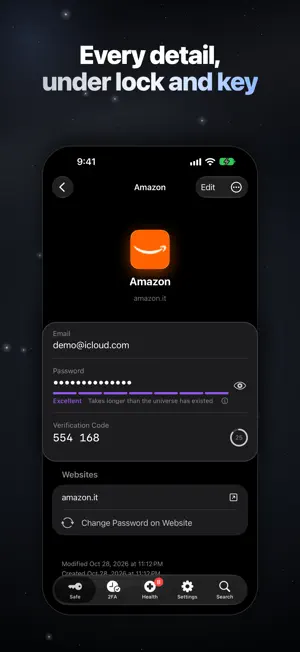
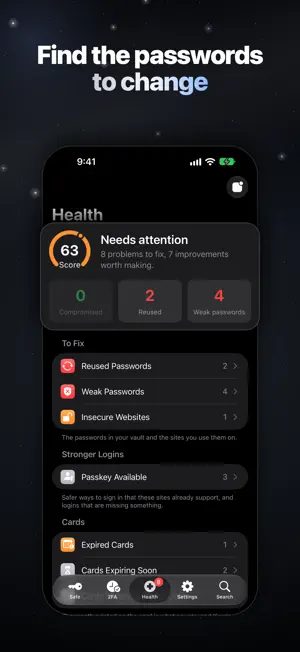
Your keys, in order. Keyring is a premium password manager for iPhone, iPad, Mac and Apple Watch: passwords, passkeys, codes and cards in one calm, private place, filled in by the system itself. It is built the way Apple's own Passwords app is built, and picks up where that app stops: more than one vault, every kind of secret, a real authenticator, a health report on all you keep. No account, no server of ours, no ads. Features • AutoFill Everywhere Passwords, passkeys and codes in Safari and in every app, on iPhone, iPad and Mac. Face ID or Touch ID, and the field is filled. Safari hands a new or changed password straight to Keyring, generator included. • Passkeys, First Class Create passkeys and sign in with them wherever a site offers them. Each one lives inside its login, beside the password it replaces. • An Authenticator You Will Actually Use Every code on one screen, in the order you drag them into: large digits, a draining ring, the next code in view, one tap to copy. Scan a QR code, or bring your Google Authenticator library over in one pass. • Far More Than Passwords Logins, credit and debit cards, bank accounts, crypto wallets, identities, companies, documents, SIMs, Wi-Fi networks, licenses and secret notes. Card numbers check themselves and the network is read from the number. • Health, Not Just Storage A score out of 100 and the reasons behind it: reused, weak and aging passwords, sites still on http://, Wi-Fi without real encryption, cards expired or expiring, logins that could have a passkey or a code and don't. Breach checking uses Have I Been Pwned; no password leaves your device. • Your Vaults, Your Rules One vault or many — work, family, a client — each with its own master password, color and symbol. Tags, favorites, archive, a 30-day trash, and search that finds anything by title, site, user name or tag. • In Sync Through Your Own iCloud Every device stays in step through CloudKit in your iCloud account. Apple stores ciphertext it cannot read; we have no servers and no access. A vault can also stay on one device. • On Your Wrist, and on Your Mac 2FA codes on Apple Watch, with a Next Code complication for the watch face. On the Mac, a native app with a full menu bar and a search panel that opens over anything with ⌥⌘K. • Built to Be Unreadable Every item is sealed with AES-256-GCM under a key derived from your master password, plus a 128-bit Secret Key in your iCloud Keychain. The Emergency Kit is a PDF you print and keep: the way back in stays in your hands. • Yours to Leave With Import from Apple Passwords, NordPass, SafeInCloud, Google Authenticator or any CSV. Export an encrypted .keyring archive any time, and keep a daily backup of each vault in iCloud Drive. • Private by Default No account, no tracking, no analytics, no ads, no third-party services — not even for site icons, fetched from each site directly. Auto-lock, a clipboard that clears itself, a blurred app switcher. • Beautiful by Design A native Apple experience in eleven languages, with Light and true black Dark Mode, Dynamic Type and VoiceOver. Keyring Plus Unlimited items, vaults and devices, breach checking, the Apple Watch app, Quick Access on the Mac and attachments. Yearly with a two-week free trial, or a one-time lifetime purchase, both with Family Sharing. The free plan keeps 100 items in one vault on two devices, and nothing you save is ever held hostage: export stays available. Perfect for • Anyone outgrowing the built-in Passwords app • People who want their 2FA codes and passwords in one place • Families and freelancers keeping work and home apart • Anyone leaving SafeInCloud, NordPass or Google Authenticator • People who value privacy From the first login to the last code, Keyring keeps your keys in order and your secrets to yourself. Privacy Policy: https://aumatex.it/keyring-privacy Terms of Use (EULA): https://www.apple.com/legal/internet-services/itunes/dev/stdeula/
What’s new
Version 1.4.0 · Updated October 29, 2026
A new icon, and six more to choose from. • Keyring has a new icon: the silver key on a deep night blue, in place of the white one • On iPhone and iPad, pick the icon you like in Settings › Appearance & Language: Keyring, White, Ocean, Emerald, Amethyst, Ruby or Gold. The six alternates come with Keyring Plus, and the icon you chose stays even if Plus ends • More from Aumatex welcomes Edora, meal plans from your nutritionist, as soon as it is out in your country
App privacy
The developer, Aumatex srls, reported these privacy practices to Apple.
Data Not Collected
The developer does not collect any data from this app.
Alternatives to Keyring – Passwords & 2FA
Looking for apps like Keyring – Passwords & 2FA? Here are 6 similar apps on the App Store. The highest rated is VeWorld (4.7/5), and all 6 are free to download.
-
 Vault – Password Manager & 2FA
-
 Red Dead - Map & Companion
4.5
-
 DSV Tracking
-
 Rabby Wallet - Crypto & EVM
3.5
-
 Ronin Wallet
3.8
-
 VeWorld
4.7
| App | Rating | Price | Last updated | Compare |
|---|---|---|---|---|
| Keyring – Passwords & 2FA | – | Free | October 29, 2026 | |
| Vault – Password Manager & 2FA | – | Free | Oct 13, 2026 | Compare |
| Red Dead - Map & Companion | 4.5 / 5 (422) | Free | Oct 12, 2026 | Compare |
| DSV Tracking | – | Free | Jun 8, 2026 | Compare |
| Rabby Wallet - Crypto & EVM | 3.5 / 5 (1,316) | Free | Oct 30, 2026 | Compare |
| Ronin Wallet | 3.8 / 5 (233) | Free | Aug 10, 2026 | Compare |
| VeWorld | 4.7 / 5 (2,013) | Free | Sep 11, 2026 | Compare |