

Gesdro: Gesture Drawing
Tomoya Akase Graphics & Design iPad
Gesdro: Gesture Drawing is a free Graphics & Design app for iPad by Tomoya Akase. Requires iOS 17.0. Updated September 30, 2026.
- Price
- Free
- on the App Store
- Size
- 61 MB
- Age 4+
- Updated
- Sep 30
- 2026 · v1.0.1
Screenshots



About Gesdro: Gesture Drawing
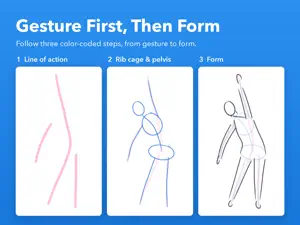
Capture the motion, not the outline. Gesdro is an iPad app built for one thing: short, focused gesture drawing practice. ■ CG pose references, made for this app Two figures, male and female, in standing, walking, stepping, crouching and seated poses, each shot from front, three-quarter, side and back. Every image is framed identically, at the same subject size, so your eye never has to hunt for the figure when the pose changes. (The exact count is shown in the app's credits screen.) ■ Switch the same pose between Body and Skeleton One tap swaps the reference for a simplified artist's skeleton: the rib cage and pelvis masses, the joints, the axes of the limbs. It shows beginners what the "Simplified Figure" step is really asking them to find. ■ Two step-by-step patterns ・Basic: Line of Action, then Simplified Figure, then Cylinders ・Big Shape: Line of Action, then one big mass Each layer has its own pen color, and earlier stages stay faintly visible underneath. In Big Shape, the mass is laid in with Lasso Fill: circle an area and it fills with a light tone. ■ High, low and foreshortened angles too Some poses also come in angles made for practicing depth and foreshortening. ■ A drawing engine built for feel A custom stroke engine that responds honestly to pressure and tilt. Draw with a finger or with Apple Pencil. With Apple Pencil, pressure and tilt shape the line, and Settings can limit drawing to the Pencil. ■ Built to keep you coming back Streaks and totals are tracked automatically. Open any pose in the gallery to look back at every sketch you have made of it and see your progress. ■ The practice features are free No limits on time, count, patterns or history. One short ad is shown when you start a session (never during or after practice). If you choose to watch one longer ad to the end, the short ads stop for the rest of that day. It is entirely optional. Because of the ad, starting a session needs an internet connection (if you are online and no ad could be loaded, the session simply starts). ■ Remove ads (one-time purchase) A single purchase removes the ads and lets you practice offline. Not a subscription. Use "Restore Purchases" in Settings after a reinstall or a new device. The references are CG made by the developer from assets the MakeHuman community publishes under CC0. The images themselves may not be redistributed; drawings you make from them are yours to publish or sell. The asset source is credited in the app.
What’s new
Version 1.0.1 · Updated September 30, 2026
- Added the developer website to the App Store listing. - No changes to app features.
App privacy
The developer, Tomoya Akase, reported these privacy practices to Apple.
Data Used to Track You
The following data may be used to track you across apps and websites owned by other companies:
- Identifiers: Device ID
- Usage Data: Advertising Data
Data Not Linked to You
The following data, which may be collected but is not linked to your identity, may be used for the following purposes:
- Location: Coarse Location
- Identifiers: Device ID
- Usage Data: Product Interaction, Advertising Data
- Diagnostics: Crash Data, Performance Data
Used for: Third-Party Advertising, Analytics
Alternatives to Gesdro: Gesture Drawing
Looking for apps like Gesdro: Gesture Drawing? Here are 6 similar apps on the App Store. The highest rated is refs. (5.0/5), and 5 of the 6 are free to download.


| App | Rating | Price | Last updated | Compare |
|---|---|---|---|---|
| Gesdro: Gesture Drawing | – | Free | September 30, 2026 | |
| Mirukaku | – | Free | Sep 4, 2026 | Compare |
| Daily Drawing Practice : GHOST | – | 1.99 USD | Jul 16, 2026 | Compare |
| Circles & Lines | – | Free | Oct 15, 2026 | Compare |
| refs. | 5.0 / 5 (3) | Free | Mar 1, 2026 | Compare |
| PictureTimer | 5.0 / 5 (1) | Free | Sep 20, 2026 | Compare |
| Art Anatomy | 4.3 / 5 (4) | Free | Oct 17, 2026 | Compare |