

LittyUp: Alarm Clock
Nicolas Raillot Utilities iPhoneiPadiPod touch
LittyUp: Alarm Clock is a free Utilities app for iPhone and iPad by Nicolas Raillot. Requires iOS 26.0. Updated October 21, 2026.
- Price
- Free
- on the App Store
- Size
- 137 MB
- Age 4+
- Updated
- Oct 21
- 2026 · v1.1.2
Screenshots


About LittyUp: Alarm Clock
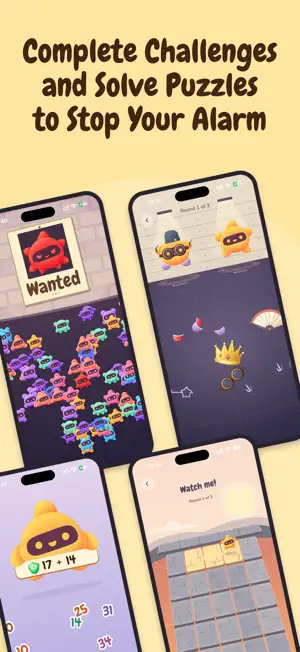
LittyUp is an alarm clock with eight wake-up challenges, scheduled app blocking and a customizable companion. Choose how to stop your alarm, build your morning routine and earn stars with Litty. EIGHT WAYS TO STOP YOUR ALARM Solve math problems, remember a path, find a character in a moving crowd, match Litty's accessories, shake your phone, scan a saved barcode or QR code, find a bright spot with the camera, or walk with Litty while holding your phone. Choose one or more challenges. Each alarm picks one from your selection. Try them in practice mode before your next alarm. If you need help during an alarm, switch to another available challenge. ALARMS THAT FIT YOUR WEEK Set one-time or repeating alarms, choose weekdays and alarm sounds, adjust your next morning or skip a planned day. BLOCK DISTRACTING APPS Choose the apps and websites to block during your morning routine. Blocking lasts for your configured window, even after you complete the alarm challenge. Schedule evening blocking around your next alarm and planned bedtime. App blocking is optional and requires Screen Time permission. COLLECT COMPLETED MORNINGS AND GIFTS Track your completed mornings and calendar history. Missed days do not reset your total. Collect daily stars and milestone gifts, then spend stars on accessories to dress up Litty and save your favorite outfit. REVEAL YOUR MORNING PHOTO Opt in to a candid selfie when you finish an alarm challenge, then reveal it in the evening. Photos stay in your private on-device gallery unless you choose to save or share them. KEEP YOUR ROUTINE IN VIEW Home Screen and Lock Screen widgets show your next alarm and progress. Live Activities show scheduled app-blocking countdowns. Requires iOS 26 or later. Light and barcode challenges use the camera, as do optional selfies. Walking requires Motion & Fitness permission. No account is required. SUBSCRIPTION An active LittyUp Premium subscription is required to activate and run alarms and Shields. Monthly and yearly plans are available. Prices and any eligible trial offer are shown before purchase. Payment is charged to your Apple Account. Subscriptions renew automatically unless canceled at least 24 hours before the end of the current period. Manage or cancel your subscription in your App Store account settings. Support: [email protected] Privacy: https://littyup.app/privacy/ Terms of Use: https://www.apple.com/legal/internet-services/itunes/dev/stdeula/
What’s new
Version 1.1.2 · Updated October 21, 2026
Small improvements for a smoother, more reliable experience.
App privacy
The developer, Nicolas Raillot, reported these privacy practices to Apple.
Data Not Linked to You
The following data, which may be collected but is not linked to your identity, may be used for the following purposes:
- Purchases: Purchase History
- Identifiers: User ID
- Usage Data: Product Interaction
- Diagnostics: Crash Data
Used for: Analytics, App Functionality
Alternatives to LittyUp: Alarm Clock
Looking for apps like LittyUp: Alarm Clock? Here are 6 similar apps on the App Store. The highest rated is No Scroll Alarm: Zonk (5.0/5), and all 6 are free to download.
-
 RestWake: Math Alarm Clock
-
 Wakepet: Pet Alarm Clock
-
 AlarmCat: Wake Up Alarm
-
 No Scroll Alarm: Zonk
5.0
No Scroll Alarm: Zonk
5.0
-
 Done Sleeping: Mission Alarm
-
 Loud Alarm MultiAlarm Pro
3.0
Loud Alarm MultiAlarm Pro
3.0
| App | Rating | Price | Last updated | Compare |
|---|---|---|---|---|
| LittyUp: Alarm Clock | – | Free | October 21, 2026 | |
| RestWake: Math Alarm Clock | – | Free | Oct 6, 2026 | Compare |
| Wakepet: Pet Alarm Clock | – | Free | Sep 19, 2026 | Compare |
| AlarmCat: Wake Up Alarm | – | Free | Oct 20, 2026 | Compare |
| No Scroll Alarm: Zonk | 5.0 / 5 (4) | Free | Aug 12, 2026 | Compare |
| Done Sleeping: Mission Alarm | – | Free | Sep 4, 2026 | Compare |
| Loud Alarm MultiAlarm Pro | 3.0 / 5 (2) | Free | Mar 25, 2026 | Compare |