

Worlderous
Penpichaya Suttimark Productivity iPhoneiPadiPod touch
Worlderous is a free Productivity app for iPhone and iPad by Penpichaya Suttimark. Requires iOS 17.4. Updated October 18, 2026.
- Price
- Free
- on the App Store
- Size
- 5 MB
- Age 17+
- Updated
- Oct 18
- 2026 · v1.3.0
Screenshots

About Worlderous
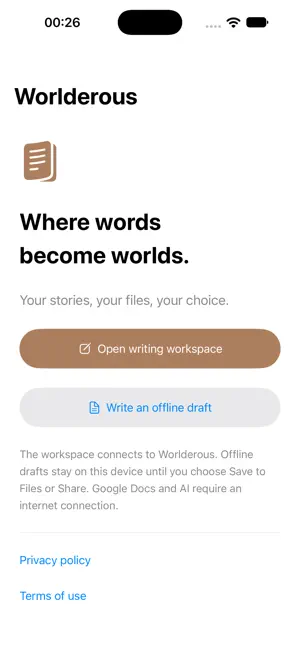
Build your manuscript and the world around it with Worlderous. Open your writing workspace to organize projects, work with Google Docs, and develop characters, settings, scenes and story memory. Review AI suggestions before accepting them into your manuscript. Keep the writer in control of every change. Choose a folder in Files for Local Vault access. Reconnect it when you open a new workspace session. Worlderous checks for conflicting edits instead of silently overwriting your files. Need a quiet place to start? Write a temporary offline draft without signing in, then choose Save to Files or Share. Temporary drafts have no automatic backup: save before leaving or closing the app. Prepare a Hybrid project online and grant a Local Vault folder to view its maps and graphs offline. The connected workspace still requires internet access for Google Docs and cloud features. Google Docs features require a Google account and access to the files you choose. AI features require available AI access; providers and models are identified in the workspace. AI processing is optional and asks for consent. Suggestions remain temporary until you approve them. Buy non-expiring Worlderous credit packs through the App Store, or subscribe for 750,000 non-expiring credits each month. Purchases are tied to your signed-in Worlderous account and can be restored in the app. Worlderous for iOS is for adults aged 18 or older. Native AI access requires an adult-use acknowledgment and processing consent for each workspace session. Terms of Use (EULA): https://www.apple.com/legal/internet-services/itunes/dev/stdeula/
What’s new
Version 1.3.0 · Updated October 18, 2026
View the World Map, relationship graph, world mind map, family tree and Universe graph offline after preparing a Hybrid project online. Reopen prepared views after closing the app. This update also refreshes the Worlderous app icon and improves offline recovery.
App privacy
The developer, Penpichaya Suttimark, reported these privacy practices to Apple.
Data Linked to You
The following data, which may be collected and linked to your identity, may be used for the following purposes:
- Purchases: Purchase History
- Contact Info: Email Address, Name
- User Content: Photos or Videos, Customer Support, Other User Content
- Identifiers: User ID
- Usage Data: Product Interaction
- Diagnostics: Other Diagnostic Data
Used for: App Functionality, Other Purposes
Alternatives to Worlderous
Looking for apps like Worlderous? Here are 6 similar apps on the App Store. The highest rated is miMind - Mind Map, Brainstorm (4.8/5), and all 6 are free to download.
-
 Authenticator App - 2FA PRO
-
 miMind - Mind Map, Brainstorm
4.8
miMind - Mind Map, Brainstorm
4.8
-
 WeNote - Notes, Notepad, To do
4.8
WeNote - Notes, Notepad, To do
4.8
-
 TimeBlocks - Mobile Planner
3.1
TimeBlocks - Mobile Planner
3.1
-
 MarginNote 3
4.7
MarginNote 3
4.7
-
 Folderly - Academic Organizer
4.8
Folderly - Academic Organizer
4.8
| App | Rating | Price | Last updated | Compare |
|---|---|---|---|---|
| Worlderous | – | Free | October 18, 2026 | |
| Authenticator App - 2FA PRO | – | Free | Dec 4, 2024 | Compare |
| miMind - Mind Map, Brainstorm | 4.8 / 5 (360) | Free | Aug 27, 2026 | Compare |
| WeNote - Notes, Notepad, To do | 4.8 / 5 (1,030) | Free | Aug 6, 2026 | Compare |
| TimeBlocks - Mobile Planner | 3.1 / 5 (162) | Free | Oct 18, 2026 | Compare |
| MarginNote 3 | 4.7 / 5 (5,045) | Free | Nov 29, 2025 | Compare |
| Folderly - Academic Organizer | 4.8 / 5 (3,224) | Free | Mar 5, 2026 | Compare |
Compare Worlderous with the top alternatives: ratings, updates, ASO score and keyword gaps →