

Reach: Control Surface
Moriah Point LLC Music iPad
Reach: Control Surface is a free Music app for iPad by Moriah Point LLC. Rated 5.0/5 from 1 ratings. Requires iOS 17.0. Updated October 30, 2026.
- Rating
- 5.0
- 1 ratings
- Price
- Free
- on the App Store
- Size
- 30 MB
- Age 4+
- Updated
- Oct 30
- 2026 · v1.0.5
Screenshots

About Reach: Control Surface
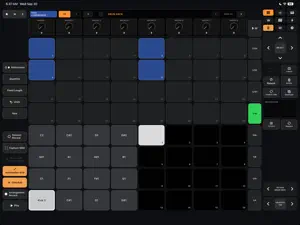
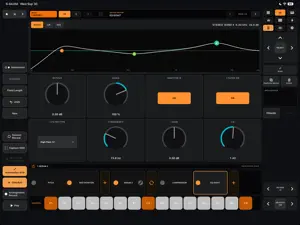
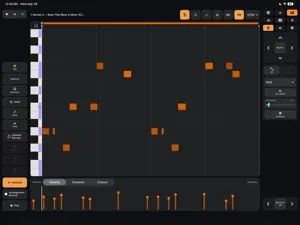
Reach turns your iPad into a responsive, touch-first control surface for Ableton Live. Play instruments, sequence drums, shape instruments and effects, mix tracks, and launch clips and scenes. Record and edit MIDI and audio clips in both Live’s Session and Arrangement Views, with controls designed for touch. PERFORM AND CREATE • Multi-touch melodic pads and scale layouts • Play chords from a single pad, with diatonic chord options and inversions • Drum Rack playing and sequencing, loop-page controls, 16 Velocities, and 64 Pads • Session clip and scene launching • Recording and clip editing in both Session and Arrangement Views • Capture MIDI, quantize, fixed-length recording, duplication, and undo • Designed to coexist with an existing Ableton Push setup EDIT AND SHAPE • Piano-roll editing with velocity, chance, and timing deviation controls • Audio waveforms with draggable Start, End, and loop handles • Move entire loops while preserving their length • Audio clip gain, pitch, and supported Warp controls • Device parameter banks and dedicated views for supported Live instruments and effects • Simpler and Drum Sampler waveform, sample, and trim controls • Available Convert actions for audio clips and instruments • Nested rack, chain, and drum-pad navigation CONTROL YOUR SET • Mixer volume, pan, sends, mute, solo, and track arm • Browse and load compatible devices, plug-ins, samples, and content from your Live library and Collections • Searchable Commands and a customizable 64-slot Favorites grid • Main and Secondary roles for multiple iPads • Optional Follow Main: share track and clip selection while keeping a separate view and device selection on each iPad CONNECTIONS Mac supports USB MIDI, Bluetooth MIDI, and Wi-Fi Network MIDI. A direct USB connection is recommended for consistent timing and low latency. Wireless responsiveness depends on your equipment, signal quality, and interference. Windows connects over a shared local network using rtpMIDI and Bonjour. Direct iPad-to-Windows USB MIDI and Windows Bluetooth MIDI are not supported. Windows compatibility has not been fully validated across configurations. TRY BEFORE YOU BUY Eligible new users can try every feature free for 7 days. Use the trial to check your computer, connection, and workflow before purchasing, especially with a Windows setup. You can set up your connection before starting the trial. Your 7 days begin only when you tap Start Free 7-Day Trial and confirm through the App Store. There is no automatic charge or renewal. After the trial, a one-time in-app purchase unlocks Reach’s performance and editing features. The Full Version price is shown before purchase. No subscription. Restore purchases using the same Apple Account. REQUIREMENTS AND COMPATIBILITY • iPad with iPadOS 17 or later, used in landscape • A Mac or Windows computer running Ableton Live 12.4.6 or later • The latest free ReachBridge MIDI Remote Script installed in Live • A compatible MIDI connection Earlier Live versions may support some features, but full compatibility—including browsing and loading content—is not guaranteed. Available features depend on your Live edition and installed instruments, effects, and content. Ableton Live, a computer, network equipment, and third-party MIDI utilities are not included. PRIVACY No Reach account, advertising, cross-app tracking, third-party analytics, or developer-operated telemetry. MIDI messages and Live session information stay within your selected MIDI connection between the iPad and computer. SETUP AND SUPPORT https://moriahpoint.io/reach/ [email protected] PRIVACY POLICY https://moriahpoint.io/reach/privacy/ TERMS OF USE https://www.apple.com/legal/internet-services/itunes/dev/stdeula/ Reach is not affiliated with or endorsed by Ableton AG. Ableton and Live are trademarks of Ableton AG.
What’s new
Version 1.0.5 · Updated October 30, 2026
See more of your music in Session view. • Follow each playing clip with shading that shows its playback position. • Identify looping clips with a small loop icon. One-shot clips remain free of loop symbols. • Recognize group and bus content with striped clip slots. • Enjoy steadier playback feedback with reduced flickering. • Switch from Pads to Session without a brief red flash from automatic track arming. • Find consistent loop symbols in Session and Clip properties, plus updated setup instructions, Quick Start and Owner’s Manual. Requires ReachBridge Revision 6 or later. Open Setup in Reach for the download and instructions. Save your Live Set, quit Live, replace the complete ReachBridge folder, then restart Live.
App privacy
The developer, Moriah Point LLC, reported these privacy practices to Apple.
Data Not Collected
The developer does not collect any data from this app.
Alternatives to Reach: Control Surface
Looking for apps like Reach: Control Surface? Here are 6 similar apps on the App Store. The highest rated is KQ MiniSynth 26 (4.7/5), and 4 of the 6 are free to download.
-
 MidiMe MIDI Controller
4.0
MidiMe MIDI Controller
4.0
-
 GhostKeys
-
 BloopMachine - Acid Bassline
3.0
BloopMachine - Acid Bassline
3.0
-
 Live Navigator
-
 Sylvaris Sapling
-
 KQ MiniSynth 26
4.7
KQ MiniSynth 26
4.7
| App | Rating | Price | Last updated | Compare |
|---|---|---|---|---|
| Reach: Control Surface | 5.0 / 5 (1 rating) | Free | October 30, 2026 | |
| MidiMe MIDI Controller | 4.0 / 5 (1) | 3.99 USD | Oct 19, 2026 | Compare |
| GhostKeys | – | Free | Oct 29, 2026 | Compare |
| BloopMachine - Acid Bassline | 3.0 / 5 (2) | Free | Oct 29, 2026 | Compare |
| Live Navigator | – | Free | Feb 27, 2026 | Compare |
| Sylvaris Sapling | – | Free | Oct 27, 2026 | Compare |
| KQ MiniSynth 26 | 4.7 / 5 (3) | 9.99 USD | Oct 16, 2026 | Compare |