

Nestpic – Blur Faces & Kids
Monto Bleu BVBA Photo & Video iPhoneiPadiPod touch
Nestpic – Blur Faces & Kids is a free Photo & Video app for iPhone and iPad by Monto Bleu BVBA. Requires iOS 17.0. Updated September 24, 2026.
- Price
- Free
- on the App Store
- Size
- 10 MB
- Age 4+
- Updated
- Sep 24
- 2026 · v1.0.1
Screenshots



About Nestpic – Blur Faces & Kids
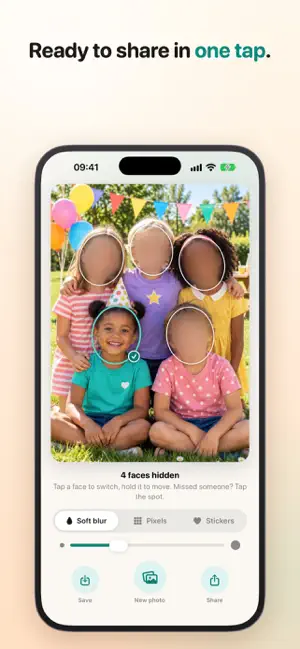
Share photos of your child without showing other people's children. A birthday party, the school play, sports day: almost every photo has other kids in it. Nestpic hides their faces, so you can share with peace of mind in the class chat, the family group or on Instagram. HOW IT WORKS • Pick a photo or take one. Nestpic finds every face and hides them all. • Tap your child; only that face comes back. • Share in one tap. When Nestpic is unsure, it hides too much rather than too little. One tap on a face brings it back. Missed someone? Tap the spot and it's hidden too. CHOOSE HOW TO HIDE • Soft blur • Pixels • Stickers: a heart, a flower or a star over each face Too big or too small? One slider sets the size, and holding a cover moves it. THE BIRD CAMERA (PREMIUM) The bird calls, your child looks up, and Nestpic takes a burst. The sharpest shot with open eyes is ready right away; the others are a swipe away. PRIVACY Nestpic looks at your photos on your iPhone itself. Your photos and the faces Nestpic learns never leave your iPhone. No account, no cloud. Location and other hidden data are removed before you share. FOR SCHOOLS AND CLUBS Does your school, daycare, scout group or sports club send photos to parents? With Nestpic, each child is shown only to their own parents. FREE AND PREMIUM Free: 3 photos a month and 1 child. Premium: unlimited photos, all your children and the bird camera. Get Premium once, or by the year. The yearly subscription renews automatically unless cancelled at least 24 hours before the end of the period. Manage or cancel it in your Apple Account settings. Terms of Use: https://www.apple.com/legal/internet-services/itunes/dev/stdeula/ Privacy Policy: https://nestpic.app/privacy/
What’s new
Version 1.0.1 · Updated September 24, 2026
A small update. Nestpic still does one thing: it hides every face, except the ones you choose.
App privacy
The developer, Monto Bleu BVBA, reported these privacy practices to Apple.
Data Not Linked to You
The following data, which may be collected but is not linked to your identity, may be used for the following purposes:
- Identifiers: Device ID
- Usage Data: Product Interaction
- Purchases: Purchase History
Used for: Analytics, App Functionality
Alternatives to Nestpic – Blur Faces & Kids
Looking for apps like Nestpic – Blur Faces & Kids? Here are 6 similar apps on the App Store.
-
 Simple Mosaic: Pixelate Photos
-
 Blur Faces - Photo Privacy
-
 No-Paywall Photo Vault
-
 Mosa: Blur, Pixelate & Redact
-
 Face Blur - Photo & Video
-
 Poof Auto Blur Faces in Video
| App | Rating | Price | Last updated | Compare |
|---|---|---|---|---|
| Nestpic – Blur Faces & Kids | – | Free | September 24, 2026 | |
| Simple Mosaic: Pixelate Photos | – | Free | Oct 7, 2026 | Compare |
| Blur Faces - Photo Privacy | – | Free | Oct 1, 2026 | Compare |
| No-Paywall Photo Vault | – | Free | Mar 22, 2026 | Compare |
| Mosa: Blur, Pixelate & Redact | – | Free | Sep 18, 2026 | Compare |
| Face Blur - Photo & Video | – | Free | Sep 18, 2026 | Compare |
| Poof Auto Blur Faces in Video | – | Free | Jun 16, 2026 | Compare |