

Quick CAD - DWG Quick Draw
JiHun Ha Utilities iPhoneiPadiPod touch
Quick CAD - DWG Quick Draw is a free Utilities app for iPhone and iPad by JiHun Ha. Requires iOS 16.4. Updated October 30, 2026.
- Price
- Free
- on the App Store
- Size
- 54 MB
- Age 4+
- Updated
- Oct 30
- 2026 · v1.0.13
Screenshots

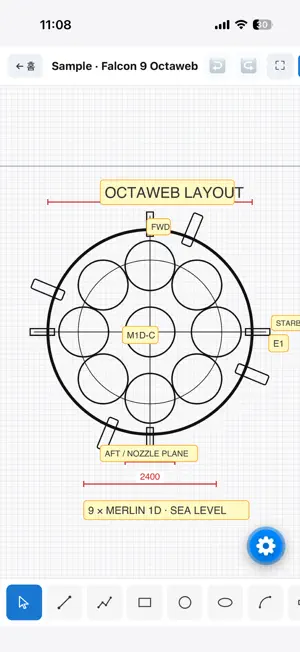
About Quick CAD - DWG Quick Draw
Quick CAD is a 2D CAD app built for phones and tablets. Draft accurate drawings on-site without heavy desktop software, add dimensions, import and export DXF and DWG files, and continue the work on your desktop CAD tool. ■ Features - Draw lines, rectangles, circles, ellipses, arcs, polylines - Smart object snap: endpoint, midpoint, center, intersection, tangent, nearest-on-edge, grid - Angle snap and ortho mode for precise angles - Dimensions (horizontal, vertical, aligned, radius, diameter) - Text annotations - Offset · Trim · Extend · Fillet - Rotate · Move · Copy · Mirror - Unlimited undo / redo - DXF and DWG import / export — works directly with AutoCAD and other desktop CAD - In-app support chat — reach the developer right from Settings ■ DWG viewer & editor Open .dwg files sent from AutoCAD, inspect and edit them, then export back as .dwg or .dxf. Dimensions and layers from the original are preserved. No desktop viewer install needed — do it on your phone or tablet. ■ Multi-language UI Available in 11+ languages — English, Korean, Japanese, Chinese (Simplified / Traditional), Spanish, French, German, Portuguese, Russian, Hindi, and more. Automatically matches your device language. ■ Who it's for - Architects, interior designers, and contractors who need to view and edit DWG/DXF on-site - Designers and engineers who prefer drawing by hand while keeping precision - Students and independent makers who need a lightweight drafting tool ■ Privacy first Quick CAD has no accounts and no login. Every drawing stays on your device. No ad SDK. Anonymous usage patterns (which tools/features are used) are collected to improve the product; no personally identifiable information is included. You can opt out in Settings. (DWG conversion is processed via the CloudConvert API and discarded immediately after.) Contact: [email protected] Terms of Use (EULA): https://www.apple.com/legal/internet-services/itunes/dev/stdeula/
What’s new
Version 1.0.13 · Updated October 30, 2026
• Line types: Continuous / Dashed / Center / Hidden (4 CAD standard types) • Line type preserved in DXF export/import (AutoCAD compatible) • Draw menu redesigned: Line / Shape sections, center-aligned, scrollable • Pinch zoom fix: shapes no longer disappear when zooming in • Stability improvements
App privacy
The developer, JiHun Ha, reported these privacy practices to Apple.
Data Not Collected
The developer does not collect any data from this app.
Alternatives to Quick CAD - DWG Quick Draw
Looking for apps like Quick CAD - DWG Quick Draw? Here are 6 similar apps on the App Store. The highest rated is RaceBox GPS Info (5.0/5), and 5 of the 6 are free to download.


| App | Rating | Price | Last updated | Compare |
|---|---|---|---|---|
| Quick CAD - DWG Quick Draw | – | Free | October 30, 2026 | |
| AnyCAD | – | Free | May 1, 2026 | Compare |
| GModel | – | Free | Jul 1, 2026 | Compare |
| How to tie a tie step by step | 3.0 / 5 (1) | 1.99 USD | Jun 3, 2024 | Compare |
| RaceBox GPS Info | 5.0 / 5 (1) | Free | Oct 27, 2026 | Compare |
| RoomVector | – | Free | Dec 5, 2025 | Compare |
| KISP | – | Free | Mar 30, 2026 | Compare |