

MusicTools: Auto Page Turner
Kihoon Kwon Music iPhoneiPadiPod touch
MusicTools: Auto Page Turner is a free Music app for iPhone and iPad by Kihoon Kwon. Requires iOS 16.4. Updated November 27, 2026.
- Price
- Free
- on the App Store
- Size
- 64 MB
- Age 4+
- Updated
- Nov 27
- 2026 · v1.6.0
Screenshots
Save to Pinterest


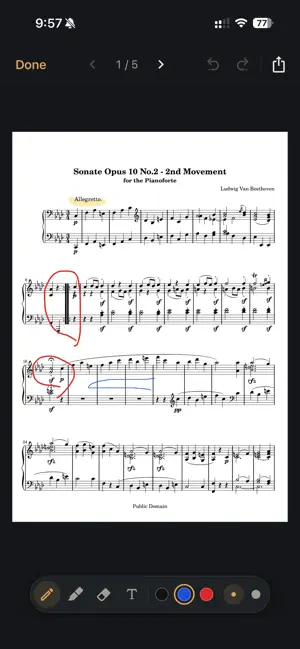
About MusicTools: Auto Page Turner
No spare hand to turn the page while you're playing? MusicTools turns it for you. KEY FEATURES ■ PDFs, photos and scans Import PDF sheet music, or make a score from photos of its pages or a camera scan (*), straightened and put in order. A PDF from another app opens straight in MusicTools. Folders, search and your recent songs keep the library in order. ■ Full-screen reading A song's score fills the screen, the white margins trimmed so the notes come out larger. Tap the sides or swipe to turn the page, or use a Bluetooth page-turn pedal; tap the middle for the controls. On an iPad in landscape two pages sit side by side, every song opens where you left it, and the screen stays on while you read. ■ Setlists Songs in the order you play them, a practice routine or a concert program: turn past the last page and the next song opens. ■ It reads the bars and repeats for you When you import a score, MusicTools finds the bars on every page and reads repeat signs and 1st and 2nd endings, so the playing order is ready. It reads cleanly printed scores best; any line it can't read, you add in the Song Form editor. ■ Auto page turn: hands-free practice (*) After a count-in at the song's own meter and tempo, each page turns the moment its last bar ends, so your hands never leave the instrument. The bar you're playing is marked on the score, filling beat by beat. Or choose Simple: the metronome plays over the score while you turn the pages. ■ Repeats, D.C. and tempo changes as written In the Song Form editor, mark repeat signs, endings, D.C., D.S., Coda and Fine on their bars and the playing order follows. Mark tempo and meter changes, rit. and accel., fermatas and pickups too: the metronome and the page turns follow them all. ■ Write on your sheet music Pen, highlighter, eraser and text, plus one-tap stamps for fingerings, dynamics, accidentals and more, with undo and redo. With an Apple Pencil, the pencil draws and your finger turns pages. Your original PDF stays untouched. ■ Arrange, share and print Reorder, turn, remove or add pages, or split some off as a new song; your notes follow their pages. Share or print the PDF with your notes. ■ Play along (*) Attach an audio file or a recording to a song and play it while you read: slower without changing the pitch, or looped from A to B. ■ Record your practice One tap records your practice in the Recordings tab. Recording carries on in other apps or with the screen off, and a take cut short by the app closing comes back. Recording over the sheet as you play is part of a pack (*). ■ Hum to MIDI, experimental (*) Hum a melody and get its notes as a MIDI file for your DAW or notation app. ■ A precise metronome, and a tuner - Quarter, eighth, triplet and 16th clicks, swing and shuffle - Odd meters grouped the way you count them (7/8 as 3+2+2) - Enter the tempo as the score gives it (dotted quarter = 60), or tap it in - A tuner beside it: the nearest note and how many cents off, with A from 415 to 466 Hz ■ Backup Your scores, notes, Song Forms and setlists in one file, to keep safe or restore on a new device. ■ (*) One-time purchases The features marked (*) come in three packs, each bought once, with no subscription: Hands-Free Page Turning (Auto page turn and face gestures), Recording & Play-Along, and Sheet Scanning. Each can be tried for free first, and Everything opens all three. Reading, notes, pages, setlists, the metronome, the tuner and backups are free. ■ Offline, no data collected No account, and no internet connection needed (buying and restoring go through the App Store). Sheet reading and transcription run on your device; the microphone is used only to record and for the tuner, and the camera only to scan a score and for face gestures, when they're on, with nothing it sees kept. Nothing leaves your device unless you share, print or back it up yourself, and there are no ads. Best experienced on iPad. In English, Korean and Japanese: Settings › Language.
What’s new
Version 1.6.0 · Updated November 27, 2026
- Some features can now be bought, each once, with no subscription: · Hands-Free Page Turning: Auto page turn, and turning pages by a face gesture · Recording & Play-Along: recording over the sheet, slowing down and A–B looping a play-along track, hum to MIDI · Sheet Scanning: straight sheets made from photos or a camera scan Each can be tried for free: 2 songs per pack, 2 scans, 3 transcriptions. - If you had MusicTools before anything in it was sold, all of it stays free for you. - MusicTools now speaks Japanese: Settings › Language. - Settings are grouped in frames, so each part is easy to find.
App privacy
The developer, Kihoon Kwon, reported these privacy practices to Apple.
Data Not Collected
The developer does not collect any data from this app.
Alternatives to MusicTools: Auto Page Turner
Looking for apps like MusicTools: Auto Page Turner? Here are 6 similar apps on the App Store. The highest rated is Leadbook - 악보 뷰어 & 그리기 (5.0/5), and 5 of the 6 are free to download.
-
 OnScore
-
 Mussorgsky Pictures Exhibition
3.5
-
 Leadbook - 악보 뷰어 & 그리기
5.0
-
 Volti: Sheet Music Page Turner
4.0
-
 StringMate
-
 LUVOL PS-300
| App | Rating | Price | Last updated | Compare |
|---|---|---|---|---|
| MusicTools: Auto Page Turner | – | Free | November 27, 2026 | |
| OnScore | – | Free | Oct 17, 2026 | Compare |
| Mussorgsky Pictures Exhibition | 3.5 / 5 (2) | 1.99 USD | Nov 4, 2026 | Compare |
| Leadbook - 악보 뷰어 & 그리기 | 5.0 / 5 (1) | Free | Nov 25, 2026 | Compare |
| Volti: Sheet Music Page Turner | 4.0 / 5 (1) | Free | Nov 21, 2026 | Compare |
| StringMate | – | Free | Jul 16, 2026 | Compare |
| LUVOL PS-300 | – | Free | May 20, 2025 | Compare |