

Planbound: Time Block Planner
Umit Caglayan Kirkoc Productivity iPhoneiPadiPod touch
Planbound: Time Block Planner is a free Productivity app for iPhone and iPad by Umit Caglayan Kirkoc. Requires iOS 17.0. Updated October 12, 2026.
- Price
- Free
- on the App Store
- Size
- 13 MB
- Age 4+
- Updated
- Oct 12
- 2026 · v1.1.0
Screenshots



About Planbound: Time Block Planner
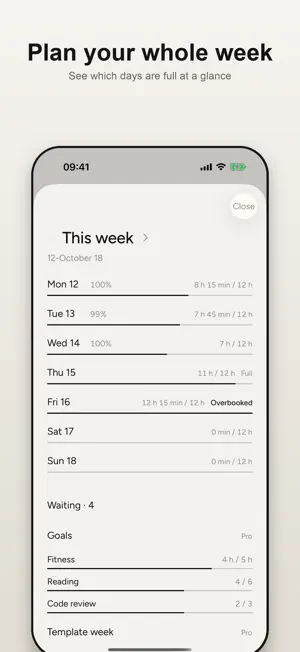
Planbound is a simple daily planner and agenda where you time-block your day minute by minute on a timeline. Balance your week on one screen, reschedule slipped tasks instead of losing them, and see one number at night: how much you stuck to your plan. No account, no ads, no tracking. Your data stays on your phone. TIME VIEW - See your day on a timeline: a now line, the free gaps between tasks, and what you planned next to what actually happened - Tap a gap to add a task right there - Switch between List and Time on the Today screen with one tap NOTHING GETS LOST - When a task ends, one question: Done, +15 min or Move it - Move slipped work to the first free slot today or tomorrow, to the Waiting box, or let it go on purpose - A conscious decision costs fewer points than quietly skipping - In the evening, "Close today" walks you through what's left, then you plan tomorrow - Log unplanned time with "What are you doing now" WEEK - See this week and next on one screen: which days are full, which are overbooked - Tasks without a day or time wait in the Waiting box DAILY PLAN AND SCORE - Add tasks with a start and end time and build your daily routine - Mark each one Free or Phone off - Phone-off tasks open a full-screen countdown; leaving the app marks the task broken - Your day gets a fidelity score from 0 to 100 - On your off days (weekends, holidays) nothing is scored and your streak keeps its place USE IT YOUR WAY - List only: a plain to-do list, no scores, no reminders - Plan + Track: reminders and scoring, nothing is blocked BUILT TO STAY OUT OF YOUR WAY - Simple screens, one main button. No dashboards. - Light, quiet, monochrome design - Works fully offline - No account, no sign-up - No analytics, no ads, no tracking - Your data stays on your phone PLANBOUND PRO (optional) - Weekly planning flow and reminder - Weekly goals - Week templates - Calendar import (read-only, stays on your device) - Lock Screen countdown - Duration suggestions - Repeating tasks - Unlimited day templates - Unlimited history - Weekly summary - All widgets - Camp mode: pick a date range and your template is applied to every day in it Monthly, yearly (3-day free trial) or a one-time lifetime purchase. Planbound is made by one developer who wanted a planner that keeps its promises. Subscriptions renew automatically at the end of each period. You can turn off renewal at least 24 hours before the current period ends from your App Store account settings. The lifetime purchase is a one-time payment and does not renew. Privacy policy: https://planbound.kirkoc.com/gizlilik.html Terms of use: https://planbound.kirkoc.com/kosullar.html
What’s new
Version 1.1.0 · Updated October 12, 2026
Planbound 1.1: your day minute by minute, your week end to end. • New: Time view. See your day on a timeline with a now line, the free gaps between tasks, and what you planned next to what actually happened. Switch between List and Time on the Today screen. • New: Nothing gets lost. When a task ends you're asked "Done / +15 min / Move it". Move slipped work to the first free slot today or tomorrow, to Waiting, or let it go on purpose. A conscious decision costs fewer points than quietly skipping. In the evening, "Close today" walks you through what's left. • New: Week view (this week and next, with how full each day is), a Waiting box, and "What are you doing now" to log unplanned time. • New: Start in one tap on the Today screen. A task you start early moves to now; finishing early is never penalized, and you can start the next one right away. Countdown screens are now dark to save battery. • Added to Pro: weekly planning flow and reminder, weekly goals, week templates, calendar import (read-only), Lock Screen countdown with Done and +15 min buttons, and duration suggestions. • Your plans, scores and history are all kept. A close-the-day reminder now arrives in the evening; you can turn it off or change its time in Settings.
App privacy
The developer, Umit Caglayan Kirkoc, reported these privacy practices to Apple.
Data Not Linked to You
The following data, which may be collected but is not linked to your identity, may be used for the following purposes:
- Purchases: Purchase History
Used for: App Functionality
Alternatives to Planbound: Time Block Planner
Looking for apps like Planbound: Time Block Planner? Here are 6 similar apps on the App Store. The highest rated is Logistics Cluster (5.0/5), and all 6 are free to download.
-
 TodoKu - Simple To-Do List
-
 Chore & Cleaning Planner
-
 ClevverNumber
-
 Logistics Cluster
5.0
-
 National Disability Register
3.0
-
 Summary - AI Text Summarizer
4.4
| App | Rating | Price | Last updated | Compare |
|---|---|---|---|---|
| Planbound: Time Block Planner | – | Free | October 12, 2026 | |
| TodoKu - Simple To-Do List | – | Free | Feb 6, 2026 | Compare |
| Chore & Cleaning Planner | – | Free | Oct 19, 2026 | Compare |
| ClevverNumber | – | Free | Dec 30, 2024 | Compare |
| Logistics Cluster | 5.0 / 5 (2) | Free | Nov 5, 2025 | Compare |
| National Disability Register | 3.0 / 5 (2) | Free | Sep 8, 2025 | Compare |
| Summary - AI Text Summarizer | 4.4 / 5 (38) | Free | Jul 8, 2025 | Compare |