

Wage Ticker - Salary Counter
SanglimSoft Productivity iPhoneiPadiPod touch
Wage Ticker - Salary Counter is a free Productivity app for iPhone and iPad by SanglimSoft. Requires iOS 15.0. Updated October 16, 2026.
- Price
- Free
- on the App Store
- Size
- 24 MB
- Age 4+
- Updated
- Oct 16
- 2026 · v1.5.3
Screenshots

About Wage Ticker - Salary Counter
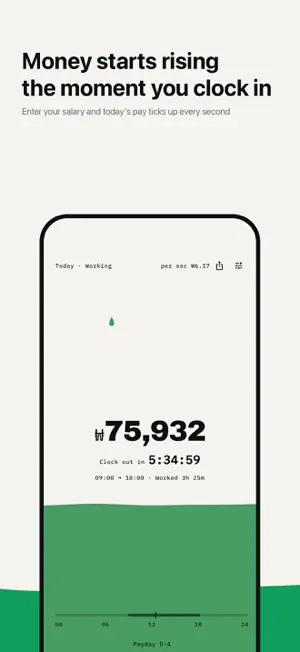
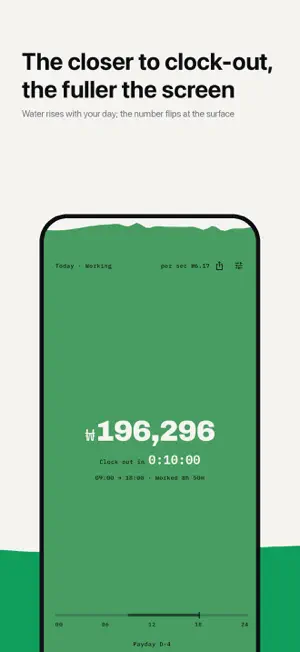
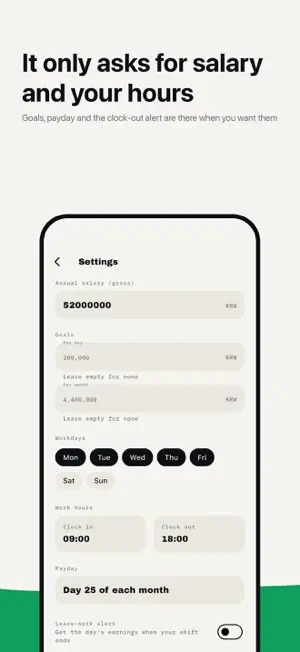
How much have I earned right this second? Wage Ticker is a live salary counter: enter your annual salary and your work hours, and it shows what you have earned so far today, ticking up every second. The number is not the only thing rising. As the day goes on, the screen fills like water from the bottom up, and every second a single drop falls and leaves a ripple on the surface. By the time you clock out, the screen is full. ■ The screen becomes a glass - Today's earnings rise in real time, second by second - A field of color fills to match how far along your day is, and the number inverts as the surface passes it - It only runs during work hours and stops at clock-out. Days off stay still - Tap anywhere on the color and the bottom line moves through this week, this month, this year and the countdown to payday - Set a goal for the day or the month and that line shows how far along you are ■ Widgets on your Home Screen and Lock Screen - See today's earnings right on your Home Screen, without opening the app (the amount refreshes every minute) - Three Home Screen sizes, small, medium and large, plus three Lock Screen widgets - The field of color waves and fills on the widget too - While you are on the clock, the time left until you clock out counts down by the second ■ Three things to start - Gross annual salary - Workdays - Clock-in and clock-out times Your hourly rate and your per-second rate are worked out for you (salary ÷ 52 weeks ÷ weekly hours). Payday, daily and monthly goals and the leave-work alert are waiting in Settings for when you want them. ■ Days off come out of the totals - The work log calendar fills itself in from the days and hours you set - Tap a date to mark it off, and this week, this month and this year drop by that much ■ Share as an image - What you have earned so far, drawn as a single card - A preview shows you exactly what goes out before you send it ■ 83 languages - The app follows your device language, 83 of them in all - The widgets are translated too ■ Light and quiet - No sign-up, no login - The salary and hours you enter stay on your device and are never sent to a server - Notifications only if you turn them on: the optional leave-work alert shows the day's earnings when your shift ends - Anonymous usage statistics and crash reports are collected to improve the app (see the privacy policy) ■ Before you start · The amounts shown are estimates based on the salary and hours you enter. They may differ from your actual pay, taxes and allowances · The whole stretch from clock-in to clock-out counts as work time. To leave out your lunch break, set your clock-out time that much earlier · Hourly and part-time work fits the same way. Just enter the days and hours you actually work · Amounts are shown in Korean won (₩) Privacy policy: https://wagetick.sanglimsoft.com/privacy Support: https://wagetick.sanglimsoft.com/support
What’s new
Version 1.5.3 · Updated October 16, 2026
• Dark mode: pick System, Light or Dark in Settings › Color & theme • Fill with one of 10 colors or a mix like Rainbow, Sunset or Sea • A water-drop friend joins you before and after work, on days off and when you hit a goal • The Settings calendar is now a weekly ledger of your earnings • Easier-to-read time pickers • Dark and tinted app icons on iOS 18
App privacy
The developer, SanglimSoft, reported these privacy practices to Apple.
Data Linked to You
The following data, which may be collected and linked to your identity, may be used for the following purposes:
- Usage Data: Product Interaction
Used for: Analytics
Data Not Linked to You
The following data, which may be collected but is not linked to your identity, may be used for the following purposes:
- Diagnostics: Other Diagnostic Data, Crash Data
Used for: Analytics, App Functionality
Alternatives to Wage Ticker - Salary Counter
Looking for apps like Wage Ticker - Salary Counter? Here are 6 similar apps on the App Store. The highest rated is ShiftFit: Work Pay Tracker (4.0/5), and all 6 are free to download.
-
 월급 미터기
-
 Clocked Up: Salary Counter
-
 Meeting Cost: Live Ticker
-
 퇴근까지
퇴근까지
-
 Emvron: Shift Schedule & Pay
-
 ShiftFit: Work Pay Tracker
4.0
ShiftFit: Work Pay Tracker
4.0
| App | Rating | Price | Last updated | Compare |
|---|---|---|---|---|
| Wage Ticker - Salary Counter | – | Free | October 16, 2026 | |
| 월급 미터기 | – | Free | Jun 2, 2026 | Compare |
| Clocked Up: Salary Counter | – | Free | Oct 5, 2026 | Compare |
| Meeting Cost: Live Ticker | – | Free | Aug 15, 2026 | Compare |
| 퇴근까지 | – | Free | Mar 19, 2026 | Compare |
| Emvron: Shift Schedule & Pay | – | Free | Aug 2, 2026 | Compare |
| ShiftFit: Work Pay Tracker | 4.0 / 5 (2) | Free | Sep 10, 2026 | Compare |