

Sparlo: Budget & Expenses
JACK AUSTIN GAUNT Finance iPhoneiPadiPod touch
Sparlo: Budget & Expenses is a free Finance app for iPhone and iPad by JACK AUSTIN GAUNT. Requires iOS 17.0. Updated October 7, 2026.
- Price
- Free
- on the App Store
- Size
- 11 MB
- Age 4+
- Updated
- Oct 7
- 2026 · v2.0
Screenshots

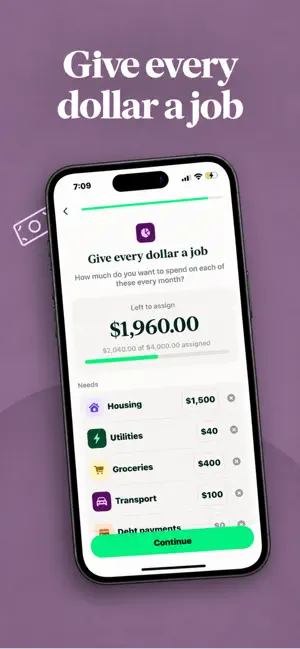
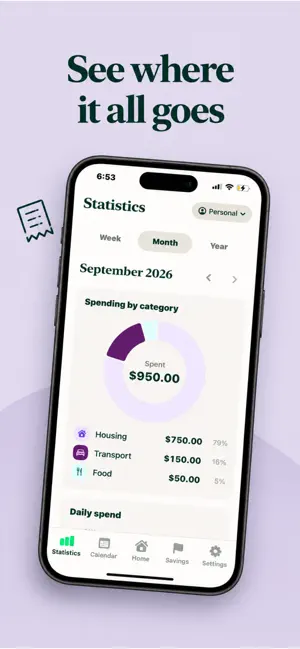

About Sparlo: Budget & Expenses
Sparlo: Budget & Expense Tracker Sparlo is a calm, simple budgeting app that helps you see where your money goes and keep more of it. You don't need a bank login, an account or a spreadsheet. You just log what you spend and Sparlo handles the rest. A PLAN BUILT AROUND YOU When you first open Sparlo, a short setup asks about your goals, your income and how you spend. It then builds a starting budget split into Needs and Wants. You can change any of it later. BUDGETS BY CATEGORY Give each category its own monthly budget and see how much is left at a glance. Add your own categories with custom icons and colours. Your budget month can start on any day from the 1st to the 28th, which helps if you're paid mid-month. QUICK EXPENSE LOGGING Add an expense or income in a few taps with the built-in keypad. Add notes, pick a date and edit or delete any entry later. Your home screen shows your available balance, your expected balance and your recent transactions. SEE YOUR SPENDING CLEARLY • Statistics by week, month or year • Spending by category, daily spend and income vs expenses • Weekly reports and a month in review • A calendar that shows your money day by day, with a summary for each day and month SAVINGS GOALS & CHALLENGES Create goals like an emergency fund or a holiday, then set a target and a deadline. Add contributions and watch your progress grow. For some fun, try the savings challenges: • 52-week challenge: tick off a cell each week you save • Savings roulette: spin to get a random amount to set aside REPORTS & EXPORT Create a PDF summary of your month or export your transactions to CSV to use anywhere. MAKE IT YOURS • Choose from 10 app colours • Full light and dark mode • All major currencies, with decimal options PRIVATE BY DESIGN Your budget, transactions and goals are stored on your device. You never need to sign up or connect a bank account. SUBSCRIPTION Sparlo requires a subscription. A Sparlo Premium subscription unlocks the whole app: category budgets, unlimited transactions and savings goals, weekly and monthly reports, and PDF and CSV exports. It comes as a monthly or yearly plan. Payment is charged to your Apple Account when you confirm your purchase. Your subscription renews automatically unless you cancel at least 24 hours before the current period ends. You can manage or cancel it in your App Store account settings. Terms of Use: https://spendy-app.com/terms Privacy Policy: https://spendy-app.com/privacy Support: [email protected]
What’s new
Version 2.0 · Updated October 7, 2026
Bug fixes, styling changes, name rebranding!
App privacy
The developer, JACK AUSTIN GAUNT, reported these privacy practices to Apple.
Data Not Linked to You
The following data, which may be collected but is not linked to your identity, may be used for the following purposes:
- Usage Data: Product Interaction
Used for: Analytics
Alternatives to Sparlo: Budget & Expenses
Looking for apps like Sparlo: Budget & Expenses? Here are 6 similar apps on the App Store. The highest rated is Expense Tracker: Budgeting (2.0/5), and all 6 are free to download.
-
 Expense Log: Receipt Keeper
-
 Kesten: Budget & Money Tracker
-
 Expense Tracker: Budgeting
2.0
Expense Tracker: Budgeting
2.0
-
 FamilyJar: Envelope Budget
-
 Goami: Shared Expenses & Bills
-
 Spendly - Track Expense
| App | Rating | Price | Last updated | Compare |
|---|---|---|---|---|
| Sparlo: Budget & Expenses | – | Free | October 7, 2026 | |
| Expense Log: Receipt Keeper | – | Free | Oct 4, 2026 | Compare |
| Kesten: Budget & Money Tracker | – | Free | Oct 2, 2026 | Compare |
| Expense Tracker: Budgeting | 2.0 / 5 (1) | Free | Aug 23, 2026 | Compare |
| FamilyJar: Envelope Budget | – | Free | Oct 17, 2026 | Compare |
| Goami: Shared Expenses & Bills | – | Free | Oct 2, 2026 | Compare |
| Spendly - Track Expense | – | Free | Sep 4, 2026 | Compare |