

Tachwire
Maksim Pogozhii Utilities iPhoneiPadiPod touch
Tachwire is a free Utilities app for iPhone and iPad by Maksim Pogozhii. Rated 5.0/5 from 1 ratings. Requires iOS 18.4. Updated October 24, 2026.
- Rating
- 5.0
- 1 ratings
- Price
- Free
- on the App Store
- Size
- 167 MB
- Age 4+
- Updated
- Oct 24
- 2026 · v0.4.0
Screenshots


About Tachwire
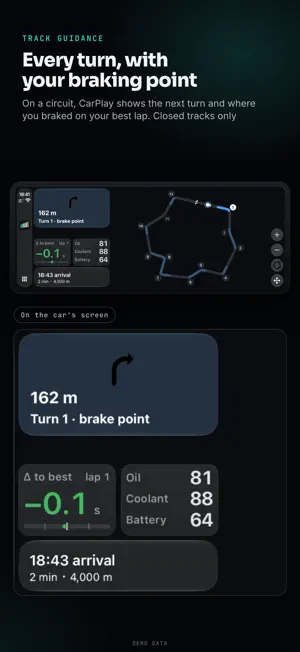
Tachwire reads your car through a Bluetooth LE OBD adapter and puts what the dashboard keeps to itself — oil and gearbox temperatures, boost, gear, a hybrid's battery, on a BMW even oil pressure — on the car's screen, laid out the way you want. When something runs critically hot, it says so out loud. Deepest on BMW, which it asks through its own engine, gearbox and hybrid units. First support for many more makes, from Mercedes-Benz, Porsche and Ford to Toyota, Land Rover and RAM. Standard readings on any car with an OBD port. A SCREEN OF YOUR OWN IN THE CAR • Tiles of any size on a grid fitted to your car's display. • Pages for the road, the track and the warm-up, a button apart. • Arrange it on the phone, start from a layout in the Gallery, or edit on the car's screen while parked. • A Live Activity on the Lock Screen, in the Dynamic Island and, on iOS 26, in CarPlay. YOUR CAR AND YOUR DRIVES • Car: your car pictured in its factory colour; tank, battery, tyres and the last drive at a glance. • Drives: a diary by day — city, highway or track, with alerts, pulls and records. • A drive's page: the route, a verdict with its reason, every reading on one time line. • Route video: a 15–60 s flyover on an OpenStreetMap map, saved to Photos. • Logbook: records and trends against your car's own usual; ignition timing pull and power by rpm. • Power from the torque the engine reports, never estimated. 0–60 mph or 0–100 km/h, ¼ and ½ mile, timed from the car's speed — on a closed track only. ROAD CAMERAS • Spoken alerts and a map window on the car's screen for speed and red-light cameras, section controls and low-emission zones in Spain, Portugal, Italy, the United Kingdom, Poland, Austria, Belgium, Bulgaria, Norway, Cyprus, Malaysia and Russia. France: danger zones and low-emission zones only, as French law allows. Silent where such alerts are banned. • Off until you turn it on. TRACKS • 535 tracks in 17 countries, or set your own start/finish line. • Laps by session and the gap to your best, on the car's screen too. Runs and laps only on a closed track. • Track guidance in CarPlay: on a circuit, the track map with the next turn, and your braking points once a lap is recorded. A Track map tile for any page. WHICH CARS • BMW, the deepest: G-series from 2018 and F-series, recognised from the VIN — oil temperature and pressure, gearbox temperature and gear, boost, torque and power, a plug-in hybrid's e-motor and battery, a diesel's DPF and AdBlue. • MINI (2014–2024) and the Toyota GR Supra are read the way a BMW is. • First support, readings vary by model: Mercedes-Benz, Porsche, Ford (F-150, Mustang, Ranger and more), Toyota and Lexus (Land Cruiser 300 among them), RAM, Dodge, Jeep, Chrysler, Land Rover, Jaguar, Audi, Volkswagen, SEAT, CUPRA, Mazda and Honda. Their own readings stay quiet, with no warnings, until a drive confirms them. Renault, Dacia and Alpine are recognised. • Any other car with an OBD port: revs, speed, coolant, intake, load, often oil temperature and boost. A tile stays empty rather than show a wrong number. Make by make: tachwire.app/cars. WHAT YOU NEED • A Bluetooth LE OBD adapter: OBDLink CX (the fastest), vLinker, UniCarScan, or an ELM327 BLE clone (slower). Classic Bluetooth and Wi-Fi adapters can't connect to an iPhone. • iOS 18.4 or later and CarPlay, wired or wireless: the app reads the car only while CarPlay is connected. • No car nearby? Choose "No car yet" on the first screen for a demo drive. READ-ONLY, PRIVATE Tachwire only reads live values: no fault codes, no coding, nothing changed in the car. No account, ads or tracking. Drives stay on the phone unless you turn sending on (encrypted, route removed; only laps on a track keep their positions). Crash reports turn off with one switch; usage data only if you agree. GPS runs only during a drive. Tachwire is independent and not affiliated with or endorsed by any carmaker. All trademarks belong to their owners.
What’s new
Version 0.4.0 · Updated October 24, 2026
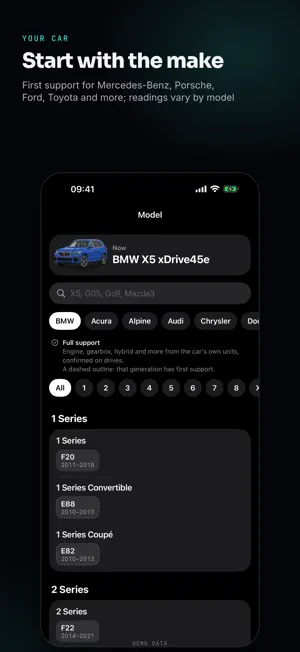
A screen of your own in the car, track guidance, many more makes, a new design and route videos to share. • Screen in the car: instruments you place yourself — tiles of any size on a grid fitted to your car's display, and pages for the road, the track and the warm-up. Arrange them on the phone, start from the Gallery, or edit on the car's screen while parked. • Track page: the gap to your best lap, the laps and the gear, laid out like a race display. • Track guidance in CarPlay: on a circuit, the track map with the next turn, and your braking points once a lap is recorded. A Track map tile for any page. • More makes, first support: Mercedes-Benz, Porsche, Ford (F-150, Mustang, Ranger, Bronco and more), Toyota and Lexus (Land Cruiser 300, Tundra, Hilux and more), RAM, Dodge, Jeep, Chrysler, Land Rover and Jaguar; Renault, Dacia and Alpine are recognised. Their own readings stay quiet, with no warnings, until a drive confirms them. • Choose your car by make, then model, pictured in its factory colours. • BMW diesels: AdBlue range and litres, and more readings from the engine unit. • Road cameras: now in the United Kingdom, with limits in mph; a map window on the car's screen shows the camera ahead. • A new look across the app, with a light appearance that follows your phone. The car's screen stays dark. • Car: tank, battery and tyres at a glance; the last drive and this week. • Drives: a diary by day. Each drive says what it was — city, highway or track — with its alerts, pulls and records. • Drive page: a verdict with its reason and health against your car's own usual. All charts shows every recorded reading; turn the phone sideways for a cursor. • Logbook: records and trends in one tab. Ignition and Power by rpm: timing pull and the power curve over every pull. • Route screen and route video: the line coloured by speed, power, pedal or g-force, a replay, and a 15–60 s flyover on an OpenStreetMap map, saved to Photos. • Share: one sheet everywhere, a source for every figure, and no VIN, time of day or route by default. • Engine software: tell the app about a Stage 1 or 2 tune, and power and ignition are judged with it in mind. • Less CPU and battery use during a drive, and many fixes from drivers' logs. Runs and laps: on a closed track only.
App privacy
The developer, Maksim Pogozhii, reported these privacy practices to Apple.
Data Linked to You
The following data, which may be collected and linked to your identity, may be used for the following purposes:
- Location: Precise Location
- Identifiers: Device ID
Used for: App Functionality
Data Not Linked to You
The following data, which may be collected but is not linked to your identity, may be used for the following purposes:
- User Content: Other User Content, Customer Support
- Diagnostics: Crash Data, Performance Data, Other Diagnostic Data
Used for: App Functionality, Other Purposes