

Pen Friend: Handwriting Notes
BISHWAS BHANDARI Productivity iPad
Pen Friend: Handwriting Notes is a free Productivity app for iPad by BISHWAS BHANDARI. Requires iOS 18.0. Updated October 23, 2026.
- Price
- Free
- on the App Store
- Size
- 9 MB
- Age 4+
- Updated
- Oct 23
- 2026 · v1.2
Screenshots



About Pen Friend: Handwriting Notes
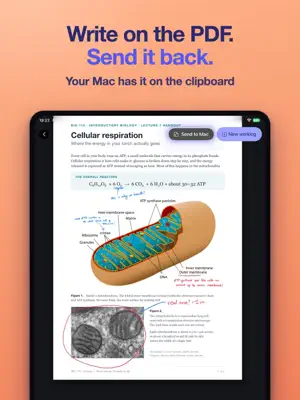
The thing you're thinking about is usually on your Mac. A paper you're reading, a contract someone sent, a design waiting for feedback. The notes happen on the iPad, by hand, and getting one onto the other has always meant AirDrop, a trip through Files, and exporting it all back afterwards, by which point the thought you had has mostly gone. Pen Friend closes that gap. Drop a PDF or a picture on your Mac's notch and it lands on the page you have open on your iPad. Circle what matters, write in the margins, then send it back with one tap, and it's sitting on your Mac's clipboard ready to paste. And when you get stuck halfway down a page, you don't have to leave it either. Write the question where you are and pause, and the answer comes back in ink beside it. FROM YOUR MAC, ONTO THE PAGE • Drop a PDF on the notch, mark it up with Apple Pencil, and send it back marked up • Screenshots arrive in the bar at the top, so nothing lands on top of your writing • Put a PDF's pages straight into a worklog when you want to keep them • Turn a picture with its handle, or carry it onto the next page • Writing around a picture moves with it, unless you tell it to stay behind • Everything you send, either way, waits on the Mac in case you want it again You'll need Pen Friend Companion on the Mac. It's free on the Mac App Store. A REAL NOTEBOOK FIRST Most of the time you just want to write, so that part had to feel right. • One smooth canvas that stays crisp however far you zoom • Grid, lined, dotted or blank paper, in five page sizes • Double tap to paste, and pasted text even arrives as handwriting • Export a worklog as a PDF, or a single page as an image WHEN YOU ASK • A worked step for the line you're stuck on • A labelled sketch, or a graph plotted from what you wrote • Tracing paper, so it can sketch over your page without touching it • A page of maths copied as LaTeX, ready for your document WHEN THE PAGES PILE UP Handwritten notes are lovely right up until you need to find one. • Write your search by hand, and it finds worklogs by what they mean, not only the words in them • Every worklog typed up as clean text, headings and all • A short briefing of where each one stands • It sorts your worklogs into folders, and nothing moves until you approve it YOURS • No account, no ads, no tracking. It opens straight to a page. • Your notes live on your iPad, backed up to your own iCloud • Lock a folder, and only Touch ID, Face ID or your passcode opens it • The pen friend stays off until you say yes, and the app tells you in plain words what it sends The answers, briefings, search by meaning and sorting are written by Google's Gemini, and only with your agreement. Say no and you still have the whole notebook, PDFs and the Mac included. WHY I MADE IT I take notes by hand on an iPad while I work on a Mac, and I built Pen Friend so a screenshot could land on my page and the page could go back. Then two grad students wrote to me a day apart, both halfway through a paper, both asking whether it could open a PDF. It couldn't. People who take notes next to a laptop are mostly taking notes about a document, and I'd missed that completely, so 1.2 is mostly that. If something's wrong or missing, write to [email protected]. I read all of it.
What’s new
Version 1.2 · Updated October 23, 2026
• Drop a PDF on your Mac's notch, mark it up on the iPad, and send it back. It lands on the Mac's clipboard, ready to paste. • Marking up a screenshot can now end on your page, not only on the Mac. • Pictures turn with a handle and can be carried to another page. Writing around a picture can be left behind when it moves. • Sending a worklog no longer waits for the briefing, so it works with the AI switch off. • Icons line up on one scale, and dark mode reads better on the page.
App privacy
The developer, BISHWAS BHANDARI, reported these privacy practices to Apple.
Data Not Linked to You
The following data, which may be collected but is not linked to your identity, may be used for the following purposes:
- User Content: Photos or Videos
- Search History: Search History
- Other Data: Other Data Types
Used for: App Functionality
Alternatives to Pen Friend: Handwriting Notes
Looking for apps like Pen Friend: Handwriting Notes? Here are 6 similar apps on the App Store. The highest rated is StackMap (5.0/5), and all 6 are free to download.
-
 Ciremi
-
 StackMap
5.0
StackMap
5.0
-
 GrabIt Library Manager
-
 TipTop Sheet
5.0
TipTop Sheet
5.0
-
 OdoKeep: Car Maintenance Log
-
 Tably: Hold Now, Decide Later
5.0
Tably: Hold Now, Decide Later
5.0
| App | Rating | Price | Last updated | Compare |
|---|---|---|---|---|
| Pen Friend: Handwriting Notes | – | Free | October 23, 2026 | |
| Ciremi | – | Free | Nov 7, 2023 | Compare |
| StackMap | 5.0 / 5 (1) | Free | Nov 5, 2025 | Compare |
| GrabIt Library Manager | – | Free | Oct 5, 2026 | Compare |
| TipTop Sheet | 5.0 / 5 (3) | Free | Jan 27, 2026 | Compare |
| OdoKeep: Car Maintenance Log | – | Free | Oct 13, 2026 | Compare |
| Tably: Hold Now, Decide Later | 5.0 / 5 (1) | Free | Aug 25, 2026 | Compare |