

PlainPen: AI Writer & Editor
于川 曹 Productivity iPhoneiPadiPod touch
PlainPen: AI Writer & Editor is a free Productivity app for iPhone and iPad by 于川 曹. Requires iOS 17.0. Updated October 2, 2026.
- Price
- Free
- on the App Store
- Size
- 4 MB
- Age 17+
- Updated
- Oct 2
- 2026 · v1.0
Screenshots
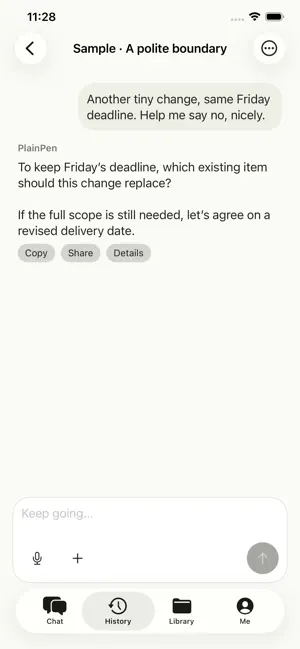


About PlainPen: AI Writer & Editor
Turn a rough message into a clearer email. Find a reply that sounds like you. Turn your notes into a first draft. PlainPen is an AI writing assistant for iPhone. Start with your own words or materials, then ask for a shorter, warmer or more professional version. Keep working in the same conversation and review the result before sharing it. EMAILS AND REPLIES Draft an email, rewrite a difficult message or prepare a reply from text or a screenshot. Add a follow-up to change the tone, length or audience. REWRITE WITH CONTROL Rephrase a sentence or work on a longer draft. The document editor offers suggested changes, comparison, undo and version history, so you can choose what to keep. START FROM YOUR NOTES Bring in source material to draft, summarize or translate. Import TXT, Markdown, DOCX, text-based PDF, PPTX and XLSX files. Selected materials are shared with the AI for the task; review extracted text and any references. MAKE IT SOUND LIKE YOU Save writing preferences, tone rules and expressions to avoid. These guide the assistant; they are not a guarantee that every suggestion will match your intent. KEEP YOUR WORK Revisit conversations and saved documents. Export documents as TXT, Markdown or DOCX. Local document editing and export work offline. AI needs an internet connection; you can try the free AI Chat allowance without signing in. Sign in with Apple is used for subscriptions and a recoverable account. FREE AND PRO Start with 20 successfully completed AI replies per UTC calendar month. PlainPen Pro includes 300 per UTC calendar month on either the monthly or yearly plan. Follow-up replies count toward the allowance; background summaries do not use an extra reply. Unused replies do not roll over. Subscriptions renew automatically unless canceled. The price and billing period shown by Apple apply. Manage or cancel your subscription in your Apple account settings, or use Restore Purchases in the app. AI requests send the content needed for your task to our service and AI provider after your consent. AI can change details or make mistakes. Check names, dates, amounts and references before using an answer. Privacy: https://plainpen-api.mapp012-server.workers.dev/privacy.html Terms of Use: https://www.apple.com/legal/internet-services/itunes/dev/stdeula/
App privacy
The developer, 于川 曹, reported these privacy practices to Apple.
Data Linked to You
The following data, which may be collected and linked to your identity, may be used for the following purposes:
- Purchases: Purchase History
- User Content: Emails or Text Messages, Photos or Videos, Other User Content
- Identifiers: User ID
- Usage Data: Other Usage Data
Used for: App Functionality
Alternatives to PlainPen: AI Writer & Editor
Looking for apps like PlainPen: AI Writer & Editor? Here are 6 similar apps on the App Store. The highest rated is Commonplace: Book notes (5.0/5), and all 6 are free to download.
-
 Commonplace: Book notes
5.0
Commonplace: Book notes
5.0
-
 PaperInk: PDF Sign & Fill
5.0
PaperInk: PDF Sign & Fill
5.0
-
 WE Catalog
5.0
WE Catalog
5.0
-
 Jarvis OS1
1.0
Jarvis OS1
1.0
-
 Jenova
3.8
Jenova
3.8
-
 Jarvis - Voice AI Assistant
4.9
Jarvis - Voice AI Assistant
4.9
| App | Rating | Price | Last updated | Compare |
|---|---|---|---|---|
| PlainPen: AI Writer & Editor | – | Free | October 2, 2026 | |
| Commonplace: Book notes | 5.0 / 5 (1) | Free | Oct 7, 2026 | Compare |
| PaperInk: PDF Sign & Fill | 5.0 / 5 (1) | Free | Sep 22, 2026 | Compare |
| WE Catalog | 5.0 / 5 (1) | Free | Nov 8, 2025 | Compare |
| Jarvis OS1 | 1.0 / 5 (1) | Free | Sep 3, 2026 | Compare |
| Jenova | 3.8 / 5 (21) | Free | Sep 8, 2026 | Compare |
| Jarvis - Voice AI Assistant | 4.9 / 5 (192) | Free | Oct 28, 2026 | Compare |