

Swipe Photo Cleaner - Lumaroll
Mikail Yurt Photo & Video iPhoneiPadiPod touch
Swipe Photo Cleaner - Lumaroll is a free Photo & Video app for iPhone and iPad by Mikail Yurt. Rated 5.0/5 from 1 ratings. Requires iOS 17.0.
- Rating
- 5.0
- 1 ratings
- Price
- Free
- on the App Store
- Size
- 12 MB
- Age 4+
- Updated
- Sep 22
- 2026 · v2026.10
Screenshots


About Swipe Photo Cleaner - Lumaroll
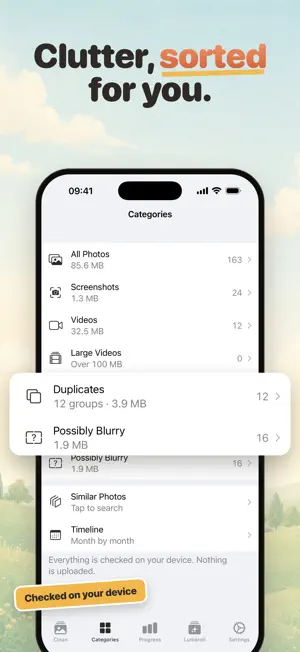
Clean your photos. Pay once. Lumaroll shows your camera roll one photo at a time. Swipe right to keep, swipe left to delete. It takes seconds per photo, and little by little your library gets lighter. No subscription, no weekly fees: the first 500 decisions are free, then one Lifetime purchase unlocks unlimited cleanup. HOW IT WORKS • Swipe right to keep, left to delete. Or use the buttons. • Changed your mind? Undo. • Nothing is deleted until you confirm. Deleted items go to Recently Deleted in Photos, just like when you delete them yourself. • Start a 10 minute cleanup when you have a moment, or clean month by month. FIND WHAT TAKES UP SPACE • Screenshots • Duplicates: exact copies, grouped. You choose which one stays. • Similar photos taken moments apart • Possibly blurry photos • Large videos, sorted by size • Short videos you recorded by accident • Timeline: every month of your library, with its own progress Nothing is selected for you. You decide what goes. PROGRESS, NOT PRESSURE Progress counts every photo you review, including the ones you keep. Follow your journey month by month, keep a daily streak if you like, unlock achievements and see how much space you have recovered. Share a card of your session, or turn a photo you kept into a wallpaper. YOUR CAMERA ROLL, IN NUMBERS The Lumaroll tab tells you how you take photos: your golden hour, your busiest year, your first photo, your record day. Every card is free and can be shared. PRIVATE BY DESIGN • Your photos never leave your device. No uploads, no cloud processing. • Duplicate, similar and blurry detection all run on your iPhone or iPad. • No account, no sign-in, no ads. • Anonymous usage counts help us improve the app, and you can turn them off in Settings. ONE PAYMENT • The first 500 decisions are free. • Lifetime: pay once, unlimited cleanup, forever. Not a subscription. • Restore your purchase any time from Settings. IPHONE AND IPAD On iPad, Lumaroll uses a sidebar and a larger deck, with keyboard shortcuts. Available in 20 languages. Requires iOS or iPadOS 17 or later.
App privacy
The developer, Mikail Yurt, reported these privacy practices to Apple.
Data Not Linked to You
The following data, which may be collected but is not linked to your identity, may be used for the following purposes:
- Usage Data: Product Interaction
Used for: Analytics
Alternatives to Swipe Photo Cleaner - Lumaroll
Looking for apps like Swipe Photo Cleaner - Lumaroll? Here are 6 similar apps on the App Store. The highest rated is Clean Up Storage - PicFres (5.0/5), and all 6 are free to download.
-
 Lock Screen Photo Live Widget
-
 Swoop: Photo Cleaner & Storage
-
 Swipe Photo Cleaner: RollSift
4.7
Swipe Photo Cleaner: RollSift
4.7
-
 Clean Up Storage - PicFres
5.0
Clean Up Storage - PicFres
5.0
-
 FilmFold - Vintage Camera
4.4
FilmFold - Vintage Camera
4.4
-
 LOOCI
5.0
LOOCI
5.0
| App | Rating | Price | Last updated | Compare |
|---|---|---|---|---|
| Swipe Photo Cleaner - Lumaroll | 5.0 / 5 (1 rating) | Free | September 22, 2026 | |
| Lock Screen Photo Live Widget | – | Free | Oct 20, 2026 | Compare |
| Swoop: Photo Cleaner & Storage | – | Free | Oct 25, 2026 | Compare |
| Swipe Photo Cleaner: RollSift | 4.7 / 5 (6) | Free | Oct 25, 2026 | Compare |
| Clean Up Storage - PicFres | 5.0 / 5 (11) | Free | Aug 28, 2026 | Compare |
| FilmFold - Vintage Camera | 4.4 / 5 (7) | Free | Oct 10, 2026 | Compare |
| LOOCI | 5.0 / 5 (1) | Free | Aug 24, 2026 | Compare |