

Markdown Editor: MD HTML PDF
KADIRCAN OKSUZOGLU Productivity iPhoneiPadiPod touchMac
Markdown Editor: MD HTML PDF is a free Productivity app for iPhone and iPad by KADIRCAN OKSUZOGLU. Requires iOS 15.0. Updated November 1, 2026.
- Price
- Free
- on the App Store
- Size
- 13 MB
- Age 4+
- Updated
- Nov 1
- 2026 · v1.3.0
Screenshots
Save to Pinterest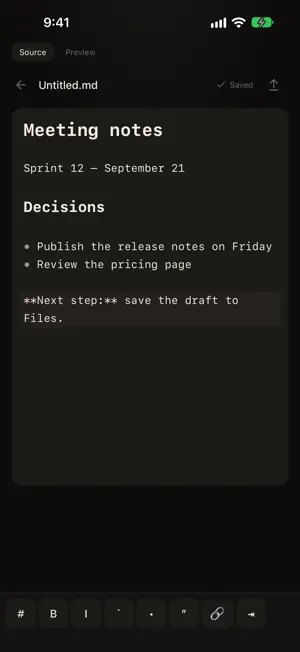
About Markdown Editor: MD HTML PDF
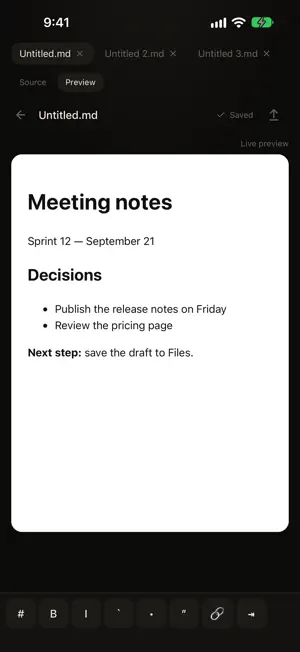
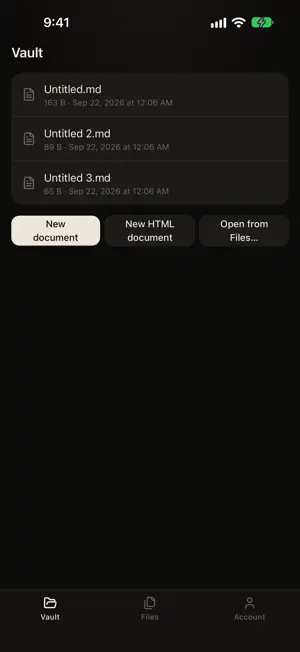
MD Editor opens Markdown, HTML and text files from your device and saves them back in place — not into a copy you have to export later. WHY IT EXISTS On iOS, Files cannot open a .md file for editing, and there is no way to look at the HTML source of a page you saved. MD Editor fixes exactly that. EDITING - Inline preview: the line your cursor is on stays raw source, every other line is formatted - Syntax highlighting for Markdown, HTML and plain text - A keyboard row with the symbols these formats actually need - Autosave, with conflict detection if the file changed on disk - Files opened from your device are always free to edit and save, with no limit VAULT Documents you create inside the app live in a private vault. The free vault holds three documents. MD EDITOR PRO - Unlimited vault documents - Export to Markdown, HTML, text and PDF - Live HTML preview and render - Connect more than one folder - Syntax highlighting for Python, Swift, JavaScript and more - Mermaid diagram and LaTeX math preview (also in PDF) PRIVACY No account. No server. No analytics. Your files stay on your device. Terms of Use: https://www.apple.com/legal/internet-services/itunes/dev/stdeula/ Privacy Policy: https://mdeditor.oksuzoglu.dev/privacy
What’s new
Version 1.3.0 · Updated November 1, 2026
Light and dark looks: the app follows your device, or choose one under Account → Appearance. A new launch screen to match. Keyboard: hide it with one tap from the shortcut bar, and the editor now fills the screen when the keyboard is closed. Shortcut buttons have icons and labels in your language. Preview is a warm page in both looks instead of a white box. In Source view prose uses a reading typeface and code stays monospaced; the line you edit shows soft markers; bulleted lists wrap neatly. A single-row header with a Source / Preview switcher; Split view is wider on iPad. Rename, share or delete documents from the list, and see how many documents remain on the free plan. Adjust text size, line wrapping and line numbers. A Welcome document shows the basics on first launch.
App privacy
The developer, KADIRCAN OKSUZOGLU, reported these privacy practices to Apple.
Data Not Collected
The developer does not collect any data from this app.
Alternatives to Markdown Editor: MD HTML PDF
Looking for apps like Markdown Editor: MD HTML PDF? Here are 6 similar apps on the App Store. The highest rated is Planora : AI Organizer (5.0/5), and all 6 are free to download.
-
 Planora : AI Organizer
5.0
-
 xgoose
5.0
-
 Markmatic - AI to Word & PDF
-
 TXToCHART – Text to Charts
-
 HTMLens: HTML Viewer & PDF
-
 Markdown.md - Reader & Editor
5.0
| App | Rating | Price | Last updated | Compare |
|---|---|---|---|---|
| Markdown Editor: MD HTML PDF | – | Free | November 1, 2026 | |
| Planora : AI Organizer | 5.0 / 5 (1) | Free | Feb 20, 2026 | Compare |
| xgoose | 5.0 / 5 (2) | Free | Nov 13, 2026 | Compare |
| Markmatic - AI to Word & PDF | – | Free | May 6, 2026 | Compare |
| TXToCHART – Text to Charts | – | Free | Jul 31, 2026 | Compare |
| HTMLens: HTML Viewer & PDF | – | Free | Oct 9, 2026 | Compare |
| Markdown.md - Reader & Editor | 5.0 / 5 (2) | Free | Jul 20, 2026 | Compare |