

Storily: Split Video Parts
Jhomar Maravillas Photo & Video iPhoneiPadiPod touch
Storily: Split Video Parts is a free Photo & Video app for iPhone and iPad by Jhomar Maravillas. Requires iOS 17.0. Updated September 28, 2026.
- Price
- Free
- on the App Store
- Size
- 1 MB
- Age 4+
- Updated
- Sep 28
- 2026 · v1.0.1
Screenshots
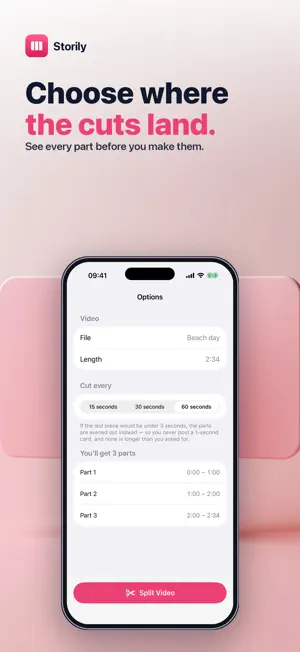


About Storily: Split Video Parts
Upload a long video and it gets chopped up for you — at whatever second it happens to land on, sometimes losing the end. Storily cuts it where you want instead. Pick a video, choose 15, 30 or 60-second pieces, and see exactly where every cut falls before you make them. • YOU SEE THE CUTS FIRST — every part is listed with its start and end time before you commit. • NO RUNT ENDINGS — if the last piece would be under 3 seconds, the parts are evened out instead, so you never post a 1-second card and none runs longer than the length you chose. • 15, 30 OR 60 SECONDS — match the format you are posting to. • IN ORDER, READY TO POST — parts are numbered so you share them in sequence. • ON YOUR DEVICE — nothing is uploaded, and your original is untouched. The first part is free, so you can check the cut before you buy. Questions: [email protected]
What’s new
Version 1.0.1 · Updated September 28, 2026
Parts cut from HDR videos now keep the original brightness and colour instead of coming out darker, and stay in the original video format.
App privacy
The developer, Jhomar Maravillas, reported these privacy practices to Apple.
Data Not Collected
The developer does not collect any data from this app.
Alternatives to Storily: Split Video Parts
Looking for apps like Storily: Split Video Parts? Here are 6 similar apps on the App Store. The highest rated is SplitKit Video Splitter (5.0/5), and all 6 are free to download.
-
 SplitKit Video Splitter
5.0
-
 Split Video Parts
-
 ハイライト動画マーカー
-
 KlipCut
-
 動画分割&結合
-
 Storybly - Clip Cutter
5.0
| App | Rating | Price | Last updated | Compare |
|---|---|---|---|---|
| Storily: Split Video Parts | – | Free | September 28, 2026 | |
| SplitKit Video Splitter | 5.0 / 5 (1) | Free | Jul 6, 2026 | Compare |
| Split Video Parts | – | Free | Sep 24, 2026 | Compare |
| ハイライト動画マーカー | – | Free | Oct 30, 2026 | Compare |
| KlipCut | – | Free | Jun 17, 2026 | Compare |
| 動画分割&結合 | – | Free | Mar 5, 2026 | Compare |
| Storybly - Clip Cutter | 5.0 / 5 (1) | Free | Sep 8, 2026 | Compare |