

StajPilot
JONGWOONG AN Music iPhoneiPadiPod touch
StajPilot is a paid Music app for iPhone and iPad by JONGWOONG AN. Requires iOS 15.0. Updated October 17, 2026.
- Price
- 29.99 USD
- on the App Store
- Size
- 43 MB
- Age 4+
- Updated
- Oct 17
- 2026 · v2.0.1
Screenshots


About StajPilot
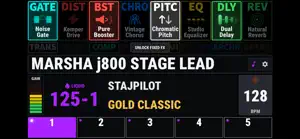
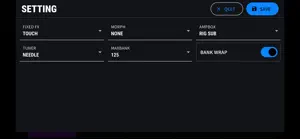
StajPilot brings two connected workflows to your KEMPER PROFILER: STAJ mode for performance and PILOT mode for editing. It is not just for Player. Supported device profiles include PROFILER Player and MK1/MK2 models such as Stage, Head/Toaster and Rack, with available controls adapted to your hardware and Player level. STAJ MODE: YOUR PERFORMANCE DISPLAY AND CONTROLLER See rig names, effect names and on/off states, bank/slot positions, amplifier information, gain, tempo and pedal Morph status in a clear landscape interface. Switch rigs and supported effects with touch controls. View Effect I-IV assignments and Player FX1/FX2 assignments on the corresponding effect blocks where supported. SONG MODE AND SONG EDITING Organize your own song names, slot labels and sub-labels with multilingual text and emoji support. Song Mode works with Player banks and the Performance slots of supported larger PROFILER models. Quickly choose a song from Song Select, or long-press a song to edit it directly. Manage amp-image assignments alongside your song data. Import and export local Song data, and use the companion web Song Editor to prepare and edit songs on a larger screen. Song labels are managed by StajPilot; they do not rename rigs stored on your PROFILER. NEW IN STAGE 2: PILOT MODE Select an effect block, change its effect type and supported preset, and adjust detailed parameters using knobs, switches, selection lists, a focused slider and direct numeric entry where available. Edit supported RIG, INPUT, AMP, CABINET, OUTPUT and Fixed FX settings in the same workspace. Related controls are grouped visually. Controls and effect availability follow the selected device and Player level. PILOT mode is unavailable in Browser mode on MK1/MK2. CUSTOM TUNING Use Standard tuning or three editable Custom Tuner profiles with individual E-A-D-G-B-E offsets from -15.0 to +15.0 cents. Rename your profiles and choose the one you need. Custom offsets apply to needle mode, with the standard note/cents reference available for comparison. Needle, decimal needle and strobe displays are available, along with a full-screen tuner option. MORE CONTROL Tap tempo, direct tempo entry, configurable bank limits, amp images and in-app information panels support everyday use. Optional Bluetooth MIDI foot-controller support currently targets the M-VAVE Chocolate controller only; it is separate from the wired PROFILER connection. A reserved app MIDI channel can keep app-specific commands from being forwarded to the PROFILER. BEFORE USING PILOT MODE Select the correct device type and Player level in Settings. To keep changes permanently, press STORE on the KEMPER itself. Calibration has been extensively checked and verification continues, but some displayed values may differ from the hardware. Read the in-app PILOT notice before editing. Synchronization combines incoming MIDI data with targeted requests to limit unnecessary traffic; it is not completely bidirectional, so avoid simultaneous editing on the PROFILER while using PILOT mode. CONNECTION AND COMPATIBILITY A compatible KEMPER PROFILER and a reliable USB MIDI data connection are required for hardware control. Supported functions vary by model, firmware and Player level. The app does not intercept proprietary non-MIDI communication. Core USB functions require no account or subscription. Demo mode lets you explore the interface without hardware. Test your complete setup before an important performance. Hardware, firmware and operating-system changes may affect compatibility. StajPilot is an independent third-party app, not affiliated with or endorsed by Kemper GmbH. KEMPER and PROFILER are trademarks of Kemper GmbH.
What’s new
Version 2.0.1 · Updated October 17, 2026
Stage 2: Introducing PILOT Mode - Edit supported effect, RIG, INPUT, AMP, CABINET, OUTPUT and Fixed FX parameters. - Change effect types and supported presets; use grouped controls, a focused slider and direct numeric entry where available. - Adds three editable, renameable Custom Tuner profiles with per-string offsets for needle mode. - Applies device and Player-level availability rules within PILOT mode. - Adds PILOT setup, calibration and saving guidance, with updated parameter calibration and display improvements. - Open Song Select without leaving PILOT. Swipe across the upper area to move between presets. Optional Cross-Bank navigation is off by default. - In STAJ mode, hold the bank/slot number for 1 second to turn on the tuner. - Song Select closes automatically if the connection is lost or Browse mode is entered. Before editing in PILOT mode, select your device and Player level in Settings. Save permanent changes using STORE on the Kemper itself.
App privacy
The developer, JONGWOONG AN, reported these privacy practices to Apple.
Data Not Collected
The developer does not collect any data from this app.
Alternatives to StajPilot
Looking for apps like StajPilot? Here are 6 similar apps on the App Store. The highest rated is KP Viewer (5.0/5), and 3 of the 6 are free to download.
-
 KP Viewer
5.0
KP Viewer
5.0
-
 Solo Gig Pro
5.0
Solo Gig Pro
5.0
-
 MIDI Aid
-
 Smart Multibox Editor
-
 ContiNote: Scores & Setlists
-
 ReStem 2: Drum Stem Separator
5.0
ReStem 2: Drum Stem Separator
5.0
| App | Rating | Price | Last updated | Compare |
|---|---|---|---|---|
| StajPilot | – | 29.99 USD | October 17, 2026 | |
| KP Viewer | 5.0 / 5 (3) | 19.99 USD | Oct 7, 2026 | Compare |
| Solo Gig Pro | 5.0 / 5 (1) | Free | Oct 5, 2026 | Compare |
| MIDI Aid | – | 0.99 USD | Oct 7, 2026 | Compare |
| Smart Multibox Editor | – | Free | Oct 16, 2026 | Compare |
| ContiNote: Scores & Setlists | – | Free | Oct 20, 2026 | Compare |
| ReStem 2: Drum Stem Separator | 5.0 / 5 (2) | 29.99 USD | Aug 25, 2026 | Compare |
Compare StajPilot with the top alternatives: ratings, updates, ASO score and keyword gaps →