

PhraseX - Clipboard & Keyboard
兴宇 吴 Productivity iPhoneiPadiPod touchMac
PhraseX - Clipboard & Keyboard is a free Productivity app for iPhone and iPad by 兴宇 吴. Rated 3.0/5 from 2 ratings. Requires iOS 17.0.
- Rating
- 3.0
- 2 ratings
- Price
- Free
- on the App Store
- Size
- 13 MB
- Age 4+
- Updated
- Oct 21
- 2026 · v1.3.0
Screenshots

About PhraseX - Clipboard & Keyboard
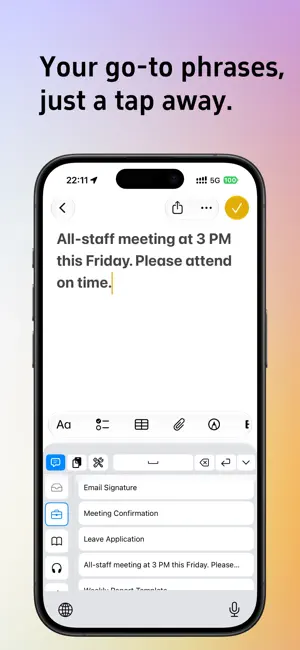
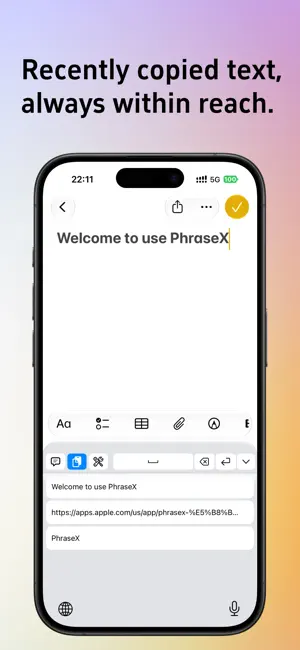
Keep the text you use most within easy reach. PhraseX helps you organize it and insert it into chats, emails, and other apps using a custom keyboard. • Organize frequently used phrases into categories and insert them with a tap • Save clipboard history when you open the clipboard page or the keyboard’s clipboard mode, without continuous background monitoring • Capture clipboard content whenever you need it, or quickly save a clipboard entry as a phrase • Add useful scripts from the script library, or write your own JavaScript to transform or generate text • Import and export backups as JSON files • Choose from 19 languages, follow your system language, or change the app language in Settings Core features are free. PhraseX Pro offers higher content limits, iCloud sync, and an app lock to protect the main app. Available purchase options are shown in the app. To get started, enable the PhraseX keyboard in your iPhone’s Settings. Running scripts that use the internet from the keyboard requires “Allow Full Access.” For detailed instructions, see “How to Use PhraseX” in the app. Privacy Policy: https://phrasex-legal.wtx132.com/en/ Terms of Use: https://www.apple.com/legal/internet-services/itunes/dev/stdeula/
What’s new
Version 1.3.0 · Updated October 21, 2026
• Added word segmentation to the iOS keyboard. Tap or swipe across word blocks to select and insert them instantly. Deselect a block to remove the inserted text. • Added word segmentation to the Mac quick panel, with a live preview of selected blocks. Click Done to copy the result. • With Allow Full Access and Pro iCloud sync enabled, the iOS keyboard can sync directly in both directions while you use it, without opening the main app first. • Increased the Pro clipboard limit from 50 to 100 items. Set the capacity anywhere from 10 to 100 items, with the capacity setting synced through iCloud. • Added a local image clipboard on Mac. Store up to 10 images separately, without uploading them to iCloud. • The Mac clipboard now lets you clear text only, images only, or all items. • The Mac quick panel can integrate the clipboard into phrase categories for more centralized access. • The Mac quick panel now supports cycling through pages in order and assigning a separate keyboard shortcut to each page. • Manually reorder categories, phrases, and clipboard items. Use the new touch-and-hold menu on iOS or right-click options on Mac. • Added a title toggle to the phrase editor, along with the option to create a category directly. • Improved phrase and clipboard previews on iOS with category details, character counts, and consistent copy confirmations. • Turning the iOS privacy lock on or off now requires authentication. The lock turns off automatically when your subscription expires. • Updated the Pro benefits page to show subscription expiration and renewal status, with options to switch plans and manage your subscription. • Redesigned the user guide with a topic index, full-text search, and step-by-step instructions to make features easier to find. • Fixed issues including duplicate clipboard entries when copying within the app and a briefly empty clipboard after unlocking. Improved sync and script stability.
App privacy
The developer, 兴宇 吴, reported these privacy practices to Apple.
Data Not Collected
The developer does not collect any data from this app.
Alternatives to PhraseX - Clipboard & Keyboard
Looking for apps like PhraseX - Clipboard & Keyboard? Here are 6 similar apps on the App Store. The highest rated is BlinkPaste: Snippet Keyboard (5.0/5), and all 6 are free to download.
-
 BlinkPaste: Snippet Keyboard
5.0
BlinkPaste: Snippet Keyboard
5.0
-
 Text2File
-
 EverPass: Expiry Reminder
-
 BriefFeed
5.0
BriefFeed
5.0
-
 ShiftFlow: Rotation Calendar
-
 OWrite Pro
5.0
OWrite Pro
5.0
| App | Rating | Price | Last updated | Compare |
|---|---|---|---|---|
| PhraseX - Clipboard & Keyboard | 3.0 / 5 (2 ratings) | Free | October 21, 2026 | |
| BlinkPaste: Snippet Keyboard | 5.0 / 5 (1) | Free | Oct 22, 2026 | Compare |
| Text2File | – | Free | Dec 14, 2025 | Compare |
| EverPass: Expiry Reminder | – | Free | Oct 12, 2026 | Compare |
| BriefFeed | 5.0 / 5 (1) | Free | Oct 23, 2026 | Compare |
| ShiftFlow: Rotation Calendar | – | Free | Oct 18, 2026 | Compare |
| OWrite Pro | 5.0 / 5 (3) | Free | Oct 25, 2026 | Compare |