

PoseAnalyzer Motion Analysis
Kazutaka Murata Sports iPhoneiPadiPod touch
PoseAnalyzer Motion Analysis is a free Sports app for iPhone and iPad by Kazutaka Murata. Requires iOS 17.0. Updated October 11, 2026.
- Price
- Free
- on the App Store
- Size
- 185 MB
- Age 4+
- Updated
- Oct 11
- 2026 · v2.2.0
Screenshots

About PoseAnalyzer Motion Analysis
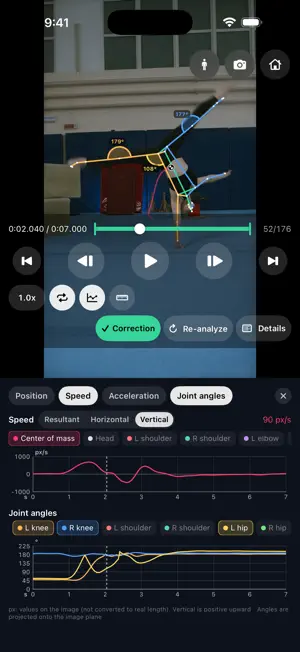
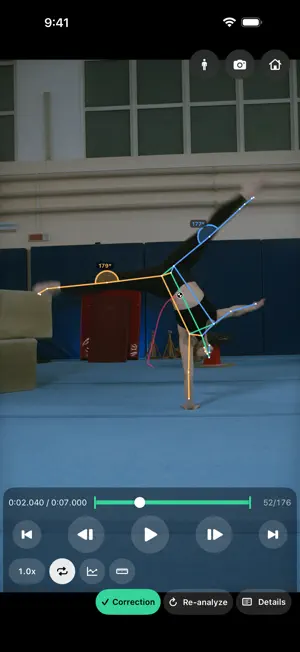
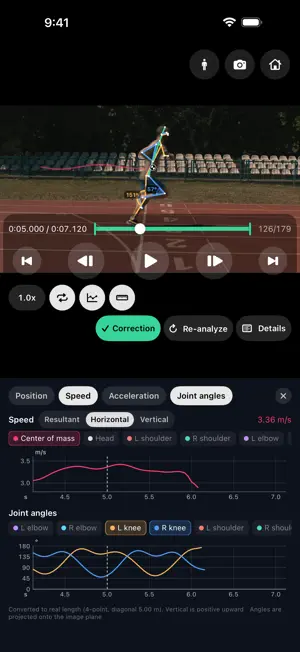
PoseAnalyzer is a motion analysis app for physical education and sports coaching. From videos you shoot on your iPhone or iPad, it computes a person's skeleton, joint angles and center of mass (CoM) on the spot. All analysis runs on the device. Videos and data are never sent to external servers. ■ Shoot, select, analyze ・Record a trial and it appears in the list right away. ・Choose the range to analyze (start and end), then tap the box around each person you want to analyze (you can pick several). ・Only the selected people are tracked, so others in the frame never get mixed up. ・Analysis runs in the background. You can watch videos or record the next trial while you wait. ・If you stop an analysis midway, you can still see the results so far. ■ Quick result right after recording Skeletons estimated live during recording are shown with graphs as soon as you stop. When you analyze every frame later, they are replaced with the accurate result. ■ Result correction Fixes swapped left/right legs, removes outlier points, fills hidden points from neighboring frames, and smooths the motion. You can switch back to the uncorrected result at any time to compare. ■ What you can see ・Skeleton (26 Halpe-26 keypoints, including toes and heels) ・Joint angles (elbows, knees, shoulders and hips, left and right; knees are measured on the back side) ・Center of mass and its trajectory ・Graphs: show one or two of position, velocity, acceleration and joint angles (for the CoM or any keypoint) ・Frame stepping (also by tapping the screen edges), 0.1–2.0× speed, range looping, pinch to zoom ■ Real-length calibration Calibrate with two points of known length (for height: top of the head and the feet) or with the four corners of a rectangle on the floor and its diagonal, and position, velocity and acceleration are shown in m and m/s. ■ Center of mass fitted to the subject The CoM is calculated with body segment parameters that match the subject's age group, build and sex. Children's heads are relatively heavy, so adult parameters would place their CoM too low. ・Ages 3–15: Yokoi et al. (1986) (by build; by sex from age 9) ・Ages 16–18 and adults: Ae et al. (1992) ・Older adults: Okada et al. (1996) You can change the subject for each trial after analysis, and the CoM is recalculated immediately. ■ Export ・Video with the skeleton overlaid (saved to Photos), optionally with graphs and the original audio ・CSV (one row per frame: 26 keypoints with confidence, 8 joint angles, CoM) ・JSON (video information and data for every frame) ・The original video ■ Camera ・30 / 60 / 120 / 240 fps (as supported by the device) ・Standard and ultra-wide lenses, manual focus ・Live skeleton and CoM while shooting (up to 3 people) ・Delayed playback (shows the scene from 3–20 seconds ago, so athletes can check their own movement right away) ■ About the measurements Angles and the CoM are measured in the image plane as seen by the camera. Motion toward or away from the camera is not reflected. Real-length calibration is an approximation that assumes motion in a plane parallel to the camera. If you use the values for research or assessment, please keep these properties in mind. ■ Privacy All videos and results are stored on your device. No account is required, and nothing is sent to external servers.
What’s new
Version 2.2.0 · Updated October 11, 2026
• Camera: zoom buttons (.5 / 1 / 2) and pinch to switch lenses like the Camera app, long-press AE/AF lock, volume-button recording, self-timer, and grid & level • Delayed playback: pause, slow motion and rewind. Record while watching the delayed view, and review a take without stopping the camera • Compare: play two takes side by side or overlaid, aligned at a sync point • Improved pose estimation for rotated poses such as handstands and flips • The camera now starts right away without waiting for the AI to load • Mac link: more stable connection; the iPhone now sends its estimated skeleton to the Mac • Bug fixes
App privacy
The developer, Kazutaka Murata, reported these privacy practices to Apple.
Data Not Collected
The developer does not collect any data from this app.
Alternatives to PoseAnalyzer Motion Analysis
Looking for apps like PoseAnalyzer Motion Analysis? Here are 6 similar apps on the App Store.
-
 J-Kinetics
-
 MultiLap Stopwatch
-
 スポーツトレーナー AI - AIでフォーム分析・解析
-
 B-COURT RECORD
-
 grow sports
-
 AXIFY: Sports Video Coaching
| App | Rating | Price | Last updated | Compare |
|---|---|---|---|---|
| PoseAnalyzer Motion Analysis | – | Free | October 11, 2026 | |
| J-Kinetics | – | Free | Aug 9, 2026 | Compare |
| MultiLap Stopwatch | – | Free | Sep 30, 2026 | Compare |
| スポーツトレーナー AI - AIでフォーム分析・解析 | – | Free | Jun 20, 2026 | Compare |
| B-COURT RECORD | – | Free | Oct 18, 2026 | Compare |
| grow sports | – | Free | Oct 17, 2026 | Compare |
| AXIFY: Sports Video Coaching | – | Free | Oct 19, 2026 | Compare |