

GPXplorer
Giuseppe La Guardia Navigation iPhoneiPadiPod touch
GPXplorer is a free Navigation app for iPhone and iPad by Giuseppe La Guardia. Requires iOS 18.2. Updated October 21, 2026.
- Price
- Free
- on the App Store
- Size
- 13 MB
- Age 4+
- Updated
- Oct 21
- 2026 · v1.6
Screenshots



About GPXplorer
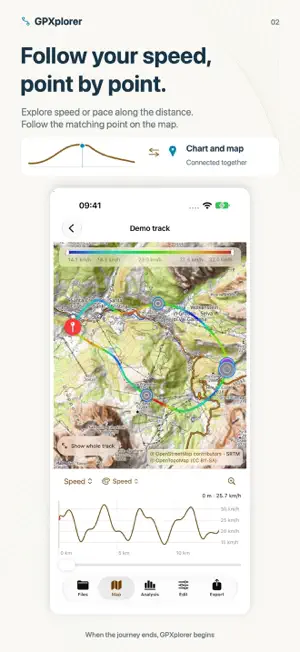
Open, organize and explore GPX and KML tracks directly on your iPhone. Connect a folder from the Files app or choose individual documents. View several routes on one map and show or hide individual tracks, including tracks stored in the same file. MAPS AND COLORS Choose Apple Maps, satellite imagery, OpenStreetMap or OpenTopoMap. Color routes by speed and adjust the color scale. Choose pace or speed for walking tracks. PREFERENCES Keep your last map choice. Follow your iPhone’s measurement system or choose kilometers, meters and km/h, or miles, feet and mph, independently of the app language. For walking, use pace in min/km or min/mi, or speed. INTERACTIVE CHARTS Explore speed or pace charts, zoom into details and browse along the distance to locate the corresponding point on the map. CLEAR TRACK INFORMATION Read distance, duration, time period, average speed or pace and estimated elevation gain and loss. Choose an activity type and inspect the data quality report. Use the crosshair to examine recorded track points. ORGANIZATION AND EXPORT Browse GPX/KML folders and files with search and previews. Export a verified GPX copy or a high-resolution map image. Export preserves track data and original elements the app does not edit. Original files are not overwritten automatically. Elevation and gradient colors and charts, photo tools, track editing and advanced features are available in the separate GPXplorer Pro app. No advertising, tracking or account required. Documents and photos are not uploaded to the developer’s servers. Online maps require an Internet connection.
What’s new
Version 1.6 · Updated October 21, 2026
Explore your tracks with new colors and charts. • Color routes by speed and adjust the color scale limits. • Open the speed chart, zoom into the details and browse along the distance to locate points on the map. Choose pace or speed for walking colors and charts. • New OpenTopoMap maps, alongside Apple Maps, satellite imagery and OpenStreetMap. • New preferences: use your iPhone’s measurement system, metric or imperial units. Your last map choice is remembered. • Redesigned track selector and map options. Show or hide individual tracks, including tracks stored in the same file. • Smoother zooming and panning with colored tracks, including long routes with many recorded points. • More accurate walking calculations, with improved handling of stops, GPS drift and slow sections, including uphill walking. • Simpler screens, controls and messages, with updated Italian and English translations. • Links to the guide and feature overview on giuzzilab.com, from the welcome screen and main sections. Elevation and gradient colors and charts are available in the separate GPXplorer Pro app.
App privacy
The developer, Giuseppe La Guardia, reported these privacy practices to Apple.
Data Not Collected
The developer does not collect any data from this app.
Alternatives to GPXplorer
Looking for apps like GPXplorer? Here are 6 similar apps on the App Store. The highest rated is DrivePulse: Car Health & MPG (5.0/5), and all 6 are free to download.
-
 Istoriaround
-
 I Kawalieri di Akashi
-
 Campingvillage.travel
-
 DrivePulse: Car Health & MPG
5.0
DrivePulse: Car Health & MPG
5.0
-
 Discover Colosseum & Forum
3.3
Discover Colosseum & Forum
3.3
-
 Loquis
| App | Rating | Price | Last updated | Compare |
|---|---|---|---|---|
| GPXplorer | – | Free | October 21, 2026 | |
| Istoriaround | – | Free | May 25, 2024 | Compare |
| I Kawalieri di Akashi | – | Free | Jun 24, 2026 | Compare |
| Campingvillage.travel | – | Free | Apr 24, 2024 | Compare |
| DrivePulse: Car Health & MPG | 5.0 / 5 (2) | Free | Oct 19, 2026 | Compare |
| Discover Colosseum & Forum | 3.3 / 5 (9) | Free | Sep 4, 2025 | Compare |
| Loquis | – | Free | Sep 7, 2026 | Compare |
Compare GPXplorer with the top alternatives: ratings, updates, ASO score and keyword gaps →