

Vizi Player
OMWSD Ltd Entertainment iPhoneiPadiPod touch
Vizi Player is a free Entertainment app for iPhone and iPad by OMWSD Ltd. Requires iOS 16.0. Updated October 6, 2026.
- Price
- Free
- on the App Store
- Size
- 79 MB
- Age 17+
- Updated
- Oct 6
- 2026 · v1.1.0
Screenshots



About Vizi Player
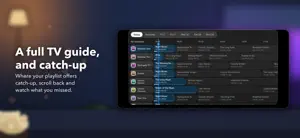
Vizi Player is a player for the playlist you already have. It comes with nothing — no channels, no catalogue, nothing to browse until you connect something. A small demo library is built in so you can look around first; everything in it is invented. What it does is play the playlist you point it at properly, with the kind of interface the content deserves. BRING YOUR OWN PLAYLIST Add an Xtream Codes login or an M3U URL and Vizi does the rest: live channels grouped the way your playlist groups them, films and box sets with posters, ratings, runtimes and plots, and a search that looks across everything at once. Add as many playlists as you like, free, and browse them together. LIVE TV, WITH A GUIDE Where your playlist supplies a guide, a full programme guide with now and next for every channel it covers, laid out as a grid of the hours ahead. Xtream logins bring theirs automatically; an M3U playlist uses the guide it names, or a guide link you add. Where an Xtream playlist offers catch-up, you can scroll back through the week and watch what you missed. FILMS AND BOX SETS Posters at a glance or a tighter list view, sorted newest first or however you prefer. Series remember which episode you were on, and films pick up where you stopped. A PLAYER THAT DOES THE JOB Two engines under the bonnet, so formats that defeat other players still open. Aspect controls, a screen lock for pockets, and a mini player you can drag away without losing your place. Picture in picture works with everything, live TV included. With Vizi+, watch on your TV with AirPlay or Screen Mirroring. FROM ONE DEVICE TO ANOTHER Already set up on one phone or iPad? Send its playlists to another with a short code or a QR code, encrypted so that only the device you are sending to can read them. A code signs a device in to your Vizi account, too. YOURS, OFFLINE Download films and episodes to watch without a connection. Record live television while Vizi is open — Keep Screen Dark lets it carry on with the phone in your pocket. FOR THE HOUSEHOLD Kids profiles that show only what you allow, with a PIN you control. Parental controls on the rest. VIZI+ The free version is supported by adverts. Vizi+ removes them and unlocks: • Downloads and live TV recording • The full TV guide and catch-up • Favourites, continue watching and your own collections • Kids profiles and parental controls • Picture in picture, live TV included • Multiview: up to four things at once, side by side • Sending several playlists to another device at once • Watching on your TV with AirPlay • Theme colours and a matching app icon Or pay once for Vizi+ Lifetime: every current Vizi+ feature, plus five Lifetime themes (Silver, Gold, Obsidian, Damascus and Cosmic, each with its own logo and app icon) and any colour you like from a colour wheel, for as long as Vizi runs. Or watch one advert for an hour of most Plus features — downloads, recording and theme colours excepted, and the app tells you that before the advert starts. HONEST ABOUT WHAT IT IS Vizi has no real content of its own and no way to find any — only the invented demo library, so you can see how it works before connecting anything. You are responsible for having the right to watch whatever you connect it to, and that is a condition of use rather than a disclaimer in a footer. Accounts are optional, and nothing about what you watch ever reaches us. The free tier's adverts come from Google. Subscriptions renew automatically unless cancelled at least 24 hours before the period ends. Manage or cancel in Settings › your name › Subscriptions. Vizi+ Lifetime is a single payment. Terms: https://viziplayer.com/terms Privacy: https://viziplayer.com/privacy
What’s new
Version 1.1.0 · Updated October 6, 2026
A whole new look. Every screen has been redesigned, with glass panels, bigger pictures, and backgrounds that move in your theme colour. Playlists from one device to another. On the new device, open Add Playlist and choose From another device: it shows a QR code and a short code. On the device that has the playlists, open Settings, then Sign Into & Manage Your Playlists, and choose Send playlists to another device. Scan or type the code, and pick the playlists. They're encrypted on the sending device, so only the receiving one can read them. Sending one at a time is free; several at once is part of Vizi+. Sign in with a code. Sign another device in to your Vizi account from this one, or sign this one in from a device that already is. Short tours: one for getting started on a new install, one as your first advert hour starts, and one when you get Vizi+. Watch any of them in Settings, under Show me around. Live TV: favourite channels and collections open just like a category, and in full screen you can change channel and see what's on without leaving the picture. Watching on your TV with AirPlay is now part of Vizi+, as the App Store has always said. Sound to headphones and speakers stays free. Fixes: search on iPad opens titles properly, with full screen working again; you stay signed in when there's no connection, the reward advert never freezes, and if an advert ends before the hour is earned, Vizi says so and lets you try again.
App privacy
The developer, OMWSD Ltd, reported these privacy practices to Apple.
Data Used to Track You
The following data may be used to track you across apps and websites owned by other companies:
- Identifiers: Device ID
- Usage Data: Advertising Data
Data Linked to You
The following data, which may be collected and linked to your identity, may be used for the following purposes:
- Identifiers: Device ID, User ID
- Usage Data: Advertising Data
- Purchases: Purchase History
- Contact Info: Email Address
Used for: Third-Party Advertising, App Functionality
Data Not Linked to You
The following data, which may be collected but is not linked to your identity, may be used for the following purposes:
- Location: Coarse Location
- Usage Data: Product Interaction
- Diagnostics: Crash Data, Performance Data, Other Diagnostic Data
Used for: Third-Party Advertising, Analytics, App Functionality
Alternatives to Vizi Player
Looking for apps like Vizi Player? Here are 6 similar apps on the App Store. The highest rated is Lit IPTV Player - Smart IPTV (4.8/5), and all 6 are free to download.
-
 20 Platform: Movies & TV Shows
3.9
20 Platform: Movies & TV Shows
3.9
-
 Purple Playlist Player
4.6
Purple Playlist Player
4.6
-
 Lit IPTV Player - Smart IPTV
4.8
Lit IPTV Player - Smart IPTV
4.8
-
 Rich Rainbow
-
 Celtic Park VIP
-
 Spark Media Player
4.6
Spark Media Player
4.6
| App | Rating | Price | Last updated | Compare |
|---|---|---|---|---|
| Vizi Player | – | Free | October 6, 2026 | |
| 20 Platform: Movies & TV Shows | 3.9 / 5 (25) | Free | Sep 12, 2026 | Compare |
| Purple Playlist Player | 4.6 / 5 (2,109) | Free | May 27, 2026 | Compare |
| Lit IPTV Player - Smart IPTV | 4.8 / 5 (26) | Free | Oct 29, 2026 | Compare |
| Rich Rainbow | – | Free | Jan 13, 2026 | Compare |
| Celtic Park VIP | – | Free | Sep 28, 2026 | Compare |
| Spark Media Player | 4.6 / 5 (11) | Free | Oct 28, 2026 | Compare |
Compare Vizi Player with the top alternatives: ratings, updates, ASO score and keyword gaps →