

Readobook: books read aloud
Artem Vashchukov Book iPhoneiPadiPod touch
Readobook: books read aloud is a free Book app for iPhone and iPad by Artem Vashchukov. Requires iOS 17.4. Updated October 11, 2026.
- Price
- Free
- on the App Store
- Size
- 284 MB
- Age 4+
- Updated
- Oct 11
- 2026 · v1.3
Screenshots


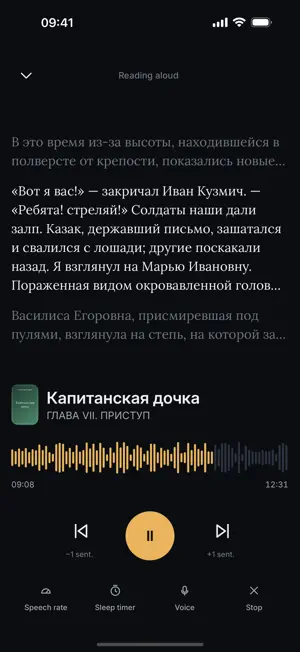
About Readobook: books read aloud
Readobook reads your books aloud in a natural voice. Speech models are included in the app and run on your iPhone or iPad, so you can read and listen without an internet connection, even on first launch. Free. No ads, subscriptions, in-app purchases or sign-up. READ AND LISTEN • Listen to English and Russian books with built-in voices • Adjust the voice and playback speed • Switch between reading and listening with a shared position in each book • Follow the spoken word as it is highlighted on the page • Keep listening with the screen off, with playback controls on the lock screen and in Control Center • Set a sleep timer • Use the Shelf to queue books for listening YOUR LIBRARY • Import EPUB, FB2, FB2.ZIP, PDF, TXT, RTF, HTML and Markdown files • Open books from Files or share them from other apps • Scan folders you choose for books • Organize books into categories, sort your library and view your reading history • Add bookmarks, search inside a book and jump to a reading percentage • Export and restore your library using a backup file • Connect to OPDS catalogs you add yourself, including a home Calibre server PDF reading uses the document's text layer. Scanned pages without recognized text cannot be read aloud. Readobook starts with an empty library and no preconfigured book catalogs; add your own books or catalog addresses. RUSSIAN PRONUNCIATION For Russian books, Readobook combines pronunciation dictionaries with on-device speech processing. It adds stress marks, restores the letter ё and expands numbers and abbreviations before speaking. You can correct a word's stress with a long press. MAKE READING COMFORTABLE • Choose page colors and fonts, including OpenDyslexic • Adjust text size, line spacing, margins and alignment • Read by scrolling or turning pages • Use an iPad layout with a side-by-side table of contents • Pause or resume speech with the VoiceOver magic tap OFFLINE VOICES The speech models are bundled with the app rather than downloaded later. They account for much of the download size and let you listen on a plane, underground or anywhere without a connection. PRIVACY Readobook has no account system, analytics or advertising trackers. Your books are processed on your device. The app accesses the network to connect to the book catalogs you choose to add.
App privacy
The developer, Artem Vashchukov, reported these privacy practices to Apple.
Data Not Collected
The developer does not collect any data from this app.
Alternatives to Readobook: books read aloud
Looking for apps like Readobook: books read aloud? Here are 6 similar apps on the App Store.
-
 Blubb Reader
-
 Local AI Reader
-
 eBook Manager: Reader
-
 Filiread: Great Books, Aloud
-
 ReadIt: Read Books Aloud
-
 LocalPlay: Audiobooks
| App | Rating | Price | Last updated | Compare |
|---|---|---|---|---|
| Readobook: books read aloud | – | Free | October 11, 2026 | |
| Blubb Reader | – | Free | Sep 30, 2026 | Compare |
| Local AI Reader | – | Free | Sep 9, 2026 | Compare |
| eBook Manager: Reader | – | Free | Aug 26, 2026 | Compare |
| Filiread: Great Books, Aloud | – | Free | Sep 18, 2026 | Compare |
| ReadIt: Read Books Aloud | – | Free | Sep 24, 2026 | Compare |
| LocalPlay: Audiobooks | – | Free | Jul 30, 2026 | Compare |