

The PLANN3R
The PLANN3R LLC Productivity iPhoneiPadiPod touch
The PLANN3R is a free Productivity app for iPhone and iPad by The PLANN3R LLC. Requires iOS 15.0. Updated November 19, 2026.
- Price
- Free
- on the App Store
- Size
- 13 MB
- Age 4+
- Updated
- Nov 19
- 2026 · v1.0.4
Screenshots
Save to Pinterest


About The PLANN3R
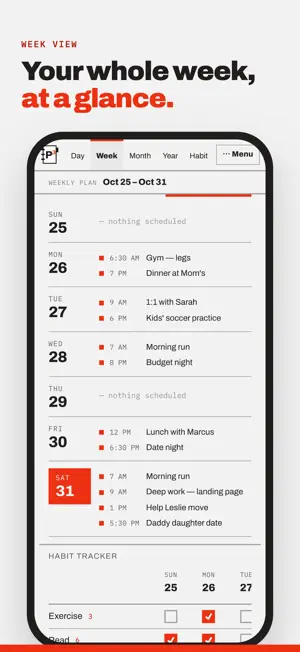
Keep writing by hand. Your plans come with you. Snap a notebook page, sticky note, wall calendar or whiteboard. The PLANN3R reads your handwriting, puts every event on the right day in Google or Outlook Calendar with a reminder, and adds your to-dos to your list. You check everything before it's added. HOW IT WORKS • Snap your page: a day, a week or a whole month. Handwriting is fine, or choose a photo you already took. • Check what it read: nothing is added until you say so. Fix a word or a date in one tap. • Get reminded: your phone buzzes before each event, and it all shows in your calendar. MADE FOR PAPER PEOPLE It's for you if you write your plans by hand and then miss things because paper can't remind you, if work, school and family dates live in three different places, or if you'd rather not type everything twice. YOUR CALENDARS • Google Calendar and Outlook sync, both ways • Apple Calendar and any other calendar by link (iCal/ICS) A FULL PLANNER WHEN YOU WANT ONE • Day, week, month and year views, with time blocks and a live "now" line • Habits with streaks, without the guilt trip • Year goals that break down into months and weeks, with an AI goal planner • Top priorities, reflections, and five looks in your own color • Home-screen widgets: Today, To-Dos, Habits and Top Priorities Quick Add understands plain English: "Dentist Tuesday 3pm" becomes an event with a reminder. Free 7-day trial, no card required. Then subscribe in the app, yearly or monthly, and cancel anytime. Terms of Use (EULA): https://www.apple.com/legal/internet-services/itunes/dev/stdeula/ Privacy Policy: https://theplann3r.com/privacy
What’s new
Version 1.0.4 · Updated November 19, 2026
• Share to PLANN3R: share a text, email, web page or screenshot from another app's Share button, check the plans it found, and add them. • Copied a message with a date? The app offers to add it, or tap "Or paste a message" under the scan button. • Connect Google Calendar right inside the app. • Calendar links (Other calendars) now work inside the app. • One sign-in for Apple, Google or email, and you can now sign in with an emailed code inside the app. • Your plans now go to your connected calendar automatically. Prefer to keep them separate? Turn off Sync events automatically in the Menu.
App privacy
The developer, The PLANN3R LLC, reported these privacy practices to Apple.
Data Linked to You
The following data, which may be collected and linked to your identity, may be used for the following purposes:
- Contact Info: Email Address, Name
- User Content: Photos or Videos, Other User Content
- Identifiers: User ID
Used for: Developer’s Advertising or Marketing, App Functionality
Alternatives to The PLANN3R
Looking for apps like The PLANN3R? Here are 6 similar apps on the App Store. The highest rated is Kairos - Mind Management (5.0/5), and 5 of the 6 are free to download.
-
 Cio: To-Do List, Daily Planner
-
 ThoughtCatch
-
 DueCycle: Recurring Tasks
-
 Habit Weekly
-
 Kairos - Mind Management
5.0
-
 Tovo – Kanban, Tasks & Planner
5.0
| App | Rating | Price | Last updated | Compare |
|---|---|---|---|---|
| The PLANN3R | – | Free | November 19, 2026 | |
| Cio: To-Do List, Daily Planner | – | Free | Oct 21, 2026 | Compare |
| ThoughtCatch | – | Free | Mar 12, 2026 | Compare |
| DueCycle: Recurring Tasks | – | Free | Mar 4, 2026 | Compare |
| Habit Weekly | – | 0.99 USD | Sep 18, 2025 | Compare |
| Kairos - Mind Management | 5.0 / 5 (3) | Free | Oct 28, 2026 | Compare |
| Tovo – Kanban, Tasks & Planner | 5.0 / 5 (2) | Free | Feb 14, 2026 | Compare |
Compare The PLANN3R with the top alternatives: ratings, updates, ASO score and keyword gaps →