

Bungee: Granular Synth
Ibrahim Sefa Tuna Music iPhoneiPadiPod touch
Bungee: Granular Synth is a paid Music app for iPhone and iPad by Ibrahim Sefa Tuna. Requires iOS 16.0. Updated October 26, 2026.
- Price
- 9.99 USD
- on the App Store
- Size
- 75 MB
- Age 4+
- Updated
- Oct 26
- 2026 · v1.2.0
Screenshots


About Bungee: Granular Synth
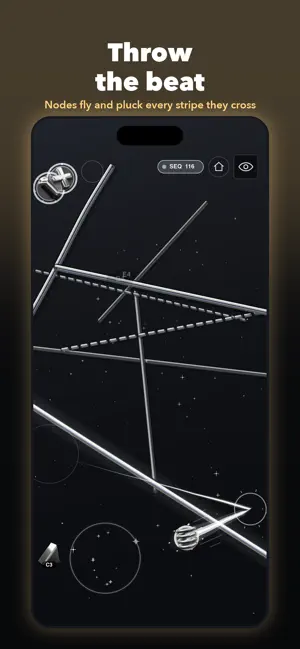
Bungee turns your iPhone and iPad into a musical instrument. Touch the screen to play a granular synthesizer, pluck glowing stripes like strings, and let sequences and drum beats play along. No music theory needed: every note fits the scale, so everything you play sounds musical. PLAY THE PLATE Every finger sprays clouds of tiny grains of sound. Move left and right to travel through the sound, up and down to change the grain size, press harder for denser clouds and swipe fast for stutter bursts. Up to ten fingers play at once. PLUCK, HOLD AND STRETCH STRIPES The stripes behave like strings. Pluck them, hold them to sustain, stretch them until they snap, or bow them with a slow swipe. Hold one stripe with up to four fingers and pull: the note rises as it stretches. Each stripe plays a note of the scale, and you can draw your own. THROW THE NODES Nodes sit on the stage and play whenever a stripe touches them. Drag them into place, or flick one and it flies across the stage, bouncing off the edges and plucking every stripe it crosses. TWENTY LOOKS, ONE INSTRUMENT Pick a theme and the whole app changes with it, from the stage to the menus, and Settings shows each one with a preview. ASCII terminal green (the default), Teletype ink on paper, Watercolor washes, black-and-white Noir, ringing Bronze, Blueprint drafting lines, Glass over an aurora, Mosaic tiles, 8-bit Handheld and Arcade, liquid Chrome, white Clay, Neo Brutalism, Acid neon, Pixel, Op Art, a Thermal heat camera, Glacier satellite maps, Orbit planets and Bubble. Your home-screen icon follows the theme too. 82 READY-TO-PLAY INSTRUMENTS Every template is a complete instrument with its own sound, stripes, effects and sequence, laid out on shelves: Techniques, Weird, Ambient, Melodic, Beats, Drums and Glitch. Each template opens in a look picked to fit it. Long-press one to preview or star it, start a New project on an empty stage, or take the nine-step guided tour. PLAY REAL MATERIALS The Techniques shelf teaches a way to play on a material that sounds like the real thing: steel strings to slide, singing glass to rub, rubber bands to stretch, a nylon harp to swipe, a musical saw and a bronze singing bowl to bow, coil springs, icicles, bamboo chimes, water drops and a talking drum whose pitch bends under your finger. WEIRD: IDM AND GLITCH Beat-led IDM templates: drill'n'bass, chopped breaks, acid, braindance and glitch, with growling Reese bass, modem leads, FM tines and stuttering pads. RECORD, UNDO, TRANSFORM Record what you play and share it straight away. Undo and redo anything. Three big controls, Glitch, Space and Tone, transform any template in one move, and Mutate varies the running sequence. DRUM MACHINES BUILT IN Ten drum templates play real beats: footwork, house, boom bap, bongos, metal, wood, chiptune, IDM clicks, water drums and half-time trap. Play along on the stripes. SOUND NODES AND SAMPLES Drop sample, synth, noise and drone nodes on the stage and play them by holding or dragging. Use 13 built-in samples (kalimba, felt piano, Rhodes, tape choir, rain and more) or import your own from Files: WAV, MP3, M4A, AIFF, FLAC and OGG. SEQUENCER Pick a pattern and a tempo, or open Advanced for the step grid, Euclidean and Turing patterns, swing and direction. EFFECTS AND MIXER Reverb, delay, phaser and drive, balanced in a touch-friendly mixer. MIDI, AUV3 AND ABLETON LINK - Use Bungee as an AUv3 instrument inside your favourite host app - Connect a MIDI controller and it maps itself: Korg nanoKONTROL2, Novation Launch Control XL, Launchkey Mini and more, plus MIDI learn for anything else - Sync the tempo with other apps and devices over Ableton Link MAKE IT YOURS - Save projects and your own templates, and share them - A retro terminal view that shows every event as you play Everything is generated live on your device. No account, no sign-up, no subscription. Touch the screen and start playing.
What’s new
Version 1.2.0 · Updated October 26, 2026
Bungee 1.2 brings ten new themes and a lot more to play. - Ten new themes: Watercolor, Noir, Bronze, Blueprint, ASCII (the new default), Teletype, Mosaic, Handheld, Arcade and Glass. Twenty in all. - Pick a theme by sight: Settings > Theme shows every theme with a preview of the stage. - Each template opens in its own look, and Scene > Theme sets one for a project. - Eight new techniques on real materials: a nylon harp to swipe, a singing saw, a bronze bowl, coil springs, icicles, bamboo chimes, water drops and a talking drum. - Weird: a new shelf of beat-led IDM templates, with new glitch sounds and drum kits. - Record & share what you play. On iPhone and iPad, hold Record for a screen video with sound. - Undo and redo. - Glitch, Space and Tone transform any template in one move, and Mutate varies the sequence. - Gesture hints show how to play each technique. - Smoother scrolling, a faster Bubble theme and many refinements.
App privacy
The developer, Ibrahim Sefa Tuna, reported these privacy practices to Apple.
Data Not Collected
The developer does not collect any data from this app.
Alternatives to Bungee: Granular Synth
Looking for apps like Bungee: Granular Synth? Here are 6 similar apps on the App Store.
-
 The Musical Neon Drift Studio
-
 Instant DJ Studio: Song Mixer
-
 Patchsynth
-
 Wavimus
-
 Stochastic Lab
-
 PolySampler
| App | Rating | Price | Last updated | Compare |
|---|---|---|---|---|
| Bungee: Granular Synth | – | 9.99 USD | October 26, 2026 | |
| The Musical Neon Drift Studio | – | 0.99 USD | Feb 25, 2026 | Compare |
| Instant DJ Studio: Song Mixer | – | Free | Oct 22, 2026 | Compare |
| Patchsynth | – | 7.99 USD | Jul 9, 2026 | Compare |
| Wavimus | – | 9.99 USD | Oct 12, 2026 | Compare |
| Stochastic Lab | – | 7.99 USD | Sep 10, 2026 | Compare |
| PolySampler | – | 1.99 USD | Feb 5, 2025 | Compare |