

Music Slow Downer: Karaoke
ERTUNC ILBEYLI Music iPhoneiPadiPod touch
Music Slow Downer: Karaoke is a free Music app for iPhone and iPad by ERTUNC ILBEYLI. Requires iOS 15.1. Updated October 21, 2026.
- Price
- Free
- on the App Store
- Size
- 71 MB
- Age 4+
- Updated
- Oct 21
- 2026 · v1.1.1
Screenshots



About Music Slow Downer: Karaoke
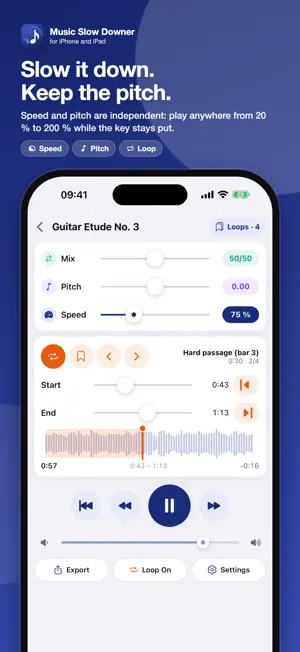
Music Slow Downer is a practice tool for musicians and music students: slow a song down without changing its pitch, change its key and loop the hard parts. Now you can also remove the vocals for a karaoke backing track, and turn the drums, bass and other instruments up or down one by one. VOCAL REMOVER AND KARAOKE • Split a track into four stems: vocals, drums, bass and other. The AI model runs entirely on your device; nothing is uploaded. • Remove the vocals and sing over the backing track, or solo the vocals to work out the lyrics. • Set each stem's volume; mute (M) and solo (S). • Karaoke, No drums and Vocals only presets; speed, pitch and loops keep working on separated tracks. • Separate any track in your library, a song you pick in the Files app, or a track you download from a file link. • Separated stems are saved, so the track is ready next time. (iOS 16 or later) SPEED AND PITCH ARE INDEPENDENT • Slow down or speed up between 20 % and 200 %; the tuning stays the same. • Transpose by up to ±12 semitones; the tempo does not change. • Hold a slider knob and drag your finger down: precision goes all the way to 0.01. • Left/right channel mix lets you bring an instrument forward or push it back. A–B LOOP • The |◀ and ▶| buttons set the loop start/end at the current position; only that section plays. • The waveform timeline spans exactly the loop range. • Name and save loops, step through them, export/import them as JSON. • Pause between repeats and "stop after N repeats" options. LIBRARY • Add audio and video from the Files app or the share sheet (mp3, m4a, wav, aiff, flac, mp4, mov). • Download from a direct file link. • Organize with folders; every track remembers its own speed, pitch, loops and stem mix. • Videos slow down in sync with the audio; tap the preview to watch full screen. EXPORT • Save the track, or just the loop range, with the current speed, pitch and stem mix as M4A or WAV and share it. Turn your karaoke backing track into a file in one tap. TOOLS • Metronome (10–600 BPM, 10 sounds) runs alongside the player. • Tuner with letter or solfège note names and an adjustable A4 reference. PRIVACY • No account, no ads, no data collection. Your files and the separation stay on your device. Background playback and lock-screen controls are supported. Designed for iPhone and iPad.
What’s new
Version 1.1.1 · Updated October 21, 2026
Stem separation is now more reliable: • Memory use on long songs is down by about 90%, so separation needs far fewer resources. • On iPhone, separation keeps going when you leave the app, with progress shown from start to finish. • Minor fixes and improvements.
App privacy
The developer, ERTUNC ILBEYLI, reported these privacy practices to Apple.
Data Not Collected
The developer does not collect any data from this app.
Alternatives to Music Slow Downer: Karaoke
Looking for apps like Music Slow Downer: Karaoke? Here are 6 similar apps on the App Store. The highest rated is Instrumently (5.0/5), and all 6 are free to download.
-
 Ravit Studio
-
 Stemzel
4.5
-
 Instrumently
5.0
-
 Stemio: Music & Vocal Remover
5.0
-
 Repace: Slow Down Music
5.0
-
 Key Changer
| App | Rating | Price | Last updated | Compare |
|---|---|---|---|---|
| Music Slow Downer: Karaoke | – | Free | October 21, 2026 | |
| Ravit Studio | – | Free | Oct 21, 2026 | Compare |
| Stemzel | 4.5 / 5 (2) | Free | Jul 21, 2026 | Compare |
| Instrumently | 5.0 / 5 (1) | Free | Aug 19, 2026 | Compare |
| Stemio: Music & Vocal Remover | 5.0 / 5 (3) | Free | Oct 15, 2026 | Compare |
| Repace: Slow Down Music | 5.0 / 5 (1) | Free | Aug 30, 2026 | Compare |
| Key Changer | – | Free | Aug 26, 2026 | Compare |