

SpeedTask: Swipe Habit Tracker
SHIHO CHIHARA Productivity iPhoneiPadiPod touch
SpeedTask: Swipe Habit Tracker is a free Productivity app for iPhone and iPad by SHIHO CHIHARA. Requires iOS 17.0. Updated October 23, 2026.
- Price
- Free
- on the App Store
- Size
- 13 MB
- Age 4+
- Updated
- Oct 23
- 2026 · v1.5.0
Screenshots


About SpeedTask: Swipe Habit Tracker
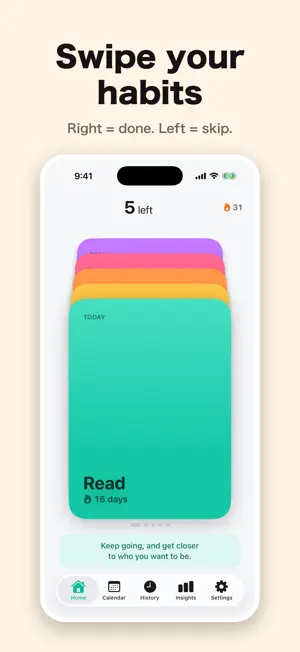
■ It's not about willpower Open a habit app and you see a list. That's where the question "which one first?" starts. A screen full of unchecked items becomes a weight of its own. SpeedTask doesn't show you a list. It shows one card at a time. ■ Right if you did it, left to skip Just swipe the card in front of you. Right means done. Left means skip. There's nothing to think about, so it takes seconds. Skipping doesn't mean "not doing it." It means "ask me again later." Skipped cards come back the next time you open the app. Swiped the wrong way? Undo from the top left as many times as you need. ■ The real problem isn't logging. It's forgetting to open the app. So the home screen widget shows how many cards are left today. You can watch the stack get thinner. Log straight from the widget's buttons. No need to open the app. Notifications work the same way: they show what's left, and you can log right there. On days you're already done, no notification comes. ■ Start with up to 5 You can add up to 5 habits for free. "8 left" tends to feel like pressure before it feels like motivation. Finishing a few every day is what keeps you going. Want more? SpeedTask Plus lets you add up to 10. ■ Look back on what you've built - Calendar: colored dots show which habits you did each day - History: your streak and everything you've logged - Insights: completion rate by week, month, and all time. You choose your own daily goal A day doesn't reset to zero just because you didn't do everything. Any day you do at least one counts toward your streak. Busy days won't break your streak and make you want to quit. ■ SpeedTask Plus (subscription) Up to 10 habits, your own photos on cards and widgets, and card styles. Choose yearly or monthly. The yearly plan starts with a 1-week free trial. Cancel anytime. Renews automatically unless canceled at least 24 hours before the end of the current period. Terms of Use: https://scrublystore37-afk.github.io/speedtask-legal/#terms-en ■ Privacy Your habit names and daily records are stored only on your device. They are never sent anywhere. No account needed. - No account - No ads - Nothing you type is ever sent
What’s new
Version 1.5.0 · Updated October 23, 2026
SpeedTask Plus is now a yearly or monthly subscription, and the yearly plan starts with a 1-week free trial. If you bought the earlier one-time Plus, you keep it with no expiration.
App privacy
The developer, SHIHO CHIHARA, reported these privacy practices to Apple.
Data Not Linked to You
The following data, which may be collected but is not linked to your identity, may be used for the following purposes:
- Identifiers: Device ID
- Usage Data: Product Interaction
- Purchases: Purchase History
Used for: Analytics, App Functionality
Alternatives to SpeedTask: Swipe Habit Tracker
Looking for apps like SpeedTask: Swipe Habit Tracker? Here are 6 similar apps on the App Store. The highest rated is X Calendar - Habit Tracker (5.0/5), and all 6 are free to download.
-
 SPENT: Screen Time Receipt
-
 KOKEMUSU: Focus & Screen Time
-
 Monthly Calendar & Agenda
-
 Itsushita
-
 X Calendar - Habit Tracker
5.0
X Calendar - Habit Tracker
5.0
-
 ShiftMatch
| App | Rating | Price | Last updated | Compare |
|---|---|---|---|---|
| SpeedTask: Swipe Habit Tracker | – | Free | October 23, 2026 | |
| SPENT: Screen Time Receipt | – | Free | Aug 2, 2026 | Compare |
| KOKEMUSU: Focus & Screen Time | – | Free | Oct 17, 2026 | Compare |
| Monthly Calendar & Agenda | – | Free | Oct 16, 2026 | Compare |
| Itsushita | – | Free | Feb 4, 2026 | Compare |
| X Calendar - Habit Tracker | 5.0 / 5 (1) | Free | Oct 19, 2026 | Compare |
| ShiftMatch | – | Free | Mar 22, 2026 | Compare |