

AI Recap – Meeting Recaps
MARTINS MORTUKANS Productivity iPhoneiPadiPod touchApple Watch
AI Recap – Meeting Recaps is a free Productivity app for iPhone and iPad by MARTINS MORTUKANS. Requires iOS 16.4. Updated October 9, 2026.
- Price
- Free
- on the App Store
- Size
- 70 MB
- Age 4+
- Updated
- Oct 9
- 2026 · v1.0.2
Screenshots


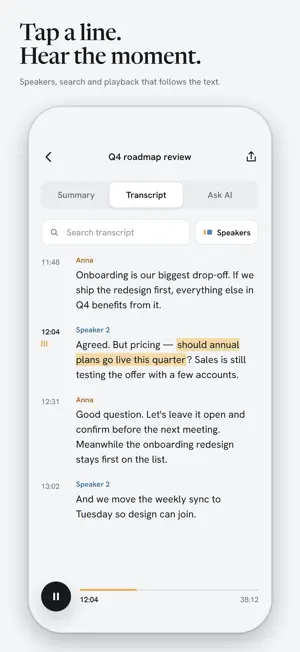
About AI Recap – Meeting Recaps
AI Recap records meetings, conversations and voice notes, transcribes them and writes a structured recap: a short summary, decisions, action items with owner and deadline, important dates, open questions. BUILT FOR LATVIAN AND ENGLISH Both languages in one conversation are fine — even when speakers switch mid-sentence. Diacritics stay intact. RECORD THE WAY THAT SUITS YOU • iPhone — with the screen locked; the timer lives in the Dynamic Island and on the Lock Screen with pause and finish buttons. • Apple Watch — start from your wrist; if the iPhone app isn't open, the watch records on its own and hands the audio to the phone. • Interruptions (calls, headphone changes) are handled automatically — the recording continues. A RECAP THAT FITS THE SITUATION Pick a context — work meeting, sales call, interview, lecture, personal note — or create your own with vocabulary (project names, client names, acronyms…) and writing instructions. Regenerate any recording with a different context or notes; every version is kept. ASK THE RECORDING "What did we decide on pricing?" — an answer with a reference to the moment in the transcript. Tap a time and the audio plays from there. SHARE IT BEAUTIFULLY The recap lands in Apple Notes, Mail or Notion with headings, lists and checkbox tasks intact. Export .md or the transcript as .txt. PRIVATE BY DEFAULT Audio, transcripts and recaps are stored only on your device, in an encrypted database. Our server never sees content — only an anonymous identifier and plan status. No ads, no tracking. PLANS • Free — recordings up to 15 min, 5 recaps a day, on-device transcription. • Unlimited (monthly subscription) — no daily limit, longer recordings, our AI processing including Latvian. • Bring your own key (one-time purchase) — use your own OpenRouter account and pick the models yourself. Subscriptions are billed through the App Store and renew automatically unless cancelled at least 24 hours before the end of the period. Privacy policy: https://mortukans.github.io/ai-recap/privacy.html Terms of use: https://www.apple.com/legal/internet-services/itunes/dev/stdeula/
What’s new
Version 1.0.2 · Updated October 9, 2026
This update focuses on reliability and polish: • More robust recording and transcription — long recordings, interruptions, and switching away mid-recording are handled more reliably. • Faster library and transcript loading. • VoiceOver accessibility improvements across the app. • Bug fixes and refinements.
App privacy
The developer, MARTINS MORTUKANS, reported these privacy practices to Apple.
Data Not Linked to You
The following data, which may be collected but is not linked to your identity, may be used for the following purposes:
- Purchases: Purchase History
- User Content: Audio Data
- Identifiers: User ID
- Usage Data: Product Interaction
Used for: App Functionality
Alternatives to AI Recap – Meeting Recaps
Looking for apps like AI Recap – Meeting Recaps? Here are 6 similar apps on the App Store. The highest rated is GetaPro.lv (5.0/5), and all 6 are free to download.
-
 QwikSpec Field
-
 AI Note Taker, Summary - iNota
4.8
AI Note Taker, Summary - iNota
4.8
-
 AI Notetaker for Lectures
4.0
AI Notetaker for Lectures
4.0
-
 Speech To Text & Whisper
4.7
Speech To Text & Whisper
4.7
-
 GetaPro.lv
5.0
GetaPro.lv
5.0
-
 Khmer Smart Calendar
4.6
Khmer Smart Calendar
4.6
| App | Rating | Price | Last updated | Compare |
|---|---|---|---|---|
| AI Recap – Meeting Recaps | – | Free | October 9, 2026 | |
| QwikSpec Field | – | Free | Sep 1, 2026 | Compare |
| AI Note Taker, Summary - iNota | 4.8 / 5 (4) | Free | Aug 19, 2026 | Compare |
| AI Notetaker for Lectures | 4.0 / 5 (2) | Free | Apr 8, 2026 | Compare |
| Speech To Text & Whisper | 4.7 / 5 (87) | Free | Jul 14, 2026 | Compare |
| GetaPro.lv | 5.0 / 5 (1) | Free | Jan 15, 2026 | Compare |
| Khmer Smart Calendar | 4.6 / 5 (1,628) | Free | Oct 30, 2026 | Compare |