

Below - Video Compressor
Matthew Donders Photo & Video iPhoneiPadiPod touch
Below - Video Compressor is a free Photo & Video app for iPhone and iPad by Matthew Donders. Requires iOS 26.0. Updated October 30, 2026.
- Price
- Free
- on the App Store
- Size
- 2 MB
- Age 4+
- Updated
- Oct 30
- 2026 · v1.1.1
Screenshots



About Below - Video Compressor
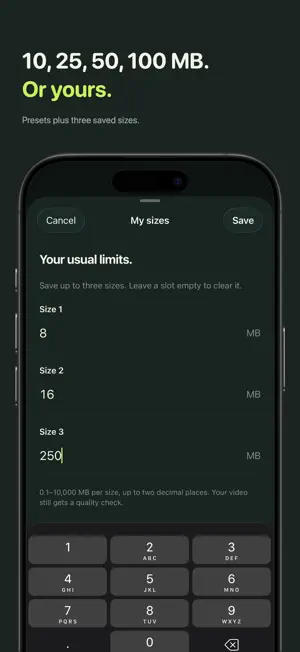
Need it under 10 MB? Choose the maximum file size. Below makes the video fit. Below does one job: it makes a video fit strictly under the size you ask for. No bitrate math, no quality sliders, no guessing. Type the limit in MB, tap Make it smaller, and Below picks the resolution, frame rate and bitrate for you. Then it checks the finished file byte for byte, so a video Below calls done really is below your limit. PICK THE LIMIT. WE HANDLE THE REST. • Enter any size from 0.1 MB up, with decimals. • Tap a preset: 10, 25, 50 or 100 MB. • Save three sizes of your own in My sizes. They are one tap away in the app and in the Share Sheet. • Below warns you before a limit would cost too much detail, and refuses limits that cannot produce a watchable video. • Already small enough? Below keeps the original quality and tells you so. VERIFIED, NOT ESTIMATED Below measures the real output file after encoding. If a first pass lands over the limit, Below tries again at a lower bitrate. It never reports a predicted size as a result. Duration, orientation and audio are preserved. Saved copies keep the date the video was filmed, so they land in the right place in Photos. Location is removed unless you choose to keep it. Output is standard H.264 MP4 with AAC audio, so it plays and shares anywhere. KEEPS GOING IN THE BACKGROUND Start a compression, then switch to another app or lock your phone. Below keeps working, iOS shows its progress, and you can stop it from there. COMPRESS FROM WHEREVER THE VIDEO LIVES • Photos and Files inside the app. • Share Sheet: share a video from Photos or Files, choose Below, and finish right there. • Shortcuts: the Compress Video Below Size action takes a video and a target in MB and hands back the smaller file for any automation. YOUR VIDEO NEVER LEAVES YOUR IPHONE Everything happens on your device. No account. No upload. No servers. No analytics. Your original video is never changed or deleted. Below collects no data. SIMPLE, HONEST PRICING Your first three compressions are free, with full quality and no watermark. Below Pro unlocks unlimited compressions for a single one-time purchase. No subscription. No ads. Ever. WHAT BELOW IS NOT Below is not a video editor or a media library. It does not trim, filter, batch or convert between formats. It is the fastest way to answer one question: how do I get this video under X MB? Sizes use decimal megabytes (1 MB = 1,000,000 bytes), the same unit Photos and most services use. Very short clips and very small limits may not have enough room for a watchable result; Below tells you when that happens instead of producing something unusable.
What’s new
Version 1.1.1 · Updated October 30, 2026
Below's App Store page is now available in Japanese, Simplified Chinese and Brazilian Portuguese.
App privacy
The developer, Matthew Donders, reported these privacy practices to Apple.
Data Not Collected
The developer does not collect any data from this app.
Alternatives to Below - Video Compressor
Looking for apps like Below - Video Compressor? Here are 6 similar apps on the App Store. The highest rated is DualCam: Front & Back Video (5.0/5), and all 6 are free to download.
-
 Slim: Photo & Video Compress
-
 Video Compressor #1
-
 Video Compressor - VidShrink
-
 DualCam: Front & Back Video
5.0
-
 Compress Video – Size Reducer
-
 Video Compressor - Squish
| App | Rating | Price | Last updated | Compare |
|---|---|---|---|---|
| Below - Video Compressor | – | Free | October 30, 2026 | |
| Slim: Photo & Video Compress | – | Free | Sep 14, 2026 | Compare |
| Video Compressor #1 | – | Free | Jan 14, 2026 | Compare |
| Video Compressor - VidShrink | – | Free | Jun 5, 2025 | Compare |
| DualCam: Front & Back Video | 5.0 / 5 (1) | Free | Sep 16, 2026 | Compare |
| Compress Video – Size Reducer | – | Free | Sep 19, 2026 | Compare |
| Video Compressor - Squish | – | Free | Jul 1, 2026 | Compare |