

Stage Plot Forge
Joao Mexia Productivity iPadMac
Stage Plot Forge is a free Productivity app for iPad and Mac by Joao Mexia. Requires iOS 18.0. Updated November 14, 2026.
- Price
- Free
- on the App Store
- Size
- 107 MB
- Age 4+
- Updated
- Nov 14
- 2026 · v1.3.0
Screenshots



About Stage Plot Forge
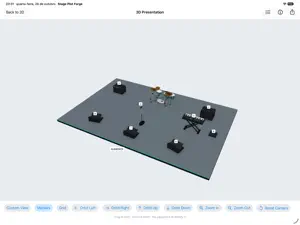
Create clear stage plots, input lists and PDF production packs for your next show. Stage Plot Forge keeps your layout and technical details together on your iPad, with a 3D presentation of the same stage. FOR BANDS, LIVE SOUND ENGINEERS AND VENUES Start with a template, explore an example or build your stage plot from scratch. Arrange instruments, microphones, monitors, backline and risers with the built-in symbol catalog. Import PDF, PNG or JPEG artwork and save reusable symbol sets. BUILT FOR TOUCH Tap to select, drag to move, use handles to resize and rotate, and pinch to zoom. Use layers, groups, snapping, alignment and the numeric inspector for precise layouts. Undo and redo keep edits reversible. A connected keyboard adds familiar shortcuts. KEEP THE SHOW DETAILS TOGETHER Manage inputs, monitor mixes, equipment and notes alongside the plot. Link rows to symbols, paste spreadsheet data, renumber lists and check preflight issues before sharing. PRESENT AND SHARE Explore the same stage in 3D with numbered equipment markers, a matching legend, and adjustable supports and heights. Copy a presentation image or export stage plots or complete production packs as PDF, save PNG and JPEG images, export CSV lists or print with AirPrint. START A PROJECT OR PICK UP WHERE YOU LEFT OFF The welcome screen offers New Stage Plot, Open Existing and Recent Projects. By default, the app reopens the project you were working on when you launch it again. Open and save Stage Plot Forge projects through Files, including compatible cloud providers. The document format is shared with the Mac app. No Stage Plot Forge account is required. FREE 14-DAY TRIAL. ONE-TIME PURCHASE. Activate the free 14-day trial through the App Store to try every feature. It does not renew or charge automatically. PDF and image exports include trial branding until purchase. A one-time in-app purchase unlocks creating and editing permanently. No subscription. After the trial ends, existing projects remain openable, printable and exportable. Already own a lifetime license from the Stage Plot Forge website? Optionally sign in to your existing account in Trial & Purchase to restore it on iPad without a second purchase. App Store purchases can be restored with Restore Purchases. The iPad app does not create new Stage Plot Forge accounts. Requires iPadOS 18 or later. The app interface is in English.
What’s new
Version 1.3.0 · Updated November 14, 2026
This update makes Stage Plot Forge faster and more comfortable to use by touch. Adding symbols • New symbols appear in the middle of what you are looking at, not at the center of the stage, and no longer stack on top of each other. Editing on the stage • Larger handles that are easier to grab. Corner handles resize in proportion, side handles change one dimension, and both follow a rotated symbol. • Rotation always snaps to 15° steps. • A selection bar with Duplicate, Delete, Rotate, Flip, Group, Align and Move to Layer. Touch and hold a symbol for the same actions. • In Select Multiple, tap to add symbols to the selection or drag a box around them. • Drag empty space to pan. With a trackpad, scroll to pan and pinch to zoom. The current zoom is shown next to Fit Stage. • Press Delete on a keyboard to remove the selection. A clearer toolbar • Undo, Redo, Production Data, 3D View, Inspector and Export are always visible, with everything else in one More menu. • Production Data shows a dot when preflight has errors or warnings. • In a narrow Split View or Slide Over window the stage stays in front and the symbol library opens as a sheet. Inspector • Units and steppers on every numeric field. • Link a symbol to its input, monitor mix or equipment row, or create a linked row. • Lock, show labels, rotate or move several selected symbols at once. • Typing a name is now a single undo step. Production Data • Notes and Preflight sit next to Inputs, Monitors and Equipment. • 48V is a switch and monitor type is a menu. • Drag rows to reorder them, and press Return to move to the next field. Also • Share any PDF, image or CSV straight from Export, and print without opening the preview. • A simpler 3D View with view presets, markers, grid and reset. • Delete layers; their symbols move to the next layer. • Previews for every template when you start a new stage plot, and Quick Start is one tap away. • Your remaining trial days are shown while you work. • A new accent color with better contrast in light mode, and plain names instead of technical ones.
App privacy
The developer, Joao Mexia, reported these privacy practices to Apple.
Data Linked to You
The following data, which may be collected and linked to your identity, may be used for the following purposes:
- Identifiers: Device ID, User ID
- Usage Data: Product Interaction
- Contact Info: Email Address
Used for: Analytics, App Functionality
Data Not Linked to You
The following data, which may be collected but is not linked to your identity, may be used for the following purposes:
- User Content: Customer Support
- Identifiers: Device ID
Used for: App Functionality
Alternatives to Stage Plot Forge
Looking for apps like Stage Plot Forge? Here are 6 similar apps on the App Store. The highest rated is MusicLib - Sheet Music Library (5.0/5), and all 6 are free to download.
-
 MusicLib - Sheet Music Library
5.0
-
 Packed: Moving/Storage Manager
5.0
-
 GMA WebRemote
5.0
-
 Sibelius KeyPad
4.6
-
 MyStuff2 Pro
4.4
-
 Tally & Click Counter
4.9
| App | Rating | Price | Last updated | Compare |
|---|---|---|---|---|
| Stage Plot Forge | – | Free | November 14, 2026 | |
| MusicLib - Sheet Music Library | 5.0 / 5 (1) | Free | Oct 6, 2026 | Compare |
| Packed: Moving/Storage Manager | 5.0 / 5 (16) | Free | Aug 1, 2024 | Compare |
| GMA WebRemote | 5.0 / 5 (7) | Free | Jun 19, 2024 | Compare |
| Sibelius KeyPad | 4.6 / 5 (143) | Free | Nov 10, 2026 | Compare |
| MyStuff2 Pro | 4.4 / 5 (534) | Free | Nov 1, 2026 | Compare |
| Tally & Click Counter | 4.9 / 5 (35) | Free | Nov 9, 2026 | Compare |
Compare Stage Plot Forge with the top alternatives: ratings, updates, ASO score and keyword gaps →