

Just These
Monalisa Singh Utilities iPhoneiPadiPod touch
Just These is a free Utilities app for iPhone and iPad by Monalisa Singh. Requires iOS 15.0. Updated September 26, 2026.
- Price
- Free
- on the App Store
- Size
- 20 MB
- Age 4+
- Updated
- Sep 26
- 2026 · v1.3
Screenshots


About Just These
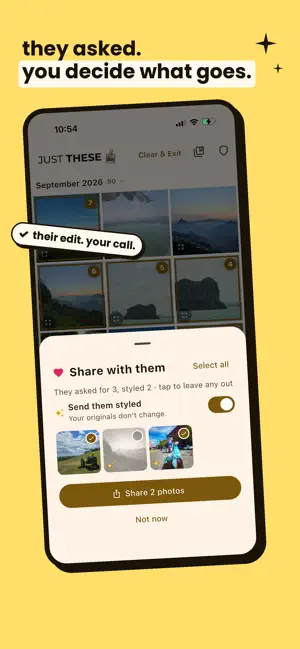
You hand someone your phone to show them one photo. Then they swipe. Just These fixes that. Pick the photos you want to show, tap Start Handover, and pass the phone across. Your guest sees those photos and nothing else — no swiping into last week, no sliding into your camera roll, no accidental discoveries. Getting back out takes your Face ID, Touch ID, or PIN. HANDOVER MODE Choose photos in any order. The person holding your phone can swipe and zoom through exactly that set, and nothing more. The back gesture is sealed off, a stray swipe from the edge of the screen won't take them out of the app, and leaving Handover Mode takes your Face ID, Touch ID, or PIN. Force-quitting does not help either: the app reopens locked. SHARE WITH ME Your guest loves one of the photos? They tap "share with me" on it, or ask for them all. When you have your phone back, you see what they asked for, untick anything you'd rather keep, and send the rest by AirDrop. They never touch your contacts or your other apps. STYLE IT Your guest can say how they want a photo, too. They tap "style it", swipe through nine looks inspired by film cameras and early-2000s digicams (soft film, disposable, night film, noir and more), crop it for a post or a story, and tap Done. When you have your phone back, you see each photo exactly as they styled it and send it that way, or flip one switch to send your originals. Your originals never change. QUICK HANDOVER Most handovers are about something that just happened. One tap covers it: - Last 10 minutes — the photos you literally just took - Last hour, today, yesterday - Last 10 or last 25 photos - All Allowed Photos, if you've given Just These only some of your library No scrolling, no hunting. Shoot, tap, hand over. COLLECTIONS Showing the same trip to everyone? Tap the bookmark to save your picks under a name, then hand the same set over again any time in one tap. NOTHING IS RECORDED No viewing history, no record of what was shown to whom. What your guest asks for, and how they styled it, is forgotten as soon as you've answered, and a styled photo is made only at the moment you send it. Collections are just a list of which photos, kept on this phone. Your selection stays put after a handover, so you can show the same photos to the next person — and Clear & Exit puts it down when you are done. BUILT FOR ONE-HANDED SPEED - Tap photos to select — they are numbered in the order you picked, so your story stays in order - Drag to rearrange them in the tray along the bottom - Long-press and sweep to select a run of photos at once - Pinch to zoom the grid from 2 columns out to 6 - Photos are grouped by month, with a scrubber down the edge you can tap to jump straight to any month LOCKED FROM THE START Just These asks for your passcode when it opens, and again after it has been closed for a while. Force-quitting the app during a handover does not get anyone anywhere: it reopens locked. PRIVACY THAT ISN'T JUST A PROMISE - No internet access. The app ships with no networking code, so it cannot upload your photos — whether or not you trust us. - No account, no cloud, no sign-up, no analytics, no ads. - Your PIN is never stored. Only a salted SHA-256 hash of it is kept, which cannot be turned back into your PIN. - iPhone does not let apps block screenshots, so Just These warns you the moment one is taken during Handover Mode. - Your photos are read to show them to you, and sent only when you tap Share. Where your data is concerned, that is the entire feature list. Share your phone, not your privacy.
What’s new
Version 1.3 · Updated September 26, 2026
Style it. Your guest can now say how they want a photo sent. In Handover Mode they open a photo, tap "style it", and swipe through nine looks inspired by film cameras and early-2000s digicams. They can press and hold to compare with the original, crop it to 4:5, Story or square, and tap Done. When you take your phone back, Share with me shows each photo exactly as they styled it, and sends it that way. Prefer the originals? One switch. Either way your photos are never changed: a styled copy is made only at the moment you send. Styled photos show a sparkle in Handover Mode, so your guest can see which ones they've done.
App privacy
The developer, Monalisa Singh, reported these privacy practices to Apple.
Data Not Collected
The developer does not collect any data from this app.
Alternatives to Just These
Looking for apps like Just These? Here are 6 similar apps on the App Store. The highest rated is Dice Roller: D20 RPG Dice (5.0/5), and all 6 are free to download.
-
 Dice Roller: D20 RPG Dice
5.0
-
 FloorAce
-
 Crew FitClub
-
 Excise QR Label Citizen App
-
 Blu Club Privilege App
1.0
-
 Blaupunkt DVR Dashcam
| App | Rating | Price | Last updated | Compare |
|---|---|---|---|---|
| Just These | – | Free | September 26, 2026 | |
| Dice Roller: D20 RPG Dice | 5.0 / 5 (3) | Free | Sep 18, 2026 | Compare |
| FloorAce | – | Free | Dec 11, 2024 | Compare |
| Crew FitClub | – | Free | Oct 27, 2026 | Compare |
| Excise QR Label Citizen App | – | Free | Nov 29, 2023 | Compare |
| Blu Club Privilege App | 1.0 / 5 (5) | Free | Oct 16, 2026 | Compare |
| Blaupunkt DVR Dashcam | – | Free | Mar 6, 2025 | Compare |
Compare Just These with the top alternatives: ratings, updates, ASO score and keyword gaps →