

Kobo: Profit Journal
Aregheviogaga Akporaro Finance iPhoneiPadiPod touch
Kobo: Profit Journal is a free Finance app for iPhone and iPad by Aregheviogaga Akporaro. Requires iOS 15.1. Updated October 2, 2026.
- Price
- Free
- on the App Store
- Size
- 49 MB
- Age 4+
- Updated
- Oct 2
- 2026 · v1.1.0
Screenshots

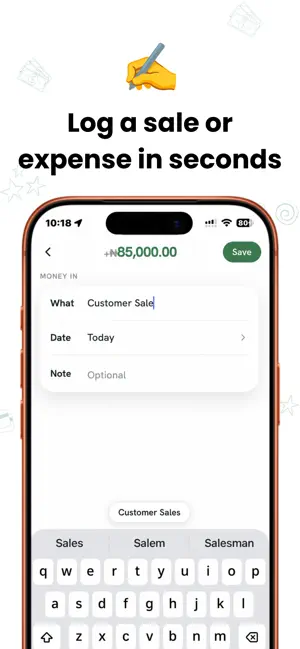

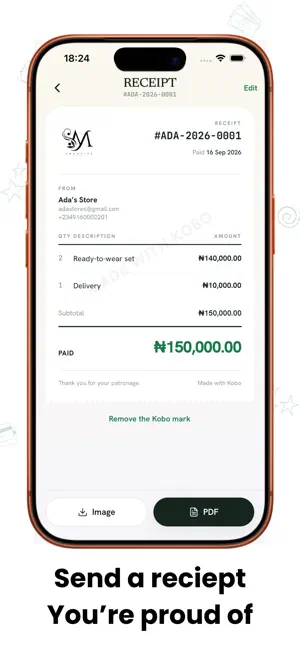
About Kobo: Profit Journal
Know what came in, what went out, and what your business actually made. Kobo is a simple profit tracker for people running a small business on their own or with a tiny team. Log a sale or an expense in seconds, then see your money in, money out, and profit for the period you choose. LOG MONEY AS IT HAPPENS Add money in or money out with an amount, title, date, and optional note. Reuse recent titles to log familiar sales and costs faster. Your entries stay in one searchable history. SEE THE WHOLE MONTH Kobo brings your figures together on Home so you can see your profit and explore where your money came from and where it went. Insights put useful patterns into plain words. SEND A RECEIPT Turn a money-in entry into a receipt with optional line items, your business details, and your logo. Share it as an image or PDF using your iPhone’s share options. START FREE Log unlimited entries and view your history and insights for free. You can issue three receipts each month on the free plan; free receipts carry a small “Made with Kobo” mark. GO FURTHER WITH KOBO PRO Pro gives you unlimited receipts, removes the Kobo mark from documents, and lets you export a branded statement for a date range. Monthly and yearly subscriptions are available in the app; your App Store shows the price before you subscribe. Kobo records money you have received and money you have spent. Profit is calculated as money in minus money out. It is designed for straightforward business tracking, not formal accounting or tax filing. Terms of Use (EULA): https://www.apple.com/legal/internet-services/itunes/dev/stdeula/ Privacy Policy: https://koboapp.com.ng/privacy
What’s new
Version 1.1.0 · Updated October 2, 2026
New in this version: • New receipt: make a receipt straight from Activity, and the sale is logged for you at the same time. • Every money-in entry in Activity now has a receipt button, so you can send or view a receipt in one tap. • Delete several entries at once: press and hold any entry in Activity to select. • Your totals now stay accurate however many entries you log. • At the start of a new month, Home and Insights show your year until you log something for the month. • Suggested names for common expenses, like Stock, Transport and Delivery, while you are getting started. • If Kobo can't refresh your figures, it now tells you instead of quietly showing older numbers. • After your first entry, Kobo offers to turn on reminders: a weekly profit summary and a nudge to log what you missed. Fixes: • Choosing a large photo as your logo could stop setup from finishing. Logos are now resized automatically, and setup always completes. • Editing an entry no longer opens the keyboard over the Send receipt and Delete buttons.
App privacy
The developer, Aregheviogaga Akporaro, reported these privacy practices to Apple.
Data Linked to You
The following data, which may be collected and linked to your identity, may be used for the following purposes:
- Contact Info: Email Address, Name, Phone Number
- Purchases: Purchase History
- Usage Data: Product Interaction, Other Usage Data
- Financial Info: Other Financial Info
- User Content: Photos or Videos, Customer Support, Other User Content
Used for: Developer’s Advertising or Marketing, Analytics, App Functionality
Alternatives to Kobo: Profit Journal
Looking for apps like Kobo: Profit Journal? Here are 6 similar apps on the App Store. The highest rated is CoinPrice - Bitcoin, ETH Price (4.6/5), and all 6 are free to download.
-
 Anchoria
-
 iBeauty: Salon Finance
-
 sBudget - Budget & Expense
-
 AltPay App
-
 CoinPrice - Bitcoin, ETH Price
4.6
CoinPrice - Bitcoin, ETH Price
4.6
-
 EmbassyCard
| App | Rating | Price | Last updated | Compare |
|---|---|---|---|---|
| Kobo: Profit Journal | – | Free | October 2, 2026 | |
| Anchoria | – | Free | Oct 13, 2026 | Compare |
| iBeauty: Salon Finance | – | Free | Oct 13, 2026 | Compare |
| sBudget - Budget & Expense | – | Free | Oct 23, 2026 | Compare |
| AltPay App | – | Free | Jul 18, 2026 | Compare |
| CoinPrice - Bitcoin, ETH Price | 4.6 / 5 (432) | Free | Sep 23, 2026 | Compare |
| EmbassyCard | – | Free | Feb 3, 2025 | Compare |