

Cifura: Mobile Protection
XM Digital Apps Utilities iPhoneiPadiPod touch
Cifura: Mobile Protection is a free Utilities app for iPhone and iPad by XM Digital Apps. Rated 5.0/5 from 3 ratings. Requires iOS 18.0.
- Rating
- 5.0
- 3 ratings
- Price
- Free
- on the App Store
- Size
- 15 MB
- Age 4+
- Updated
- Oct 12
- 2026 · v1.1
Screenshots


About Cifura: Mobile Protection
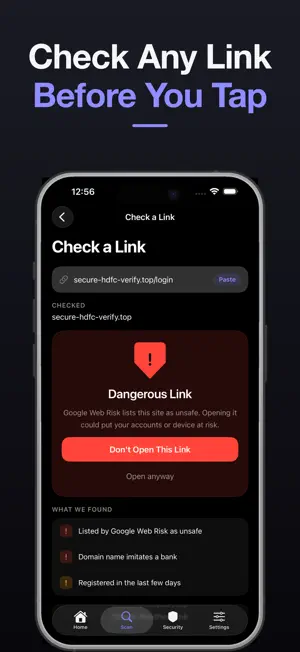
Cifura protects you from the scams that actually reach you: fake bank texts, phishing links, and sites built to steal your details. No account. No sign-up. No ads. No tracking. BLOCK BAD SITES IN EVERY APP Turn on the Web Shield and Cifura filters known phishing, malware and advertising domains across your whole iPhone — in Safari, in your banking app, in links from WhatsApp and email. Not just in one browser. It runs as a VPN configuration you approve once. Only DNS lookups pass through it — Cifura carries none of your traffic and runs no servers. iOS allows one VPN at a time, so switching Cifura on switches off any other VPN app. DNS filtering blocks most ads and trackers, but cannot block every malicious page or advertisement, and Cifura will never claim otherwise. CHECK A LINK BEFORE YOU TAP IT Paste any link and Cifura checks it three ways: against Google Web Risk, Google's live database of phishing and malware sites; against the public domain registry, for whether the domain exists and how new it is; and for imitation of a well-known company, because a fresh scam domain is on nobody's blocklist yet. You get a plain verdict — No Warnings Found, Be Careful or Dangerous — with every reason listed. Cifura will not call a link safe. A clean result means nothing known is wrong with it, which is not the same promise. SCAM DETECTOR FOR TEXTS AND CHATS Got a text about a parcel, a refund, a KYC update or a prize? Paste it in. Cifura reads what it is actually asking you to do, names the pressure tactics, and tells you how risky it looks. FAMILY PROTECTION Switch on Family Protection and Cifura also blocks known adult sites and forces Safe Search on Google, across every app. It includes everything the Web Shield blocks, so you never choose between them. DNS filtering cannot see inside an app, will not catch every site, and anyone using this iPhone can switch it off — Cifura cannot lock it behind a passcode. Use it alongside iOS Screen Time, not instead of it. SCAN A QR CODE BEFORE YOU FOLLOW IT Point the camera at a code and Cifura checks where it leads. A web address is checked the same way a pasted link is. Anything else — a Wi-Fi join, a phone number, plain text — is decoded and shown plainly, because there is nothing to check it against and Cifura will not invent a verdict. A Wi-Fi password is never shown. CHECK IF YOUR EMAIL IS IN A DATA BREACH Search your address against Have I Been Pwned, the standard public breach database. If it appears you will see which services were affected, when, and what was exposed — so you know which passwords to change first. RUN A DEVICE SECURITY CHECK Tap Scan Now, and Cifura reports: • Whether your iOS version is the newest Apple offers for your exact iPhone • Whether a passcode screen lock is set • Whether Face ID or Touch ID is enrolled • Whether a protection shield is currently active • Whether this copy of the app is genuine, verified through Apple App Attest Every result is a check Cifura genuinely performed. Nothing is simulated. WHAT CIFURA DOES NOT DO Cifura is not an antivirus and does not pretend to be one. iOS does not let any app scan your other apps or files — no security app can, whatever it implies. Cifura reports only what it can truly check, and says "Unable to determine" rather than guessing. BUILT TO KNOW AS LITTLE AS POSSIBLE ABOUT YOU • Email addresses you check are never stored • Links you check are never stored • Messages you paste are never stored • Your browsing is never logged, and Cifura cannot see which sites you visit • There is no account to create and nothing to sign in to Cifura asks for no location, no contacts, no photos and no microphone. It asks for the camera only on the QR screen and uses it nowhere else — no photo is taken, no image leaves your iPhone. The only other thing it adds is the VPN configuration powering the shields, which you can switch off any time. Security you can verify, from an app that tells you what it does not know.
What’s new
Version 1.1 · Updated October 12, 2026
Two new ways to stay protected. FAMILY PROTECTION A second shield that blocks known adult sites and forces Safe Search on Google, on top of everything the Web Shield already blocks. One switch, no profiles to install. It filters at the DNS level, so it works across every app — but it cannot see inside an app, it will not catch every site, and anyone using this iPhone can switch it off. Cifura cannot lock it behind a passcode; iOS Screen Time can, and the two are meant to sit side by side. QR CODE SCANNER Point the camera at a QR code and Cifura checks where it leads before you follow it. A code holding a web address is checked exactly like a pasted link, against Google Web Risk and the domain registry. Most QR codes are not links — Wi-Fi joins, phone numbers, plain text — and for those Cifura shows you what the code actually says instead of inventing a verdict about it. A Wi-Fi code's password is never displayed. The camera is used only on this screen. No photo is taken, and no image leaves your iPhone. ALSO IN THIS RELEASE • Web Protection is now the Web Shield, and sits alongside Family Protection • Check Now is now Scan Now • Clearer reporting when a shield is switched on but not yet filtering • Fixes to protection state so the app never reports filtering it is not doing
App privacy
The developer, XM Digital Apps, reported these privacy practices to Apple.
Data Linked to You
The following data, which may be collected and linked to your identity, may be used for the following purposes:
- Contact Info: Email Address
Used for: App Functionality
Data Not Linked to You
The following data, which may be collected but is not linked to your identity, may be used for the following purposes:
- Usage Data: Product Interaction
- Browsing History: Browsing History
- Identifiers: Device ID
Used for: Analytics, App Functionality
Alternatives to Cifura: Mobile Protection
Looking for apps like Cifura: Mobile Protection? Here are 6 similar apps on the App Store. The highest rated is AI Cleaner: On-Device Cleanup (5.0/5), and all 6 are free to download.
-
 Pax - Spam Call Blocker
-
 AI Cleaner: On-Device Cleanup
5.0
-
 Vigil by Finailabz
-
 Adfreeze: Pop Up Blocker
4.5
-
 CypherAir
-
 SpySeek
5.0
| App | Rating | Price | Last updated | Compare |
|---|---|---|---|---|
| Cifura: Mobile Protection | 5.0 / 5 (3 ratings) | Free | October 12, 2026 | |
| Pax - Spam Call Blocker | – | Free | Mar 16, 2026 | Compare |
| AI Cleaner: On-Device Cleanup | 5.0 / 5 (1) | Free | Oct 19, 2026 | Compare |
| Vigil by Finailabz | – | Free | Mar 16, 2026 | Compare |
| Adfreeze: Pop Up Blocker | 4.5 / 5 (8) | Free | Sep 28, 2026 | Compare |
| CypherAir | – | Free | May 14, 2026 | Compare |
| SpySeek | 5.0 / 5 (1) | Free | Apr 22, 2026 | Compare |