

QRist: QR Codes on Your Wrist
Palaplu BVBA Utilities iPhoneiPadiPod touchApple Watch
QRist: QR Codes on Your Wrist is a free Utilities app for iPhone and iPad by Palaplu BVBA. Requires iOS 18.0. Updated September 30, 2026.
- Price
- Free
- on the App Store
- Size
- 4 MB
- Age 4+
- Updated
- Sep 30
- 2026 · v1.1
Screenshots


About QRist: QR Codes on Your Wrist
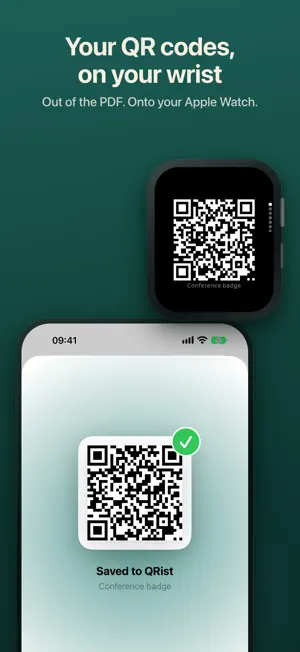
The QR codes stuck in your screenshots, PDFs and emails, on your wrist and ready to scan. A QR app reads codes. QRist presents codes you own. When you scan it yourself: an invoice PDF has a payment QR code, but your banking app wants to scan it with the same iPhone the PDF is open on. QRist gets the code off your phone and onto your Apple Watch, or into your clipboard. When someone else scans it: the gym check-in, the parcel return, the conference badge, the library card. Your phone is in your bag and someone is waiting in line behind you. Wrist up. Scanned. Done. FROM ANYWHERE TO YOUR WRIST • Import a screenshot or photo, or a PDF from Files • Or tap Share in any app and send it to QRist • QRist finds every QR code in it, even on page 7 of a PDF • Small printed codes in PDFs are read too • A code on paper? Import it with your iPhone camera • Your Apple Watch keeps its own copy, so codes work without your iPhone nearby ALREADY THERE WHEN YOU RAISE YOUR WRIST • After an import, QRist shows when the code has reached your Apple Watch • Right after an import, a Live Activity sits at the top of your Smart Stack. Tap it and the code opens full-screen • On iPhone, the same Live Activity appears on the Lock Screen and in the Dynamic Island • Turn the Digital Crown or swipe to move between your codes • Add the “Latest QR Code” widget to your watch face or Smart Stack • Rather keep your wrist quiet? Turn off “Show new codes on Apple Watch” in Settings PRIVATE BY DESIGN QRist finds codes on your device. There's no account, no tracking, no ads and no network access at all. Your original photos and PDFs are never stored, only the text inside each code, and every code is redrawn sharply from that text. Free to download. REQUIREMENTS Requires iOS 18 or later. The Apple Watch app requires watchOS 11 or later and an Apple Watch paired with your iPhone. On iPad, QRist keeps your library and imports codes; the wrist hand-off needs an iPhone. Questions or ideas? Write to [email protected].
What’s new
Version 1.1 · Updated September 30, 2026
What's new in 1.1 • Select several codes at once, then delete them together • Opening a saved code now shows its own name at the top, not the same generic title every time • Your Apple Watch card now looks the same everywhere: the Smart Stack widget and the moment a code arrives Found a code QRist can't read? Tell me at [email protected].
App privacy
The developer, Palaplu BVBA, reported these privacy practices to Apple.
Data Not Collected
The developer does not collect any data from this app.
Alternatives to QRist: QR Codes on Your Wrist
Looking for apps like QRist: QR Codes on Your Wrist? Here are 6 similar apps on the App Store. The highest rated is Wrist Codes: Barcode Wallet (5.0/5), and 5 of the 6 are free to download.
-
 QR4all - QR Code Designer
-
 Wrist Codes: Barcode Wallet
5.0
Wrist Codes: Barcode Wallet
5.0
-
 WristPass: Barcode Wallet
-
 EKCMS
EKCMS
-
 Absolute Porn Filter
2.5
Absolute Porn Filter
2.5
-
 Alarm Clock Pro - Music, Sleep
4.2
Alarm Clock Pro - Music, Sleep
4.2
| App | Rating | Price | Last updated | Compare |
|---|---|---|---|---|
| QRist: QR Codes on Your Wrist | – | Free | September 30, 2026 | |
| QR4all - QR Code Designer | – | Free | Aug 19, 2026 | Compare |
| Wrist Codes: Barcode Wallet | 5.0 / 5 (1) | Free | Oct 21, 2026 | Compare |
| WristPass: Barcode Wallet | – | Free | Jun 1, 2026 | Compare |
| EKCMS | – | Free | Oct 17, 2026 | Compare |
| Absolute Porn Filter | 2.5 / 5 (2) | Free | Jul 23, 2026 | Compare |
| Alarm Clock Pro - Music, Sleep | 4.2 / 5 (99) | 4.99 USD | Apr 7, 2026 | Compare |