

Procapy
Pro Capy Digital Productivity iPhoneiPadiPod touch
Procapy is a free Productivity app for iPhone and iPad by Pro Capy Digital. Requires iOS 16.4. Updated October 24, 2026.
- Price
- Free
- on the App Store
- Size
- 40 MB
- Age 17+
- Updated
- Oct 24
- 2026 · v1.2.0
Screenshots


About Procapy
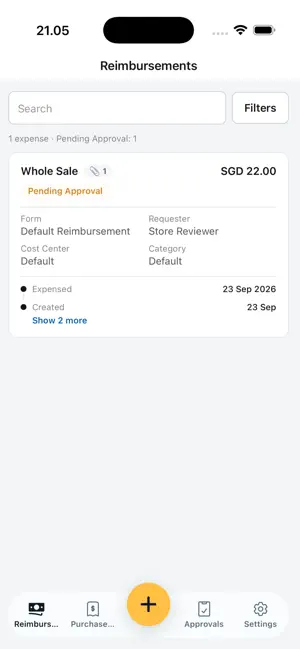
Procapy: AI-powered Payables and Expense Management, in your pocket Procapy brings your company's accounts payable and expense workflows to your phone. Snap a receipt, approve an invoice or check a cost center budget in seconds, wherever work takes you. 1. CAPTURE IN SECONDS Take a photo of a receipt, invoice or contract. Procapy's AI turns it into structured data straight away: vendor, date, amount, tax, line items and anything that you wishes you want to capture. You don't type anything or set up templates. It keeps learning from your team's corrections, so it gets more accurate over time. 2. TAG AND ORGANIZE Tag each expense or invoice with a project, cost center, department, client or custom category. Procapy suggests the right tags from your past entries, so everything is coded correctly from the start. Filter and search by tag to find any transaction in seconds. 3. APPROVE ON THE GO Get notified the moment something needs your sign-off. You can review the documents, see the full context and approve or reject with one tap. Approvals follow your finance team's own routing rules, and every action is recorded in a complete audit trail. 4. STAY WITHIN POLICY See your budgets and spending limits in real time before you commit to a purchase. Procapy flags policy issues early, before they turn into exceptions at month-end. 5. TRACK EVERY EXPENSE Submit expense reimbursements, see where each one is in the approval process and know when you'll be reimbursed. No more chasing finance for updates. 6. INSIGHTS AT A GLANCE Check cycle times, compliance and spending trends to keep your team and projects on track. 7. WORKS WITH YOUR FINANCIAL SYSTEM Procapy connects to other softwares, so data captured on your phone goes straight into your finance workflow. 8. ENTERPRISE-GRADE SECURITY Your data is protected with AES-256 encryption and role-based access controls, so each person sees only what they're meant to see. BUILT FOR: - Directors: keep every team inside policy without micromanaging, and approve high-value commitments from anywhere so operations never stall. - Finance teams: Spend less time on data entry, chasing approvals and reconciling documents, and more on analysis that improves how the business runs. - Project Owners: Get visibility over your project spending in less than a minute - Managers: Clear approvals in seconds between meetings, so your team's work, purchases and reimbursements keep moving. - Employees: Submit an expense in the moment and get back to work. No paperwork piling up at month-end. A Procapy company account is required. Ask your finance administrator for access, or visit procapy.com to get started. We are open to talk about referral and partnerships.
What’s new
Version 1.2.0 · Updated October 24, 2026
What's new in Procapy 1.2.0 • Notifications tab: your notifications now have their own place in the bottom bar, with an unread count. • One Menu: Cost Center, Purchase Invoice Drafts and Reimbursements are together in the new Menu. • Cost Center on mobile: check each cost center's budget, usage and members on the go. • Faster approvals: approve a request in a single tap. Possible duplicates are flagged before you approve. • Notification Preferences: choose how you hear about approvals, right from My Account. • Easier expense submission: see which company you're submitting to at the top of the form, clearer optional fields, a properly formatted tax amount, a simpler receipt upload, and search lists that stay above the keyboard. • Proca AI policy check: clearer results after you submit an expense. • Audit trail now shows the latest step first, the same as on the web. • Fixes and polish, including the splash screen, the notification icon and a smoother Bank Account page.
App privacy
The developer, Pro Capy Digital, reported these privacy practices to Apple.
Data Linked to You
The following data, which may be collected and linked to your identity, may be used for the following purposes:
- Contact Info: Email Address, Name, Phone Number
- User Content: Photos or Videos
Used for: App Functionality
Data Not Linked to You
The following data, which may be collected but is not linked to your identity, may be used for the following purposes:
- Identifiers: User ID, Device ID
- Usage Data: Product Interaction
- Diagnostics: Crash Data, Performance Data
Used for: Analytics, App Functionality