

DreamPlayer - Video Player
Mangesh Ghodke Entertainment iPhoneiPadiPod touch
DreamPlayer - Video Player is a free Entertainment app for iPhone and iPad by Mangesh Ghodke. Requires iOS 17.0. Updated October 24, 2026.
- Price
- Free
- on the App Store
- Size
- 61 MB
- Age 4+
- Updated
- Oct 24
- 2026 · v0.5.4
Screenshots

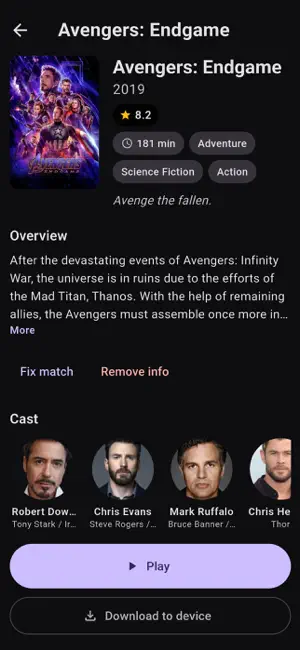
About DreamPlayer - Video Player
DreamPlayer — the video player for your entire collection. Plays virtually any video and audio file you throw at it — MKV, MP4, TS, AVI, WebM and more, with hardware decoding and a buttery native refresh rate. AUDIO THAT JUST PLAYS DTS, DTS-HD MA, TrueHD (incl. Atmos), E-AC3 JOC, AC3, FLAC, AAC. No codec hunting. YOUR FILES, WHERE THEY ARE • Local: Files app, SD card, USB — add any folder to Your Library • NAS / Network: SMB, WebDAV, Jellyfin/Emby, FTP/SFTP, UPnP/DLNA, or direct http(s) URL • iPad: Files "Open with", bookmarked folders, WebDAV/Jellyfin/SMB • TMDB posters, backdrops, cast, trailers, season/episode stills — cached offline PLAYER THAT STAYS OUT OF THE WAY • Gestures: brightness, volume, horizontal seek • Subtitles: embedded + sideloaded (SRT, ASS, VTT, TTML, SAMI, MPL2) • Continue watching, watched marks, Picture-in-Picture, background audio LIBRARY, NOT A FILE BROWSER Add folders once — DreamPlayer groups series, fetches TMDB metadata and keeps resume state. Pull to refresh, manual groups, per-episode details. PRIVACY & NO ACCOUNT Passwords stored in Keychain, never logged. No login required — core playback and all sources work free, connections are only to servers you own. DREAMPLAYER PREMIUM — in-app purchase An optional subscription or one-time purchase unlocks extra features: Dolby Vision / HDR10+ playback, subtitle styling, playback speed, A-B loop, sleep timer, download to device, and online subtitle search. • Advanced Monthly — auto-renewing subscription • Advanced Yearly — auto-renewing subscription • Advanced Lifetime — one-time purchase 7-day free trial for new users. Subscriptions auto-renew; cancel anytime in your Apple ID Settings. Free users can restore purchases anytime. Terms of Use: https://mangeshghodke.github.io/DreamPlayer/terms Privacy Policy: https://mangeshghodke.github.io/DreamPlayer/privacy
What’s new
Version 0.5.4 · Updated October 24, 2026
New: • Search your library from the Home screen. A search button matches shows, seasons, episodes and films by title, file name or episode code as you type — accents and capitals do not matter — and works without a connection. Every result opens the same page as the matching card on the Home screen. • Keyboard shortcuts when a hardware keyboard is attached: K or Space to play and pause, J and L to skip back and forward ten seconds, F for fullscreen, and the left and right arrows to skip while the controls are hidden. • A system AirPlay button in the player, so a speaker or TV can be picked without leaving the app. Audio always follows the chosen route; for some file types only the sound can be sent and the picture stays on this device. • The Now Playing card on the lock screen and in Control Center now shows the matched poster instead of a blank tile, and its skip-back and skip-forward buttons jump ten seconds, stopping cleanly at either end. The card now also shows the resolved title — with the season and episode (e.g. S02E05 · The Long Way Home) — instead of the raw file name. • The 4:3, 16:9, 1.85:1 and 2.39:1 choices in the aspect-ratio menu now give the video exactly that frame instead of approximating it on the full screen. Fit, Crop and Stretch are unchanged. • Subtitles now look the way you want them to. Settings → Subtitles covers the font, size, text colour and opacity, background colour and opacity, edge style (outline, drop shadow or none), vertical position and sync delay, with a live preview that updates as you go. Every text subtitle format follows the style; image-based subtitles keep their own artwork. The same screen is one tap away from the player's subtitle menu. • The subtitle font list now includes the full Google Fonts catalogue, with search and every name previewed in its own typeface, plus nine families that are built into the app and work with no connection at all. A chosen family applies to the video itself, not only to the preview — including while watching something from a shared folder. Fixed: • A font downloaded from the catalogue could be ignored by the player and the subtitles would fall back to the default typeface. Families whose names contain a space were the most likely to hit this. • Chapter markers on the seekbar and the previous/next chapter buttons now stay visible after changing the audio track. • Changing the audio track no longer plays the default track for a moment before switching to the one you chose.
App privacy
The developer, Mangesh Ghodke, reported these privacy practices to Apple.
Data Not Collected
The developer does not collect any data from this app.
Alternatives to DreamPlayer - Video Player
Looking for apps like DreamPlayer - Video Player? Here are 6 similar apps on the App Store.
-
 70mm: MKV Video & Media Player
-
 E2linkTV
-
 Elastic Player
-
 Woodflx : Movie Match Quest
-
 OliPlay Media Player
-
 ReelFin
| App | Rating | Price | Last updated | Compare |
|---|---|---|---|---|
| DreamPlayer - Video Player | – | Free | October 24, 2026 | |
| 70mm: MKV Video & Media Player | – | Free | Oct 23, 2026 | Compare |
| E2linkTV | – | Free | Oct 6, 2026 | Compare |
| Elastic Player | – | Free | Oct 18, 2026 | Compare |
| Woodflx : Movie Match Quest | – | Free | Oct 23, 2026 | Compare |
| OliPlay Media Player | – | Free | Oct 12, 2026 | Compare |
| ReelFin | – | Free | Oct 21, 2026 | Compare |