
Keyfeel: Mechanical Keyboard
Anh Phong Utilities iPhoneiPadiPod touch
Keyfeel: Mechanical Keyboard is a free Utilities app for iPhone and iPad by Anh Phong. Requires iOS 17.0. Updated October 28, 2026.
- Price
- Free
- on the App Store
- Size
- 8 MB
- Age 4+
- Updated
- Oct 28
- 2026 · v1.0.2
Screenshots


About Keyfeel: Mechanical Keyboard
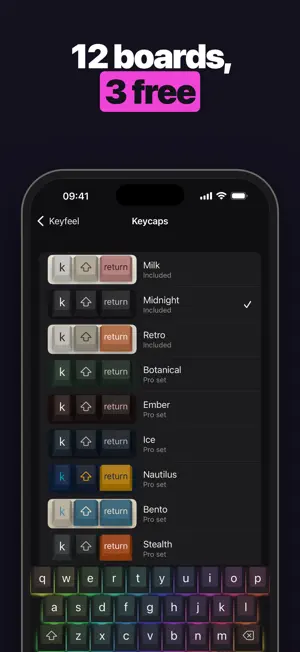
Keyfeel turns your iPhone keyboard into a mechanical one. Every key press has its own sound and haptic, the board lights up the way you set it, and your clipboard history sits right inside the keyboard. PICK YOUR SWITCH Choose from 8 switches across three kinds: linear (smooth all the way down), tactile (a soft bump, quieter) and clicky (a sharp, loud click). Each one sounds and feels different. Turn the sound and the haptic up or down on their own dials. LIGHT IT UP Four glow effects: Static, Wave, Reactive and Breathe. Light the board from under the keys or through the legends, pick a color or go rainbow, and set the brightness. 12 BOARDS Keycap sets from soft Milk to dark Midnight. Three boards are free to keep. Pro opens all 12. CLIPBOARD HISTORY, IN THE KEYBOARD Tap Paste and Keyfeel keeps the clip. Open the clipboard panel to paste it again later, pin the ones you reuse, delete the rest. The free version keeps up to 60 clips, Pro keeps 200, and pinned clips always stay. Keyfeel never reads your clipboard until you tap Paste. TYPE THE WAY YOU LIKE Swipe to type, word suggestions, a one-handed mode for the left or right hand, emoji and kaomoji, and an optional number row. PRIVATE BY DESIGN No account, no ads, no analytics, and no network requests. Nothing you type leaves your iPhone. Try it in Airplane Mode. Keyfeel works without Full Access: you can type, swipe and use suggestions with your chosen board. Allowing Full Access adds the switch sounds, haptics and clipboard history, because iOS only lets a keyboard play custom sound and haptics with Full Access. KEYFEEL PRO Pro opens all 12 boards and keeps up to 200 clips. Yearly, with a 7-day free trial Monthly Lifetime, one-time purchase Prices are shown in the App Store and vary by region. Subscriptions renew automatically unless canceled at least 24 hours before the end of the current period. Manage or cancel them in your Apple Account settings. Terms of Use: https://www.apple.com/legal/internet-services/itunes/dev/stdeula/ Privacy Policy: https://github.com/heocoi/privacy-policy/blob/main/keyfeel.md
What’s new
Version 1.0.2 · Updated October 28, 2026
Small fixes and performance improvements.
App privacy
The developer, Anh Phong, reported these privacy practices to Apple.
Data Not Collected
The developer does not collect any data from this app.
Alternatives to Keyfeel: Mechanical Keyboard
Looking for apps like Keyfeel: Mechanical Keyboard? Here are 6 similar apps on the App Store. The highest rated is OmniKeys (5.0/5), and all 6 are free to download.
-
 Thockify: Keeb ASMR Keyboard
-
 OmniKeys
5.0
-
 ClipVault Keyboard
-
 Trace Privacy
5.0
-
 IVault-Secure local encryption
-
 TheRGB64
| App | Rating | Price | Last updated | Compare |
|---|---|---|---|---|
| Keyfeel: Mechanical Keyboard | – | Free | October 28, 2026 | |
| Thockify: Keeb ASMR Keyboard | – | Free | Nov 6, 2026 | Compare |
| OmniKeys | 5.0 / 5 (1) | Free | Nov 5, 2026 | Compare |
| ClipVault Keyboard | – | Free | Oct 21, 2026 | Compare |
| Trace Privacy | 5.0 / 5 (1) | Free | Aug 27, 2026 | Compare |
| IVault-Secure local encryption | – | Free | Jan 14, 2026 | Compare |
| TheRGB64 | – | Free | Aug 20, 2026 | Compare |