

Photide: Photo Diary
Charles Ley Baldemor Photo & Video iPhoneiPadiPod touch
Photide: Photo Diary is a free Photo & Video app for iPhone and iPad by Charles Ley Baldemor. Requires iOS 18.0. Updated October 7, 2026.
- Price
- Free
- on the App Store
- Size
- 4 MB
- Age 4+
- Updated
- Oct 7
- 2026 · v0.3.6
Screenshots



About Photide: Photo Diary
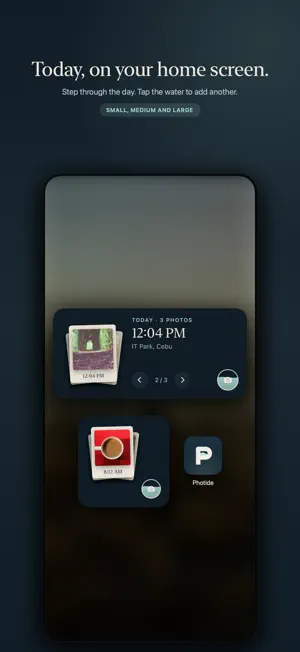
Photide is a photo diary with one button. Open it and you are looking at your calendar. Press Capture, take a photograph, and it is kept on the day it was taken, in the place it was taken. There is nothing to title, tag, caption or file. Days name themselves after where you were. Come back to any day and it opens as a timeline: photographs grouped by the hour they were taken, with your most recent moments first. Sweep the dial to move through the day. Open an hour to see everything in it, pick several at once, and share them or save them to your Photos library. MAKE YOUR DAY A STORY Choose photos from one day and turn them into a vertical collage of overlapping prints. Tap a print to replace its photo, drag to arrange the layout, then share or save the finished image. YOUR APPLE PHOTOS, WITHOUT DUPLICATE ORIGINALS Choose to show your accessible Apple Photos library in Photide. Originals stay in Apple Photos; Photide keeps references and a limited preview cache. Choose which photos the app can access, and manage that access at any time. Deleting a source or removing access can make it unavailable in Photide. Cloud-only images may need an internet connection to load. PHOTOGRAPHS AT THE SIZE YOU CHOOSE Photos taken in Photide are saved inside the app. Keep the original capture, or choose 12 MP or 7 MP to use less storage. Add the Today widget to revisit your day from the home screen. YOUR DRIVE, NOT OURS Google Drive backup is optional. Select the photos you want to back up to your own account. You can also enable automatic backup for new photos taken in Photide. Apple Photos references are never backed up automatically. Photide requests access only to files it creates or that you authorize, not your entire Drive. Your photos travel directly from your phone to Google, never through Photide servers. CONTROL WHAT YOU REMOVE Remove a photo from your diary and find it in Recently Deleted, where you can put it back. Removing it from Photide does not delete it from Apple Photos or Google Drive unless you explicitly choose those separate actions. Photide originals in Recently Deleted still use storage until permanently deleted. PLACES, NOT TRACKING Location access is used while capturing to name the day and place the photograph on your map, not to track you in the background. Photos shown from Apple Photos can use their existing location metadata. No Photide account required. No advertising. No analytics. No feed. Let the good days return.
What’s new
Version 0.3.6 · Updated October 7, 2026
Save any photo to your Photos library straight from the photo viewer.
App privacy
The developer, Charles Ley Baldemor, reported these privacy practices to Apple.
Data Not Collected
The developer does not collect any data from this app.
Alternatives to Photide: Photo Diary
Looking for apps like Photide: Photo Diary? Here are 6 similar apps on the App Store. The highest rated is DayCollage: Photo Calendar (5.0/5), and all 6 are free to download.
-
 One Still: Photo Diary
-
 Frameroll: Photo Journal
-
 DayCollage: Photo Calendar
5.0
-
 Halcy: Daily Photo Journal
-
 Kapmo: Photo Diary Challenges
-
 Foliana: Photo Journal & Diary
| App | Rating | Price | Last updated | Compare |
|---|---|---|---|---|
| Photide: Photo Diary | – | Free | October 7, 2026 | |
| One Still: Photo Diary | – | Free | Oct 1, 2026 | Compare |
| Frameroll: Photo Journal | – | Free | Oct 15, 2026 | Compare |
| DayCollage: Photo Calendar | 5.0 / 5 (1) | Free | Jun 3, 2026 | Compare |
| Halcy: Daily Photo Journal | – | Free | Oct 22, 2026 | Compare |
| Kapmo: Photo Diary Challenges | – | Free | Sep 17, 2026 | Compare |
| Foliana: Photo Journal & Diary | – | Free | Jul 22, 2026 | Compare |