

Leo Speak: Live Captions
Thomas Oomens Utilities iPhoneiPadiPod touch
Leo Speak: Live Captions is a free Utilities app for iPhone and iPad by Thomas Oomens. Requires iOS 15.0. Updated October 27, 2026.
- Price
- Free
- on the App Store
- Size
- 37 MB
- Age 4+
- Updated
- Oct 27
- 2026 · v1.8.0
Screenshots



About Leo Speak: Live Captions
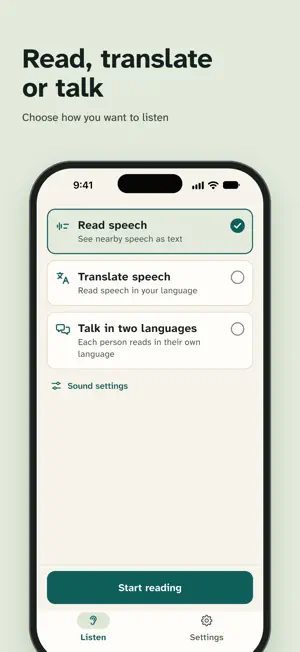
Leo Speak lets you read along with a conversation. Put your phone on the table, tap Start reading, and what people say shows up as large text on your screen. You can join in, even when you do not catch every word. Made for people who are deaf or hard of hearing. And for anyone who loses the thread in a noisy room. Where it helps • At the kitchen table, when the whole family talks at once • At the doctor's office or in the hospital, so you can follow along • At a birthday party with music and chatter • In a meeting, or a chat with a colleague at work How it works • Choose what you want: read what people say, translate it, or talk in two languages. Then tap the big button. • The text is large and clear. Make it bigger in the app; it also follows the text size setting on your phone. • Each speaker gets their own color and label. Tap "Speaker 1" and change it to "Marieke". • Works in English and many other languages. It can also translate what people say into another language, or both ways between two of them. • Words appear while someone is still talking. • Keep a conversation on your phone to read it back later, save or share it as a PDF or text, or let Leo Speak write a summary (this uses minutes). No account needed There is nothing to fill in. Open the app and go. You can sign in if you want to use your plan on all your devices, but you do not have to. Conversations are kept only if you choose, and then only on your phone. Plans Every month you get 60 minutes for free. If you need more, pick a plan: • Light: 10 hours per month • Medium: 30 hours per month • Max: 120 hours per month, about 4 hours a day Plans renew every month. Cancel any time in your Apple Account settings. Privacy Audio goes to a speech-to-text service to be turned into text, and translated if you ask for that. If you ask for a summary, the text of that conversation goes once to an AI service in the EU (Scaleway, France), which keeps nothing. We keep no audio and no transcripts on our server. Leo Speak helps you read along. It does not replace a hearing aid. A word will sometimes come out wrong; the sentence around it usually makes it clear. Translations can contain mistakes too. Terms of use: https://leospeak.app/en/terms Privacy policy: https://leospeak.app/en/privacy
What’s new
Version 1.8.0 · Updated October 27, 2026
What's new - Easier to read: each speaker gets their own colored card, with their name above the text. Tap the pencil to name a speaker. - The text now moves up smoothly instead of jumping. When you scroll back to read something again, it stays still. Tap Back to live to carry on. - The Stop button now says Stop listening. - Better with large text: the sign-in buttons, the words in Settings and the language list with the keyboard open.
App privacy
The developer, Thomas Oomens, reported these privacy practices to Apple.
Data Linked to You
The following data, which may be collected and linked to your identity, may be used for the following purposes:
- Purchases: Purchase History
- Contact Info: Email Address
- Identifiers: User ID, Device ID
- Usage Data: Product Interaction
Used for: App Functionality
Data Not Linked to You
The following data, which may be collected but is not linked to your identity, may be used for the following purposes:
- Identifiers: Device ID
- Usage Data: Product Interaction
- User Content: Other User Content
Used for: Analytics, App Functionality
Alternatives to Leo Speak: Live Captions
Looking for apps like Leo Speak: Live Captions? Here are 6 similar apps on the App Store. The highest rated is Voice Transcription - Deaf (5.0/5), and all 6 are free to download.
-
 Jimakun: Speech to Big Text
-
 Voice Transcription - Deaf
5.0
-
 Speaksee
-
 Planten - AI Plant Identifier
5.0
-
 Whatool: Saved Chat Search
4.3
-
 Utrechtse AfvalApp
| App | Rating | Price | Last updated | Compare |
|---|---|---|---|---|
| Leo Speak: Live Captions | – | Free | October 27, 2026 | |
| Jimakun: Speech to Big Text | – | Free | Aug 30, 2026 | Compare |
| Voice Transcription - Deaf | 5.0 / 5 (1) | Free | Oct 24, 2026 | Compare |
| Speaksee | – | Free | Oct 29, 2026 | Compare |
| Planten - AI Plant Identifier | 5.0 / 5 (6) | Free | Aug 25, 2026 | Compare |
| Whatool: Saved Chat Search | 4.3 / 5 (70) | Free | Oct 25, 2026 | Compare |
| Utrechtse AfvalApp | – | Free | Oct 7, 2026 | Compare |