

moa: Screenshot Organizer
heeseok shin Photo & Video iPhoneiPadiPod touch
moa: Screenshot Organizer is a free Photo & Video app for iPhone and iPad by heeseok shin. Requires iOS 18.0. Updated October 21, 2026.
- Price
- Free
- on the App Store
- Size
- 44 MB
- Age 4+
- Updated
- Oct 21
- 2026 · v1.10
Screenshots
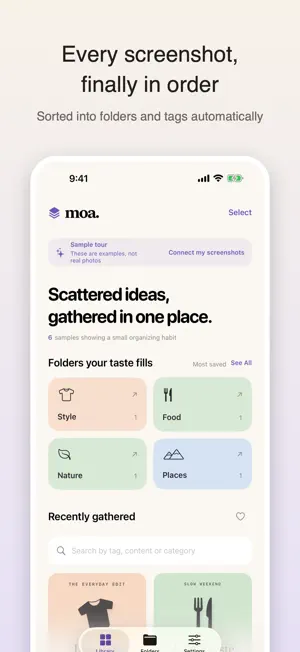
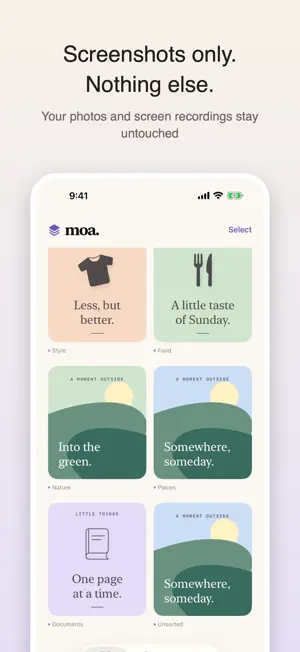


About moa: Screenshot Organizer
moa finds the screenshots in your photo library, analyzes them on your iPhone, and sorts them into folders and tags by what they show. Everything stays on the device · Images, recognized text, and tags are never sent to a server. · No account and no sign-in. Ads appear between screenshots, and they are never personalized by tracking you. · A bundled image model reads the main subject and the background of each screen. Screenshots only · Only images the system marks as screenshots are imported. · Regular photos, Live Photos, and screen recordings are skipped. · Your Photos albums are never changed, and an original is deleted only when you choose to. Pick the folders you want · Style, food, nature, places, animals, faces, and documents by default; vehicles, app screens, illustrations, products, and maps are optional. · Unclear screens stay in Unsorted, and the tags and categories you fix by hand survive re-analysis. Find things fast · Search recognized text, tags, keywords, and links. · Build your own folders and favorites. · Zoom into a screenshot and re-analyze a single one. Try the sample library first, without granting photo access. iPhone, iOS 18 or later. On iOS 26 devices with Apple Intelligence enabled, moa adds an extra interpretation step.
What’s new
Version 1.10 · Updated October 21, 2026
Small improvements and better stability. Coupon and boarding pass screenshots are waiting in the barcode and ticket folder.
App privacy
The developer, heeseok shin, reported these privacy practices to Apple.
Data Not Linked to You
The following data, which may be collected but is not linked to your identity, may be used for the following purposes:
- Location: Coarse Location
- Identifiers: Device ID
- Usage Data: Product Interaction, Advertising Data
- Diagnostics: Crash Data, Performance Data, Other Diagnostic Data
Used for: Third-Party Advertising, App Functionality
Alternatives to moa: Screenshot Organizer
Looking for apps like moa: Screenshot Organizer? Here are 6 similar apps on the App Store. The highest rated is SnapCal - Calendar Photo Album (5.0/5), and all 6 are free to download.
-
 SnapTag: My Screenshot Archive
-
 Tripfolio: Travel Photos
-
 Koutuxia: Background Remover
-
 SnapCal - Calendar Photo Album
5.0
SnapCal - Calendar Photo Album
5.0
-
 SideCam: Photos Stay Separate
-
 SellShot Product Photos
4.3
SellShot Product Photos
4.3
| App | Rating | Price | Last updated | Compare |
|---|---|---|---|---|
| moa: Screenshot Organizer | – | Free | October 21, 2026 | |
| SnapTag: My Screenshot Archive | – | Free | Sep 18, 2026 | Compare |
| Tripfolio: Travel Photos | – | Free | Jun 24, 2026 | Compare |
| Koutuxia: Background Remover | – | Free | Aug 30, 2026 | Compare |
| SnapCal - Calendar Photo Album | 5.0 / 5 (1) | Free | Dec 19, 2023 | Compare |
| SideCam: Photos Stay Separate | – | Free | Oct 16, 2026 | Compare |
| SellShot Product Photos | 4.3 / 5 (3) | Free | Sep 26, 2026 | Compare |