

PocketCAD - DXF Viewer
Naoki Chiba Productivity iPhoneiPadiPod touch
PocketCAD - DXF Viewer is a free Productivity app for iPhone and iPad by Naoki Chiba. Requires iOS 17.0. Updated October 4, 2026.
- Price
- Free
- on the App Store
- Size
- 12 MB
- Age 4+
- Updated
- Oct 4
- 2026 · v1.3
Screenshots
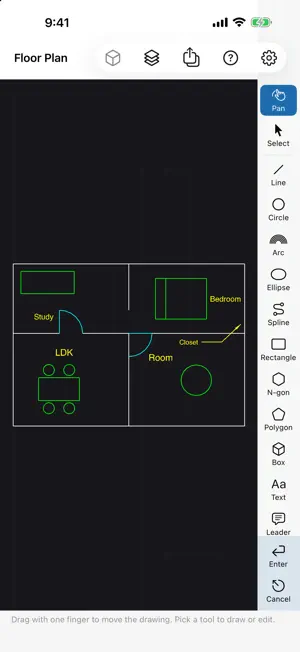
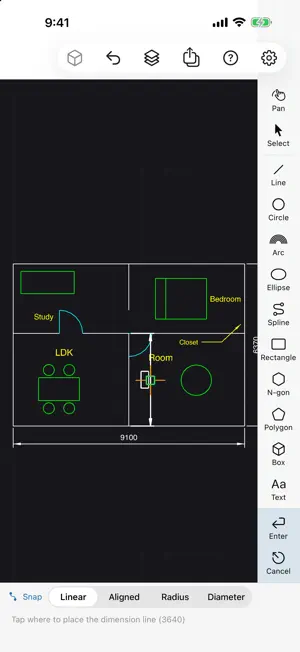
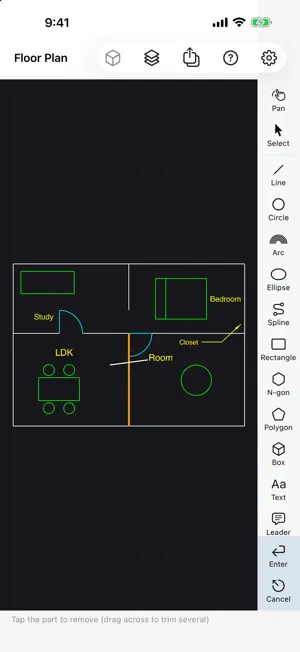
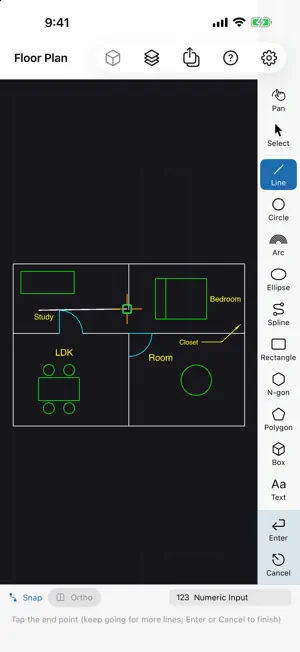
About PocketCAD - DXF Viewer
PocketCAD opens DXF drawings on iPhone and iPad so you can review them, add quick markups, check shapes in 3D and share them as PDF. FREE BASIC FEATURES DXF/pcad viewing, drawing and editing, 3D views of shapes you create, and DXF/PDF export are free. - OPEN DXF AS IS - Open DXF files from Mail, Files and other apps - Japanese text (Shift_JIS / UTF-8) is supported - Entities that could not be read are listed with the reason - Your original DXF file is never overwritten - QUICK MARKUPS Lines, circles, arcs, ellipses, splines, rectangles, regular polygons, polygons, text and leaders. - Tap to place a point, or keep your finger down and drag to explore: the shape and the snap target are shown while you move - An option offsets the point above your finger so it is never hidden - Snap to endpoints, midpoints, centers, intersections and the grid; ortho mode; numeric input (length, angle, coordinates) - Move, copy, rotate, scale, mirror and grip editing - EDIT LIKE CAD - Offset, trim (drag across to trim several at once) and extend - Fillet and chamfer, including "All Corners" to round every corner of a rectangle at once - Dimensions: linear, aligned, radius and diameter. Tap a line to dimension it end to end - SEE IT IN 3D - Extrude closed shapes into prisms, pyramids or frustums - Revolve a shape around an axis - Values you cannot point at, such as a box height, are entered right next to the shape; confirm to reuse the last value - Orbit shapes you create with one finger - SEND IT BACK AS DXF OR PDF - Export DXF (AutoCAD 2018 format, UTF-8) to hand your drawing back to other CAD apps, Japanese text included. The AutoCAD 2000 format is available for older CAD apps - For PDF, choose paper size, orientation, scale and line weights, preview, then share. Monochrome output is available - NO ACCOUNT No sign-up or sign-in. Drawings are stored only on your device or in your own iCloud Drive. PRO FEATURES (ONE-TIME PURCHASE) The following features require PRO. Existing PRO owners get them at no extra charge. - Import JWW/JWC/JWK, STL, OBJ/MTL, static GLB/glTF and 3MF - Check model dimensions, surface area, closed-mesh volume and vertex distances - Numeric transforms, annotations and approximate section drawings - Register and place parts, edit attributes and export a bill of materials as CSV - Export STL, GLB and 3MF - Remove ads and restore your purchase FREE PRO EXPERIENCE (WITH LIMITS) Explore measurements, sections, transforms and parts with original samples. Saving and export are unavailable during the experience. Check a non-interactive overview and import diagnostics for your own JW and 3D files. Zoom, pan, rotate and work on them after purchasing PRO. Some data within supported formats may be unsupported. See in-app help for JWK units and text settings, mesh approximations and unsupported extensions or presentation features. DWG files are not supported; export them to DXF first. You can remove ads with the one-time PocketCAD Pro purchase. The app is available in English and Japanese.
What’s new
Version 1.3 · Updated October 4, 2026
Version 1.3 PRO FEATURES (ONE-TIME PURCHASE) - Import JWW/JWC/JWK and STL, OBJ/MTL, static GLB/glTF and 3MF models - 3D measurements, numeric transforms, annotations and sections - Part registration, placement, attributes and bills of materials as CSV - STL/GLB/3MF export - Fixed JW arc directions, including door swings Existing PRO owners get these features at no extra charge. FREE PRO EXPERIENCE (WITH LIMITS) - Guided samples for measurement/scaling, sections and parts; no saving or export - Your own JW/3D files: fixed overview and diagnostics only. Zoom, pan, rotate, edit, save and export require PRO AVAILABLE IN BOTH FREE AND PRO - Searchable help contents with 14 illustrated pages - DXF/pcad viewing, drawing and editing, 3D views of shapes you create, and DXF/PDF export remain free
App privacy
The developer, Naoki Chiba, reported these privacy practices to Apple.
Data Used to Track You
The following data may be used to track you across apps and websites owned by other companies:
- Identifiers: Device ID
Data Linked to You
The following data, which may be collected and linked to your identity, may be used for the following purposes:
- Location: Coarse Location
- Identifiers: Device ID
- Usage Data: Product Interaction, Advertising Data
Used for: Third-Party Advertising, Developer’s Advertising or Marketing, Analytics
Data Not Linked to You
The following data, which may be collected but is not linked to your identity, may be used for the following purposes:
- Diagnostics: Performance Data, Other Diagnostic Data, Crash Data
Used for: Third-Party Advertising, Developer’s Advertising or Marketing, Analytics
Alternatives to PocketCAD - DXF Viewer
Looking for apps like PocketCAD - DXF Viewer? Here are 6 similar apps on the App Store. The highest rated is Task Chart — Planner Notebook (5.0/5), and all 6 are free to download.
-
 PonDraft
-
 Task Chart — Planner Notebook
5.0
Task Chart — Planner Notebook
5.0
-
 写真台帳
写真台帳
-
 FLEXSCHE CarryOut 4
-
 Madorimo - Floor Plan Notes
-
 ConSite Mine Scan
| App | Rating | Price | Last updated | Compare |
|---|---|---|---|---|
| PocketCAD - DXF Viewer | – | Free | October 4, 2026 | |
| PonDraft | – | Free | Oct 10, 2026 | Compare |
| Task Chart — Planner Notebook | 5.0 / 5 (1) | Free | Sep 4, 2026 | Compare |
| 写真台帳 | – | Free | Sep 6, 2026 | Compare |
| FLEXSCHE CarryOut 4 | – | Free | Aug 3, 2026 | Compare |
| Madorimo - Floor Plan Notes | – | Free | Oct 10, 2026 | Compare |
| ConSite Mine Scan | – | Free | Aug 18, 2026 | Compare |