

Gallerya: Photo Backup
Amr Essa Photo & Video iPhoneiPadiPod touch
Gallerya: Photo Backup is a free Photo & Video app for iPhone and iPad by Amr Essa. Requires iOS 26.0. Updated October 12, 2026.
- Price
- Free
- on the App Store
- Size
- 11 MB
- Age 4+
- Updated
- Oct 12
- 2026 · v1.1.0
Screenshots


About Gallerya: Photo Backup
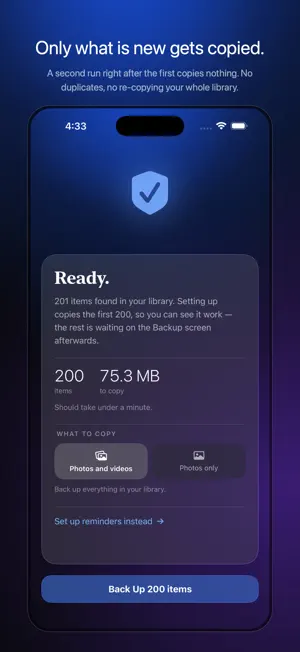
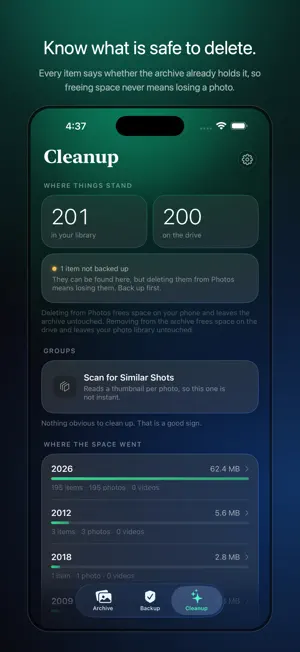
Back up your photos and videos to a USB-C drive you own. No iCloud, no storage subscription, no account. Plug in a USB flash drive, an external SSD or a memory card reader, pick a folder, and Gallerya copies the new photos and videos out of your library and onto it. The drive is the archive. The app is a window onto it. ONLY WHAT IS NEW Every run copies only what the drive does not already hold. A second backup right after the first copies nothing — no duplicates, no re-copying 40,000 photos to add yesterday's. FREE UP SPACE ON YOUR IPHONE Once a photo is safely on the drive, Cleanup can delete it from Photos. Every item carries a badge saying whether the archive already holds it, so freeing space never means losing a picture. THE ORIGINALS, NOT RE-ENCODES Full-resolution HEIC, JPEG and RAW. Original-quality video. Live Photo pairs kept together. Edited and unedited versions both. VERIFIED, NOT ASSUMED Every file is hashed while it is written, then size-checked afterwards. Nothing enters the catalog until it has been verified, and you can re-verify the whole archive whenever you like. YOURS TO READ WITHOUT THIS APP The archive is ordinary folders and files, sorted by date, with a plain-text catalog beside them. Any computer can open it. If Gallerya disappeared tomorrow, your photos would not. BROWSE WHAT IS ON THE DRIVE Your archive as a proper gallery: grouped by year and month, albums preserved, full-screen viewer, video playback with scrubbing and speed control. Share anything back out, or copy it back into Photos. WORKS COMPLETELY OFFLINE There is no server and nothing is uploaded. Gallerya has no idea whether you are online, which is the point: a backup that needs a signal is not a backup you control. — — — Free to try: your first 200 items transfer, and your first 50 cleanup deletions, with nothing to pay and nothing to cancel. Whatever it copies stays on your drive whether or not you ever pay. Unlock the full version for a one-time $4.99 and it is yours for life — no subscription, no renewal, no expiry. Cleanup is an optional subscription, $0.99 a month or $7.99 a year, which covers deleting from Photos and removing from the archive. It renews automatically, monthly or yearly, until cancelled, and you can cancel any time in your Apple Account settings. Privacy policy: https://getgallerya.com/privacy/ Terms of Use: https://www.apple.com/legal/internet-services/itunes/dev/stdeula/
What’s new
Version 1.1.0 · Updated October 12, 2026
Trips: your Archive now finds the times you were away and shows them as cards above your photos. Open one to relive it day by day, in the order you took them. • Trips are found on your iPhone from where and when your photos were taken, and named after the city or country you visited, using a list of cities built into the app. No location is ever sent anywhere, and it all works offline. • Swipe through every photo and video of a trip in the full-screen viewer, from the first day to the last. • Archives you already have work too: the first time you open one with the drive plugged in, Gallerya reads where its photos were taken, once, from Photos or from the originals on the drive. • New backups record where each photo was taken in the archive's catalog, so your drive keeps the place even after the photo has left your phone. • Cleanup now comes as a yearly plan too, for about a third less than paying monthly.
App privacy
The developer, Amr Essa, reported these privacy practices to Apple.
Data Not Collected
The developer does not collect any data from this app.
Alternatives to Gallerya: Photo Backup
Looking for apps like Gallerya: Photo Backup? Here are 6 similar apps on the App Store. The highest rated is MultiCam - Priceless Memories (5.0/5), and all 6 are free to download.
-
 MultiCam - Priceless Memories
5.0
MultiCam - Priceless Memories
5.0
-
 Photo Studio AI+
-
 MyZesty:AI Video Editor, Maker
4.7
MyZesty:AI Video Editor, Maker
4.7
-
 Kafios: AI Photo Editor
-
 Lumo: AI Video Photo Generator
4.7
Lumo: AI Video Photo Generator
4.7
-
 HD Camera & HD Photo
4.4
HD Camera & HD Photo
4.4
| App | Rating | Price | Last updated | Compare |
|---|---|---|---|---|
| Gallerya: Photo Backup | – | Free | October 12, 2026 | |
| MultiCam - Priceless Memories | 5.0 / 5 (1) | Free | Mar 2, 2025 | Compare |
| Photo Studio AI+ | – | Free | Apr 14, 2026 | Compare |
| MyZesty:AI Video Editor, Maker | 4.7 / 5 (19) | Free | Sep 22, 2026 | Compare |
| Kafios: AI Photo Editor | – | Free | Sep 4, 2026 | Compare |
| Lumo: AI Video Photo Generator | 4.7 / 5 (121) | Free | Jul 14, 2026 | Compare |
| HD Camera & HD Photo | 4.4 / 5 (61) | Free | Aug 26, 2026 | Compare |