

Fractal Remote
Justin Newbold Music iPhoneiPadiPod touchApple Watch
Fractal Remote is a free Music app for iPhone and iPad by Justin Newbold. Rated 5.0/5 from 1 ratings. Requires iOS 16.4. Updated October 26, 2026.
- Rating
- 5.0
- 1 ratings
- Price
- Free
- on the App Store
- Size
- 43 MB
- Age 4+
- Updated
- Oct 26
- 2026 · v1.89.3
Screenshots


About Fractal Remote
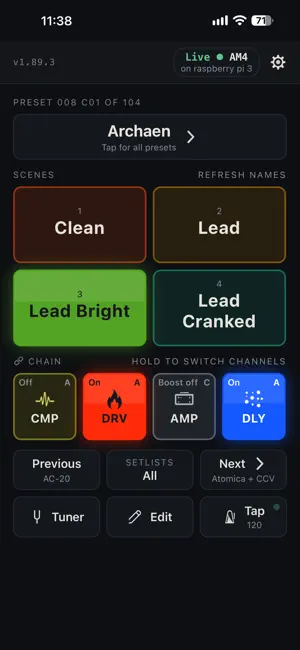
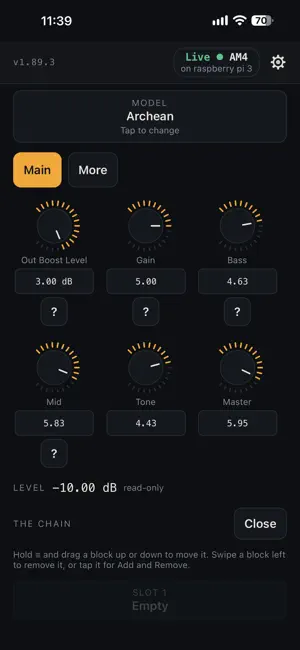
REQUIRES A COMPUTER, RASPBERRY PI, OR BLUETOOTH ADAPTER. Your Fractal unit plugs into a Mac, Windows or Linux computer with a USB cable, and that computer runs the Fractal Remote desktop app (get it at fractal.newbold.cloud/downloads). Alternatively, you can use a Bluetooth adapter with limited features. Editing and saving do not currently work with Bluetooth. Fractal Remote is independently developed and is not affiliated with, endorsed by, or supported by Fractal Audio Systems, LLC. “Fractal Audio”, “Axe-Fx”, “FM3”, “FM9”, “AM4” and “VP4” are trademarks of Fractal Audio Systems, LLC, used here only to say which hardware this app works with. Fractal Remote turns your phone into a remote control for your Fractal Audio rig. Switch presets and scenes, turn blocks on and off, change channels, tune up and tap tempo, without walking back to your unit. Build a setlist and step through it with two big buttons you can hit in the dark. SUPPORTED UNITS FM3, FM9, Axe-Fx III and AM4, and the VP4. TRY THE DEMO FOR FREE. The demo is the whole app running against a simulated unit. The demo needs no hardware and no computer. Controlling your real unit needs the computer described at the top (or Bluetooth). WHAT IT DOES • Switch any of your presets, by name, in slot order or from a setlist • Scenes, with the names your unit already uses • Turn blocks on and off, and pick channels A to D • Open a block and change its real parameters on real knobs (computer only) • Tuner, with the note and how far off you are • Tap tempo, with the tempo on the button • Setlists and starred presets, kept with your account across devices • Colors that can match your Fractal unit (Settings → Colors), so you find things by looking HOW IT WORKS A phone needs something between it and your Fractal unit, and the best one is the desktop app. It runs on your Mac, Windows PC or Linux computer, holds the USB cable, and your phone talks to it. Get it at fractal.newbold.cloud/downloads. COMPUTER Once the two are paired, the phone works from anywhere: the same room, the far side of the stage, or a different building. BLUETOOTH There are two ways to connect. The computer is the best one. Bluetooth needs no computer, but it has more lag and fewer features. It is offered on the AM4, FM3, FM9, Axe-Fx III and VP4: with a Bluetooth MIDI adapter on the unit's MIDI jacks, your phone controls it directly, with presets, scenes, effects on and off, channels, tempo and the tuner, within about 30 feet. No editing or saving, and no looper. So far it has been tried on the AM4 and the FM3: on the AM4 with a CME WIDI Master, or a CME WIDI Uhost and C2MIDI Pro cable (each with two Type-A MIDI to 3.5 mm adapters), and on the FM3 with a CME WIDI Uhost and a CME U2MIDI Pro cable. The parts are sold separately, by other companies (CME, LOOTOOLS, Eldraqth and Anker); Fractal Remote has nothing to do with them or with Amazon, and gets nothing from the app's links to them. Never plug the C2MIDI Pro or a WIDI Master into an FM3: both got very hot. What to buy and how to plug it in: Settings → My rig → Bluetooth. ONE PAYMENT, LIFETIME UNLOCK Controlling real hardware is a single purchase. It unlocks the full app on every device you own, forever, including every future update, on all supported Fractal units.
What’s new
Version 1.89.3 · Updated October 26, 2026
• New: Bluetooth, offered on the AM4, FM3, FM9, Axe-Fx III and VP4. With a Bluetooth MIDI adapter plugged into your unit's MIDI jacks, the app controls it with no computer: presets, scenes, effects on and off, channels, tempo and the tuner (on a VP4, presets and scenes). There are now two ways to connect, and the computer is still the best one: Bluetooth has more lag and fewer features, with no editing or saving. So far it has been tried on the AM4 and the FM3, and Report a Bluetooth problem, on its page, sends us a report in one tap. It is part of the full version, and the adapter parts are sold separately, by other companies. On the Bluetooth page (Settings → My rig → Bluetooth), How to connect my Bluetooth device shows every way to hook up your unit, simplest first, with what to buy and how it plugs in. • No computer signed in yet? The app now offers Bluetooth as the other way. • No signal at a gig? The app no longer stops on the sign-in screen when your sign-in has run out. • Siri: say "Scene 3 in Fractal Remote", "Next song in Fractal Remote" and more, with the Play screen open. Settings → Siri lists every command, and how to use them with Shortcuts, the Action button and Back Tap. • Play's top bar now names your unit and the computer it goes through. Tap it to switch units, or to see Phone & computer. • On iPad and an opened iPhone Duo, Play spreads across the wider screen. • New: Settings → Colors, with six looks for the tiles and scenes: Fractal Remote (the app's own colors, which a first launch wears), Match my unit (the colors of your Fractal unit), Footswitch lights, Color-blind safe, Sunlight and Stompbox. • The app starts in Dark appearance; Settings, under Play screen, has Auto, Light and Dark. • On an AM4, the amp's pedal on Play now switches the amp's boost, and says Boost on or Boost off, on the Apple Watch too. Turn the amp itself on and off in Edit. • On a VP4, the app changes presets, and scenes once you set one number on the VP4. • Apple Watch: hold a pedal to choose its channel. On an AM4 or a VP4, the scenes and pedals fill the watch's page. The watch app is now called Fractal Remote. • Feedback and Log (Settings → Troubleshooting) can add up to three screenshots, picked from your photos or pasted. • The app opens once on a card saying it is independent of Fractal Audio. • Next and Previous now show the name of what each will load. • Scene names on Play are as big as their tiles have room for. • The tempo box opens with the tempo selected, and has the metronome switch in it. • Two computers on one account? Which unit shows the unit on each, and switches between them. • A new account can be confirmed with the code in its email. • Play says NOT CONNECTED as soon as the link drops, and a tap that can't get through is dropped instead of landing late. • No unit on the computer you picked? Play says where your unit is, with one tap to switch. • The looper's Rec and Play no longer sit under its picture.
App privacy
The developer, Justin Newbold, reported these privacy practices to Apple.
Data Linked to You
The following data, which may be collected and linked to your identity, may be used for the following purposes:
- Purchases: Purchase History
- Contact Info: Email Address
- User Content: Photos or Videos, Customer Support, Other User Content
- Identifiers: User ID
- Usage Data: Product Interaction
- Diagnostics: Other Diagnostic Data
Used for: App Functionality
Data Not Linked to You
The following data, which may be collected but is not linked to your identity, may be used for the following purposes:
- Purchases: Purchase History
- Identifiers: User ID, Device ID
- Diagnostics: Other Diagnostic Data, Crash Data
Used for: Analytics, App Functionality
Alternatives to Fractal Remote
Looking for apps like Fractal Remote? Here are 6 similar apps on the App Store. The highest rated is FracPad Lite (5.0/5), and all 6 are free to download.
-
 FracPad Lite
5.0
-
 ToneRig: NAM Amp & Pedalboard
4.8
-
 Torpedo Wireless Remote
3.6
-
 Ampero Control
1.9
-
 TONEX Control
1.0
-
 Ampero II Stage
3.6
| App | Rating | Price | Last updated | Compare |
|---|---|---|---|---|
| Fractal Remote | 5.0 / 5 (1 rating) | Free | October 26, 2026 | |
| FracPad Lite | 5.0 / 5 (1) | Free | Sep 19, 2024 | Compare |
| ToneRig: NAM Amp & Pedalboard | 4.8 / 5 (37) | Free | Oct 27, 2026 | Compare |
| Torpedo Wireless Remote | 3.6 / 5 (33) | Free | May 19, 2026 | Compare |
| Ampero Control | 1.9 / 5 (61) | Free | May 13, 2026 | Compare |
| TONEX Control | 1.0 / 5 (1) | Free | Oct 23, 2026 | Compare |
| Ampero II Stage | 3.6 / 5 (7) | Free | Jul 22, 2026 | Compare |
Compare Fractal Remote with the top alternatives: ratings, updates, ASO score and keyword gaps →