

Tileray: Poster Printing
No Worries! Lifestyle, LLC Graphics & Design iPhoneiPadiPod touch
Tileray: Poster Printing is a free Graphics & Design app for iPhone and iPad by No Worries! Lifestyle, LLC. Rated 5.0/5 from 1 ratings. Requires iOS 17.0.
- Rating
- 5.0
- 1 ratings
- Price
- Free
- on the App Store
- Size
- 2 MB
- Age 4+
- Updated
- Nov 4
- 2026 · v1.0.2
Screenshots



About Tileray: Poster Printing
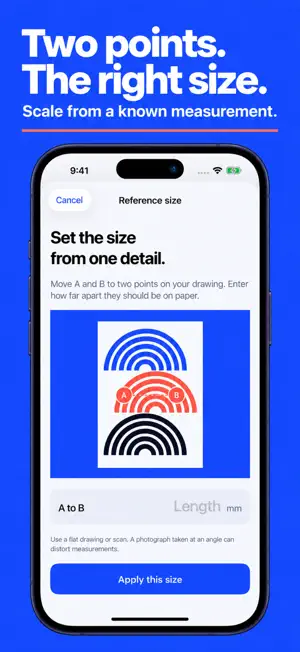
Print beyond the edge of the page. Tileray turns an image or a PDF page into a poster or template made from ordinary Letter or A4 sheets. Set the finished size, check the tile layout, then export a printable PDF and assemble it at home. FOR THE SIZE YOU ACTUALLY NEED Prepare a line drawing for tracing, enlarge a craft template, or make a wall-size photo. Enter the finished dimensions in inches or millimeters and see how many sheets the project needs before exporting. Or mark two points on a drawing and enter their known distance to set its scale. A CLEAR PLAN FOR EVERY PAGE Numbered tiles, adjustable overlap and assembly guides help you put the pages together. A printed check square lets you confirm your printer's scale before assembling the full piece. Print at 100% or Actual Size, without Fit to Page. KEEP THE DETAIL PDF pages retain their vector linework and text in the exported PDF. Imported photos keep their proportions. Enlarging a photograph cannot add detail that was not in the original, so choose a sufficiently sharp source for your finished size. PRIVATE AND FOCUSED Your images and documents are processed on your device. No account, uploads, ads or tracking. Export to Files, share the PDF, or send it to a compatible printer using iOS. TRY THE WHOLE WORKFLOW Create three export jobs for free. Then unlock Unlimited Exports with one non-consumable in-app purchase. There is no subscription. Restore your purchase with the same Apple Account. Tileray is for printing your existing images and PDF pages. It does not generate artwork, provide sewing patterns, or check whether a pattern will fit. Printer margins and print settings affect the finished result; use the check square before cutting valuable material. Support: https://tileray-nwl.netlify.app/support.html Privacy: https://tileray-nwl.netlify.app/privacy.html Terms: https://www.apple.com/legal/internet-services/itunes/dev/stdeula/
What’s new
Version 1.0.2 · Updated November 4, 2026
Name your guide: set your own title under Paper & assembly. It prints on the assembly guide and names the PDF. More precise measuring: points A and B are now small crosshairs with the letter set to the side, and dragging moves them without jumping under your finger, so you can see exactly where you're measuring.
App privacy
The developer, No Worries! Lifestyle, LLC, reported these privacy practices to Apple.
Data Not Collected
The developer does not collect any data from this app.
Alternatives to Tileray: Poster Printing
Looking for apps like Tileray: Poster Printing? Here are 6 similar apps on the App Store. The highest rated is InkCraft: Tattoo Design Try On (5.0/5), and all 6 are free to download.
-
 Portafolio: Own your work
-
 PosterSplit
-
 ScalePrint
-
 InkCraft: Tattoo Design Try On
5.0
-
 Likcut
3.7
-
 Tattoo Stencil - Pro
5.0
| App | Rating | Price | Last updated | Compare |
|---|---|---|---|---|
| Tileray: Poster Printing | 5.0 / 5 (1 rating) | Free | November 4, 2026 | |
| Portafolio: Own your work | – | Free | Apr 24, 2026 | Compare |
| PosterSplit | – | Free | Oct 2, 2026 | Compare |
| ScalePrint | – | Free | Oct 3, 2026 | Compare |
| InkCraft: Tattoo Design Try On | 5.0 / 5 (6) | Free | Nov 3, 2026 | Compare |
| Likcut | 3.7 / 5 (29) | Free | Sep 29, 2026 | Compare |
| Tattoo Stencil - Pro | 5.0 / 5 (7) | Free | Oct 25, 2026 | Compare |