

anyPWA
Adam Wallner Utilities iPhoneiPadiPod touch
anyPWA is a free Utilities app for iPhone and iPad by Adam Wallner. Rated 5.0/5 from 3 ratings. Requires iOS 17.0. Updated October 20, 2026.
- Rating
- 5.0
- 3 ratings
- Price
- Free
- on the App Store
- Size
- 9 MB
- Age 17+
- Updated
- Oct 20
- 2026 · v1.5.0
Screenshots


About anyPWA
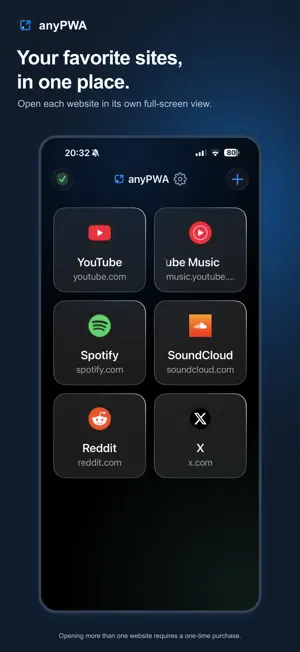
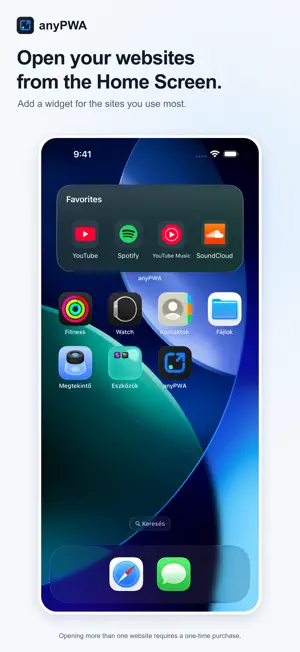
Block ads on your favorite websites, keep music playing with the screen locked, and watch videos in Picture in Picture. Your first saved website is free. Open websites as fullscreen apps on iPhone and iPad, with separate accounts for each saved website. anyPWA also runs on Macs with Apple silicon. Your websites, ready to open Choose an example such as YouTube, Spotify or Wikipedia, or paste any website address. anyPWA looks up its name and icon. Open it from your library in a dedicated view, without browser bars. Change the name or icon to make it yours. When you return to the library, the website stays open so you can pick up where you left off. Make websites easier to read Adjust page zoom and text size separately for each saved website. Open from your Home Screen Add an anyPWA widget and choose which saved websites it shows. Tap a website to open it directly. Pick a layout for one site or several favorites, and choose whether to show their names. You can also use Apple Shortcuts to create a separate Home Screen icon with each saved website’s own name and image. The icon helper requires iOS 18 or later. For setup instructions, tap "Add to Home Screen" at the bottom of your library. Two accounts, one website Each saved web app has its own cookies and storage. Add the same website twice to stay signed in to different accounts. Room to work on iPad Open your web apps in separate windows and use them side by side. Keep a reference page next to your work, or your music next to your messages. On your Mac Open websites in separate windows on a Mac with Apple silicon. Each window uses the name you saved in your library. You can listen to Spotify on Mac too. Keep listening and watching Audio keeps playing when you switch apps or lock the screen. Use the Lock Screen and Control Center to play or pause, and Picture in Picture to watch compatible videos while you do something else. YouTube and YouTube Music support background playback, Lock Screen controls and Picture in Picture. With Spotify's web player, you can choose individual tracks, browse full albums and use next and previous track controls. Playback preferences Save video quality and audio-only settings for each supported website with the optional Media Controls purchase. You can set separate Wi-Fi and cellular profiles, including an audio-only preference for background playback. Currently supported: YouTube and YouTube Music. Media Controls also includes an option to hide YouTube Shorts. Built-in ad blocking Filter ads and hide empty ad spaces using automatically updated community filter lists. Blocking also works with video and audio ads on YouTube, YouTube Music and Spotify. You can turn it off for any website. Free for your first website Use one web app for free, including ad blocking, background playback and Lock Screen controls. Unlimited Websites is a one-time purchase for all saved web apps and library rearranging. Media Controls is a separate one-time purchase for the additional playback preferences and YouTube Shorts hiding. Both purchases support Family Sharing. There is no anyPWA subscription. Your library stays on your device No anyPWA account is needed. Your saved websites and sign-ins stay on your device, and anyPWA has no analytics or tracking of its own. Websites you visit have their own privacy practices. YouTube, YouTube Music and Spotify open as websites inside anyPWA. Features depend on the websites and may change. anyPWA is independent and is not affiliated with or endorsed by these services.
What’s new
Version 1.5.0 · Updated October 20, 2026
Create Home Screen icons for your saved websites using Apple Shortcuts. Each icon uses the website’s own name and image and opens it directly in anyPWA. Follow the setup guide under Add to Home Screen in your library. The icon helper requires iOS 18 or later. Improved filter download status and startup prompts.
App privacy
The developer, Adam Wallner, reported these privacy practices to Apple.
Data Not Collected
The developer does not collect any data from this app.
Alternatives to anyPWA
Looking for apps like anyPWA? Here are 6 similar apps on the App Store.
-
 QR Flow: Scan & Browse
-
 Capsule Browser
-
 BreachGuard
-
 Wrapely
-
 Namu Browser: Watch Browser
-
 QuickBrowser - Web Browser
| App | Rating | Price | Last updated | Compare |
|---|---|---|---|---|
| anyPWA | 5.0 / 5 (3 ratings) | Free | October 20, 2026 | |
| QR Flow: Scan & Browse | – | Free | Apr 2, 2026 | Compare |
| Capsule Browser | – | Free | Oct 18, 2026 | Compare |
| BreachGuard | – | Free | Dec 14, 2025 | Compare |
| Wrapely | – | Free | Jul 1, 2026 | Compare |
| Namu Browser: Watch Browser | – | Free | Sep 7, 2026 | Compare |
| QuickBrowser - Web Browser | – | Free | Oct 17, 2026 | Compare |
Compare anyPWA with the top alternatives: ratings, updates, ASO score and keyword gaps →