

Subleaf: Subscription Tracker
Kristoffer Bjerregaard Bundgaard Finance iPhoneiPadiPod touch
Subleaf: Subscription Tracker is a free Finance app for iPhone and iPad by Kristoffer Bjerregaard Bundgaard. Requires iOS 16.4. Updated September 24, 2026.
- Price
- Free
- on the App Store
- Size
- 34 MB
- Age 4+
- Updated
- Sep 24
- 2026 · v1.1.0
Screenshots
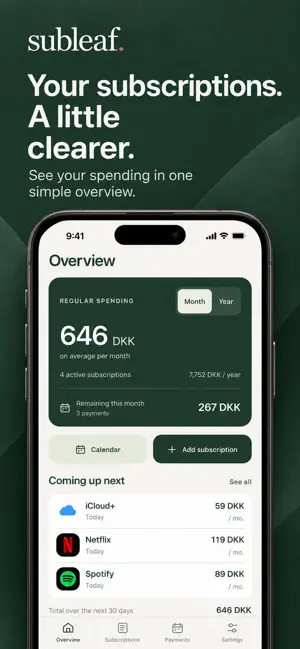
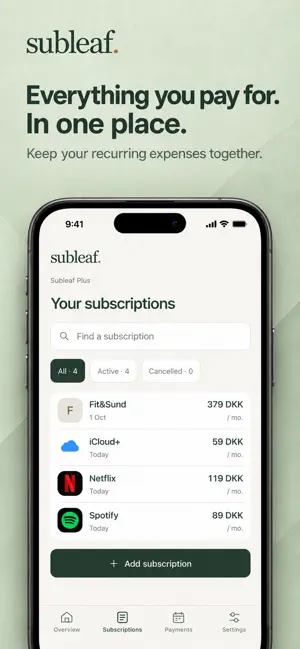

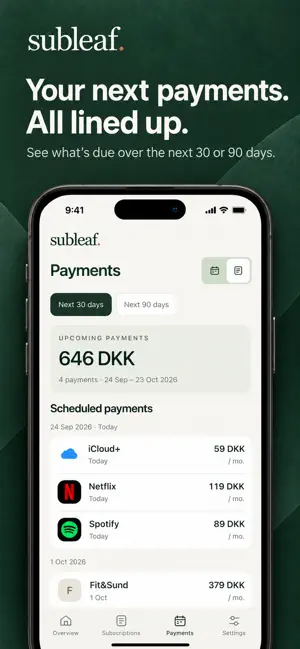
About Subleaf: Subscription Tracker
A little more clarity about your recurring expenses. Subleaf brings your subscriptions, payment dates and cancellation deadlines into one simple overview. Add a name, price and payment date, and see what is coming up. SEE YOUR SPENDING Check your average monthly or yearly costs. Explore upcoming payments in a calendar or list, view spending by category and find subscriptions with search. RECOGNIZE YOUR SUBSCRIPTIONS Known service names get a logo or name badge automatically. You can also choose your own image from Photos. Recognition and your saved images stay on your device. REMINDERS YOU CONTROL Choose the date and time for a reminder to cancel. You can also enable automatic reminders for payments and deadlines. Notifications require your permission. KEEP TRACK OF DEADLINES Save the cancellation deadline, last day of access and a link to the provider's cancellation page. Mark a subscription as cancelled after you have cancelled it with the provider. Subleaf does not cancel on your behalf. YOUR LIST STAYS WITH YOU Start with an empty list and add the subscriptions you want to track. No Subleaf account, bank connection or ads. Your list is stored on your device. Export a backup and import it when you need it. You can also import subscriptions from a CSV file. ENGLISH AND DANISH Switch between English and Danish. Record subscriptions in DKK, EUR, USD or GBP. Currencies are shown separately without automatic conversion. THREE FREE. ONE PURCHASE FOR MORE. Save up to three subscriptions for free. All saved subscriptions count, including those marked as cancelled. Subleaf Plus unlocks unlimited subscriptions with one purchase and no expiry. There is no recurring payment to Subleaf. The current price is shown before purchase, and previous purchases can be restored with the same Apple Account. Subleaf calculates from the details you enter. It does not check bank transactions or change your agreements with providers.
What’s new
Version 1.1.0 · Updated September 24, 2026
A clearer view of your subscriptions. - A refreshed overview and subscription detail screens. - A payment calendar to see upcoming charges by date. - Automatic logos or name badges for recognized services. - Choose your own subscription images from Photos. - New installations start with an empty list. Your existing personal subscriptions stay safe. Subleaf Plus remains a one-time purchase, with no recurring charge.
App privacy
The developer, Kristoffer Bjerregaard Bundgaard, reported these privacy practices to Apple.
Data Linked to You
The following data, which may be collected and linked to your identity, may be used for the following purposes:
- Identifiers: Device ID
- Usage Data: Product Interaction
- Diagnostics: Crash Data
Used for: Analytics, App Functionality
Alternatives to Subleaf: Subscription Tracker
Looking for apps like Subleaf: Subscription Tracker? Here are 6 similar apps on the App Store. The highest rated is StockHero: AI Trading Bot (5.0/5), and all 6 are free to download.
-
 NorthCountry Mobile Banking
4.8
-
 StockHero: AI Trading Bot
5.0
-
 Velliv
-
 Divvy
3.0
-
 SA Traveller Management System
1.2
-
 Mit PFA
4.3
| App | Rating | Price | Last updated | Compare |
|---|---|---|---|---|
| Subleaf: Subscription Tracker | – | Free | September 24, 2026 | |
| NorthCountry Mobile Banking | 4.8 / 5 (5,016) | Free | Oct 30, 2026 | Compare |
| StockHero: AI Trading Bot | 5.0 / 5 (8) | Free | Oct 22, 2026 | Compare |
| Velliv | – | Free | Aug 27, 2026 | Compare |
| Divvy | 3.0 / 5 (2) | Free | Jan 19, 2026 | Compare |
| SA Traveller Management System | 1.2 / 5 (13) | Free | Sep 19, 2026 | Compare |
| Mit PFA | 4.3 / 5 (21) | Free | Aug 25, 2026 | Compare |